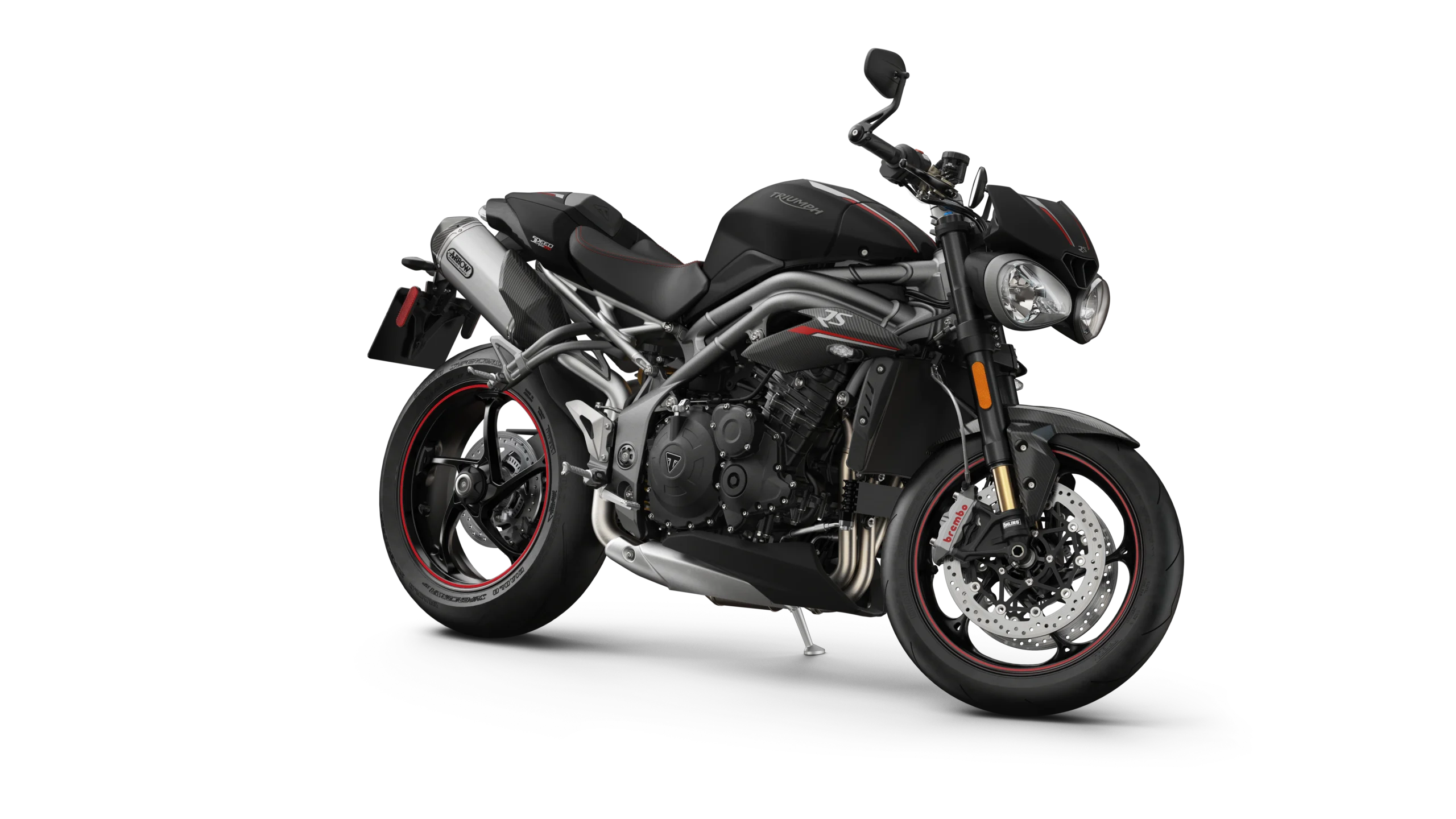
January 16, 2023 NHTSA CAMPAIGN NUMBER: 23V006000
Radiator Fan Motor May Fail and Cause Coolant Leak
An inoperative fan motor can result in leaking or spraying hot coolant, increasing the risk of injury or crash.
NHTSA Campaign Number: 23V006
Manufacturer Triumph Motorcycles America, Ltd.
Components ENGINE AND ENGINE COOLING
Potential Number of Units Affected 1,351
Summary
Triumph Motorcycles America, Ltd. (Triumph) is recalling certain 2022-2023 Speed Triple RS and Speed Triple RR motorcycles. The radiator fan may overheat, causing the fan motor to fail.
Remedy
Dealers will install an additional heatshield, free of charge. Owner notification letters are expected to be mailed February 1, 2023. Owners may contact Triumph’s customer service at 1-678-854-2010. Triumph’s number for this recall is SRAN 605.
Notes
Owners may also contact the National Highway Traffic Safety Administration Vehicle Safety Hotline at 1-888-327-4236 (TTY 1-800-424-9153), or go to www.nhtsa.gov.
Safety Recall Action Notice 605
Issue 1 – 02.2023
Install Cooling Fan Heat Shield
Background Information
Internal investigations have identified the requirement to install a heat shield to the cooling fan.
Dealers are requested to test the cooling fan operation, install the cooling fan heat shield and update the
Chassis ECM calibration as described in the procedure below.
Dealers are also requested to print the Owner’s Handbook addendum, as shown in Appendix A, for each
repaired motorcycle and provide a hard copy to the customer.
The Owner’s Handbook addendum will also be available to view and download from the Triumph Technical
Information website.
Test the Cooling Fan Operation
WARNING
Make sure the motorcycle is stabilised and adequately supported.
Do not support the motorcycle on any ancillary component, the exhaust system or any other non structural parts of the motorcycle frame.
A correctly supported motorcycle will help prevent it from falling.
An unstable motorcycle may fall resulting in motorcycle damage, serious injury or death.
Remove the seat as described in the Service Manual.
Using the Triumph Diagnostic Tool (TDT), navigate to the Function Tests within the Chassis ECM Diagnostics.
Select Cooling Fan 1 and start the test. The cooling fan should start operating. Stop the test.
If the test is satisfactory, move on to the next steps in this Safety Recall Action Notice. If the cooling fan does not operate, collate any stored DTCs from all diagnostic areas and contact Triumph Warranty.
Updating the Chassis ECM Calibration
CAUTION
The cooling fan operates automatically when the engine is running, and may continue to operate after the engine has been switched off.
Always keep hands and clothing away from the fan.
Contact with the rotating fan could result in minor or moderate injury.
Update the Chassis ECM calibration using Triumph Diagnostic Tool (TDT) version 2022-12 or later.
Included in TDT version 2022-12, is an updated Chassis ECM calibration for the Speed Triple 1200 models.
This calibration changes the operation of the cooling fan. If the cooling fan is running when the engine is stopped or the ignition switched off, the cooling fan will now continue to run for up to 2 minutes.
This change in operation will affect all Speed Triple 1200 RS and RR motorcycles which have the Chassis ECM updated using TDT version 2022-12 or later.
Make sure the relevant Owner’s Handbook addendum, as shown in Appendix A, has been provided to the customer, and the customer has had the change of functionality explained to them.
The Owner’s Handbook addendum will also be available to view and download from the Triumph Technical Information website.
Install the Cooling Fan Heat Shield
WARNING
Make sure the motorcycle is stabilised and adequately supported.
Do not support the motorcycle on any ancillary component, the exhaust system or any other non structural parts of the motorcycle frame.
A correctly supported motorcycle will help prevent it from falling.
An unstable motorcycle may fall resulting in motorcycle damage, serious injury or death.
WARNING
If the motorcycle has recently been running, some components may be hot to the touch.
Contact with the hot components may cause damage to exposed skin.
To avoid skin damage, always allow the hot parts to cool before working on the motorcycle.
Before disconnecting the battery or removing a fuse for any reason note and record the rider’s settings.
WARNING
If the battery has been disconnected or the fuses removed for any reason advise the rider to confirm the original mode settings have been correctly set.
Failure to reset the motorcycle to the rider’s preferred rider mode settings and subsequently being ridden may cause loss of motorcycle control and an accident.
NOTICE
The coolant hoses do not need to be removed for the purpose of this instruction.
1. Disconnect the battery as described in the Service Manual.
2. Remove the front side panels as described in the Service Manual. Discard the two fixings.
3. Remove the fixing and detach the clutch cable P-clip from its bracket on the cooling fan cowl.
4. Remove the fixing and the flanged sleeve securing the radiator to the lower bracket. Discard the fixing.
5. Remove the two fixings and the washers securing the radiator assembly to the frame. Discard the fixings. Note the position of the flanged sleeves for installation.
6. Lower the radiator sufficiently to allow access to the cooling fan assembly fixings.
7. Remove the four fixings, spring washers and washers securing the cooling fan assembly to the radiator. Note the order of removal of the spring washers and washers for installation.
8. Lower the cooling fan assembly sufficiently to allow access to the radiator cowl fixings.
9. Remove and discard the three bolt assemblies securing the radiator cowl to the cooling fan assembly.
Retain the nuts.
10. Install the heat shield to the radiator cowl with three new bolt assemblies from the kit and tighten to 8 Nm, whilst holding the nuts.
11. Refit the cooling fan assembly to the radiator with the four original fixings, spring washers and washers, in the order noted during installation, and tighten to 8 Nm.
12. Refit the radiator to the lower bracket with the flanged sleeve and new fixing. Tighten the fixing to 6 Nm.
13. Make sure the flanged sleeves in the upper radiator mounts are in the correct position as noted during removal.
14. Refit the radiator to the frame with the original washers and two new fixings. Tighten the fixings to 6 Nm.
15. Refit the P-clip to the bracket on the cooling fan cowl, securing the clutch cable. Tighten the fixing to 3 Nm.
16. Refit the front side panels as described in the Service Manual, using the two new fixings.
17. Reconnect the battery as described in the Service Manual.
18. Refit the seat as described in the Service Manual.
19. Check the coolant hoses for leaks. Rectify as necessary.
20. Provide a new Owners Handbook addendum page, as shown in Appendix A, with each repaired motorcycle to each customer.
Once a fuse has been refitted or the battery reconnected the rider’s settings should be reset as noted.
WARNING
If the battery has been disconnected or the fuses removed for any reason advise the rider to confirm the original mode settings have been correctly set.
Failure to reset the motorcycle to the rider’s preferred rider mode settings and subsequently being ridden may cause loss of motorcycle control and an accident.
Appendix A
Cooling Fan Operation
This document contains revised information on the cooling fan operation. It must be kept with the Owner’s Handbook.
CAUTION
The cooling fan operates automatically when the engine is running, and may continue to operate after the engine has been switched off.
Always keep hands and clothing away from the fan.
Contact with the rotating fan could result in minor or moderate injury.
The operation of the cooling fan has changed. The cooling fan may continue to operate for up to two minutes after the engine has been switched off.
Chronology :
End of June22: The Triumph Warranty department observes an increase in Warranty claims received and commences an investigation.
Aug22: Triumph Quality department requests parts back from the field to verify in-service claims.
Jan23: Triumph Recall Committee agree to launch a voluntary in-service campaign.
4 Affected Products
Vehicles
11 Associated Documents
Defect Notice 573 Report
RCLRPT-23V006-1115.PDF 213.53KB
Recall Acknowledgement
RCAK-23V006-8452.pdf 647.295KB
Recall 573 Report – January 27, 2023
RCLRPT-23V006-4800.PDF 214.03KB
Recall 573 Report – January 25, 2023
RCLRPT-23V006-7268.PDF 214.009KB
Triumph – Dealer Notice – January 2023
RCMN-23V006-7976.pdf 375.836KB
Triumph – Recall Notice – January 2023
RCMN-23V006-7921.pdf 292.294KB
Safety Bulletin
RCSB-23V006-1339.pdf 155.297KB
Triumph – Dealer Notice – January 2023
RCMN-23V006-3080.pdf 154.922KB
ISSUED Owner Notification Letter(Part 577)
RCONL-23V006-7530.pdf 103.496KB
Triumph Motorcycles – SB605 Parts Available – February 2023
RCMN-23V006-1351.pdf 148.054KB
ISSUED Renotification Notice
Latest Recalls Documents

- Genuine Honda Type 2 Long-Life Blue Coolant, pre-mixed 50/50 (ready to use)
- Protects metal and non-metal cooling system parts against corrosion and rust
- Freeze protection and boil-over resistance for extreme temperature performance
- Replaces part number OL999-9011 - matches factory fill for Honda systems requiring Type 2 coolant
- Long service life — up to 5 years or ~60,000 miles under normal conditions

- Unsurpassed freeze protection and anti-boil performance outperforms industry standards
- Organic acid technology resists rust, scale & corrosion while protecting all cooling system metals (including aluminum)
- High-quality additives protect against leaks and won’t harm gaskets, hoses, plastics or original vehicle finish
- Pre-mixed orange formula is ready-to-use in a 50/50 ratio with deionized water to protect all modern engine components from winter freezing (-34F) and summer boiling (265F).
- 5 year/150,000 mile guarantee protects against engine failure caused by freeze-ups or boil-overs


- 5 year/150, 000 mile . Silicate-free, long-life, phosphate Hybrid Organic Acid Technology chemistry
- Formulated to replace the OEM fluid in Asian make vehicles such as Honda, Nissan, KIA, Hyundai and others requiring a blue, silicate free HOAT antifreeze/coolant
- The long life formula provides protection for all cooling system metals from rust and corrosion. The silicate free, borate free formula helps protect against harmful scale and deposits
- Meets the following OEM and industry specifications: Hyundai/KIA MS 591-08, Mitsubishi ES-64217, JIS K 2234-1994, Ford WSS-M97B55-A, ASTM 3306, ASTM D4985, Federal Specification A-A-870A
- Contains 30 – 50 ppm of denatonium benzoate as a bittering agent
Last update on 2026-06-19 / Affiliate links / Images from Amazon Product Advertising API
SEOCONTENT-START
Safety Recall Action Notice 605 Issue 1 1 of 9
Safety Recall Action Notice 605 Issue 1 – 02.2023
Subject: Install Cooling Fan Heat Shield
Bulletin Number Models Affected VIN Range Markets Affected 605 Speed Triple 1200 RS, Speed Triple 1200 RR Up to VIN BJ9267 All Markets Except Brazil Background Information
Internal investigations have identified the requirement to install a heat shield to the cooling fan.
Dealers are requested to test the cooling fan operation, install the cooling fan heat shield and update the Chassis ECM calibration as described in the procedure below.
Dealers are also requested to print the Owner’s Handbook addendum, as shown in Appendix A, for each repaired motorcycle and provide a hard copy to the customer.
The Owner’s Handbook addendum will also be available to view and download from the Triumph Technical Information website. Customer Contact Instructions NOTICE
STOP DELIVERY OF AFFECTED MOTORCYCLES IMMEDIATELY.
DO NOT deliver a motorcycle affected by this Safety Recall Action Notice to a customer until you have completed, or confirmed completion of, the procedures described in this Safety Recall Action Notice.
Delivering a motorcycle subject to an outstanding Safety Recall Action Notice may contravene local or national laws in your market, territory or country. Triumph subsidiaries and distributors must instigate a Safety Recall Action in their country in accordance with the national recall code of practice. For vehicles in dealer stock, the safety recall MUST be actioned before delivery to the customer.
Dealers are to prioritise repair of customer owned motorcycles before any unsold motorcycles.
Identification of Affected Motorcycles
Speed Triple 1200 RS and Speed Triple 1200 RR models in the VIN range shown above.
Note:
• Some affected motorcycles listed in the VIN range will have been modified and repaired by Triumph prior to their release from the factory.
• ry’ on www.triumphonline.net. Warranty Claim Instructions
Notice Number Fault Code Repair Code Description Repair Time
Allowance 605 021045905 99605 SB605 – Install Cooling Fan Heat Shield 0.67 hr Genuine Parts Information
Notice Number Part Number Part Description Quantity 605 T2107778 Parts Kit, Heatshield 1
Consisting of:
Spares kit, heatshield – Qty 1
Bolt, RHHF, M6 x 1,00 x
25, Enc – Qty 3
Screw, Pan/hd, M6 x
1,00 x 25, Enc – Qty 2 Parts Ordering Instructions For Triumph Subsidiary and Overseas Distributor dealers using Triumph Warranty On-Line with Parts Auto Ordering Flag switched on: Order all repair parts by submitting a New Prior through the Warranty On- Line system. Entering the above repair code in a New Prior will automatically add the parts required and labour times for this Safety Recall Action Notice.
For Overseas Distributor dealers NOT using Triumph Warranty On-Line or for Overseas Distributor dealers using Triumph Warranty On-Line with Parts Auto Ordering Flag switched off: Orders should be placed using the normal parts ordering procedure.
Genuine Parts Return Dealer to retain parts for 90 days. All parts must be stored in a secure, non-public accessed area and correctly identified with a completed warranty label. Thereafter the parts must be rendered unusable prior to scrapping. Other Instructions
Once completed, please mark the Service Record Book that the requirements of this Safety Recall Action Notice have been complied with.
Before returning the motorcycle to the customer, download the latest calibration to the engine electronic control module, chassis electronic control module (if fitted), keyless electronic control module (if fitted) and instruments (if applicable) using the current version of the Triumph diagnostic software. Safety Recall Action Notice 605 2 of 9 Test the Cooling Fan Operation WARNING Make sure the motorcycle is stabilised and adequately supported.
Do not support the motorcycle on any ancillary component, the exhaust system or any other non structural parts of the motorcycle frame.
A correctly supported motorcycle will help prevent it from falling.
An unstable motorcycle may fall resulting in motorcycle damage, serious injury or death. Remove the seat as described in the Service Manual.
Using the Triumph Diagnostic Tool (TDT), navigate to the Function Tests within the Chassis ECM Diagnostics. Select Cooling Fan 1 and start the test. The cooling fan should start operating. Stop the test.
If the test is satisfactory, move on to the next steps in this Safety Recall Action Notice. If the cooling fan does not operate, collate any stored DTCs from all diagnostic areas and contact Triumph Warranty. Updating the Chassis ECM Calibration CAUTION
The cooling fan operates automatically when the engine is running, and may continue to operate after the engine has been switched off.
Always keep hands and clothing away from the fan.
Contact with the rotating fan could result in minor or moderate injury. Update the Chassis ECM calibration using Triumph Diagnostic Tool (TDT) version 2022-12 or later. Included in TDT version 2022-12, is an updated Chassis ECM calibration for the Speed Triple 1200 models.
This calibration changes the operation of the cooling fan. If the cooling fan is running when the engine is stopped or the ignition switched off, the cooling fan will now continue to run for up to 2 minutes.
This change in operation will affect all Speed Triple 1200 RS and RR motorcycles which have the Chassis ECM updated using TDT version 2022-12 or later.
Make sure the relevant Owner’s Handbook addendum, as shown in Appendix A, has been provided to the customer, and the customer has had the change of functionality explained to them.
The Owner’s Handbook addendum will also be available to view and download from the Triumph Technical Information website. Install the Cooling Fan Heat Shield WARNING
Make sure the motorcycle is stabilised and adequately supported.
Do not support the motorcycle on any ancillary component, the exhaust system or any other non structural parts of the motorcycle frame.
A correctly supported motorcycle will help prevent it from falling.
An unstable motorcycle may fall resulting in motorcycle damage, serious injury or death. WARNING
If the motorcycle has recently been running, some components may be hot to the touch. Contact with the hot components may cause damage to exposed skin.
To avoid skin damage, always allow the hot parts to cool before working on the motorcycle. Before disconnecting the battery or removing a fuse for any reason note and record the rider’s settings. Safety Recall Action Notice 605 3 of 9 WARNING
If the battery has been disconnected or the fuses removed for any reason advise the rider to confirm the original mode settings have been correctly set.
Failure to reset the motorcycle to the rider’s preferred rider mode settings and subsequently being ridden may cause loss of motorcycle control and an accident. NOTICE
The coolant hoses do not need to be removed for the purpose of this instruction. 1. Disconnect the battery as described in the Service Manual.
2. Remove the front side panels as described in the Service Manual. Discard the two fixings.
3. Remove the fixing and detach the clutch cable P-clip from its bracket on the cooling fan cowl. 1
2
3 B01581
1. Fixing
2. P-clip
3. Bracket 4. Remove the fixing and the flanged sleeve securing the radiator to the lower bracket. Discard the fixing. 3 2 1 4 1. Fixing
2. Flanged sleeve
3. Grommet
4. Bracket B01630_1 Safety Recall Action Notice 605 4 of 9 5. Remove the two fixings and the washers securing the radiator assembly to the frame. Discard the fixings. Note the position of the flanged sleeves for installation.
1 2 3 B01632_1
1. Fixing (left hand side shown)
2. Washer
3. Grommet
6. Lower the radiator sufficiently to allow access to the cooling fan assembly fixings.
7. Remove the four fixings, spring washers and washers securing the cooling fan assembly to the radiator. Note the order of removal of the spring washers and washers for installation. 2 1 2 1. Cooling fan assembly cles 2. Fixings (right hand side shown)
8. Lower the cooling fan assembly sufficiently to allow access to the radiator cowl fixings.
9. Remove and discard the three bolt assemblies securing the radiator cowl to the cooling fan assembly. Retain the nuts. Safety Recall Action Notice 605 5 of 9 10. Install the heat shield to the radiator cowl with three new bolt assemblies from the kit and tighten to 8 Nm, whilst holding the nuts. 1 2
2 2 1. Heat shield
2. Bolt assemblies
11. Refit the cooling fan assembly to the radiator with the four original fixings, spring washers and washers, in the order noted during installation, and tighten to 8 Nm. 2 1 2 1. Cooling fan assembly cles 2. Fixings (right hand side shown) Safety Recall Action Notice 605 6 of 9 12. Refit the radiator to the lower bracket with the flanged sleeve and new fixing. Tighten the fixing to 6 Nm. 3 2 1 4 B01630_1
1. Fixing
2. Flanged sleeve
3. Grommet
4. Bracket 13. Make sure the flanged sleeves in the upper radiator mounts are in the correct position as noted during removal.
14. Refit the radiator to the frame with the original washers and two new fixings. Tighten the fixings to 6 Nm. 1 2 3 B01632_1
1. Fixing (left hand side shown)
2. Washer
3. Grommet Safety Recall Action Notice 605 7 of 9 15. Refit the P-clip to the bracket on the cooling fan cowl, securing the clutch cable. Tighten the fixing to 3 Nm. 1
2
3 B01581
1. Fixing
2. P-clip
3. Bracket 16. Refit the front side panels as described in the Service Manual, using the two new fixings.
17. Reconnect the battery as described in the Service Manual.
18. Refit the seat as described in the Service Manual.
19. Check the coolant hoses for leaks. Rectify as necessary.
20. Provide a new Owners Handbook addendum page, as shown in Appendix A, with each repaired motorcycle to each customer.
Once a fuse has been refitted or the battery reconnected the rider’s settings should be reset as noted.
WARNING
If the battery has been disconnected or the fuses removed for any reason advise the rider to confirm the original mode settings have been correctly set.
Failure to reset the motorcycle to the rider’s preferred rider mode settings and subsequently being ridden may cause loss of motorcycle control and an accident. Safety Recall Action Notice 605 8 of 9 Safety Recall Action Notice 605 9 of 9
Appendix A
Cooling Fan Operation
This document contains revised information on the cooling fan operation. It must be kept with the Owner’s Handbook. CAUTION
The cooling fan operates automatically when the engine is running, and may continue to operate after the engine has been switched off.
Always keep hands and clothing away from the fan.
Contact with the rotating fan could result in minor or moderate injury. The operation of the cooling fan has changed. The cooling fan may continue to operate for up to two minutes after the engine has been switched off.
Circulation
Initial and date when read and return to central file holder
Service Manager
Parts Manager
Sales Manager
Workshop Supervisor
Technician 1
Technician 2
**************************************************************************************************************
SUBJECT: IMPORTANT SAFETY RECALL – TRIUMPH MOTORCYCLES
IMPORTANT SAFETY RECALL
Dear Triumph Motorcycle Owner, We hope this email finds you well.
Your motorcycle, with the following details, may be subject to recall:
• Make: Triumph
• Model: [Motorcycle Model]
• Year: [Manufacturing Year]
• VIN/Chassis Number: [VIN/Chassis Number]
Our records indicate that your Triumph motorcycle may have an outstanding safety recall. Ensuring your safety is our utmost priority, and we strongly encourage you to take immediate action by scheduling the required repair at an authorized dealer. We understand that life gets busy, and we appreciate your attention to this matter. To facilitate the recall repair process, please follow the steps outlined below: 1. Visit our dedicated recall information portal at https://www.triumphmotorcycles.com/owners/recalls. Here, you will find comprehensive details regarding the specific recall, including potential risks and the necessary actions to rectify the issue. We strongly recommend reviewing this information for a better understanding of the recall and its implications. 2. Locate your nearest authorized dealer by visiting https://www.triumphmotorcycles.com/dealers/dealer-search. These dealerships are well- equipped and trained to handle the recall repairs, providing the necessary services at no cost to you, covering both parts and labor. They will ensure your motorcycle is promptly inspected, repaired, and returned to you in optimal condition. 3. In the event, that you have sold or transferred ownership of your motorcycle, we kindly request your assistance in helping us locate the new owner. Any relevant information you can provide, such as their name or contact details, will greatly support us in reaching out to them directly and ensuring their safety as well. Your proactive response to this recall notice is essential for your safety and performance of your motorcycle. We sincerely value your trust and loyalty as a valued customer, and we are committed to resolving this matter swiftly and efficiently. If you have any further questions or require assistance, please do not hesitate to contact our dedicated customer support team on (888) 284-6288. We are here to assist you throughout the recall repair process. Thank you for your immediate attention to this matter. Your safety and satisfaction are of paramount importance to us, and we appreciate your cooperation in addressing this recall promptly.
Sincerely,
Triumph Motorcycles Ltd.
**************************************************************************************************************
riumph Motorcycles Am td.
Parkway 09 February 2023 Suite 200
Atlanta, Georgia 30354 ADDITION OF FAN ASSEMBLY HEAT SHIELD
Safety Recall: SRAN605
NHTSA Recall: 23V006
This notice applies to your motorcycle:
Model: (2022 & 2023) Speed Triple RS and Speed Triple RR
VIN: SMTXXXX
Dear [NAME]:
This notice is sent to you in accordance with the requirements of the National Traffic and Motor Vehicle Safety Act. Triumph Motorcycles Ltd. has decided that a defect which relates to motor vehicle safety exists in your motorcycle, with the VIN shown above. Triumph is conducting a safety recall to address the condition. The reason for this recall notice: The radiator fan may malfunction due to overheating caused by high ambient temperature and slow-moving traffic conditions. Coolant may be displaced if the rider ignores the instrument warning light and continues to operate the motorcycle at low-speed, which increases the risk of an injury. What Triumph Motorcycles Ltd & your dealer will do: Triumph Motorcycles Ltd has authorized your dealer to install an additional Heat shield, free of charge to you including parts and labor. This repair should take around 40 minutes.
However, depending upon the dealer’s work schedule, it may be necessary to make your motorcycle available for a longer period. What you must do to ensure your safety: Please make an appointment with your authorized Triumph motorcycles dealer to have this important remedy performed on your motorcycle as soon as possible.
Federal regulations require that any vehicle lessor receiving this recall notice must forward a copy of this notice to the lessee within 10 days. If you need help: Please contact your authorized Triumph dealer should you have any questions or encounter any difficulty regarding this recall. In the event your dealer is unable to remedy your motorcycle, please contact Triumph Motorcycles America at 1-678-854-2010.
If an authorized Triumph dealer or Triumph Motorcycle America Ltd, fails or is unable to perform this remedy without charge within a reasonable amount of time, you may contact the Administrator, National Highway Traffic Safety Administration, 1200 New Jersey Avenue SE., Washington, D.C., 20590; or call the toll-free Vehicle Safety Hotline at 1-888-327-4236 (TTY: 1-800-424-9153); or go to http://www.safercar.gov.
If you no longer own the motorcycle listed above, please contact Triumph at 1-678-854-2010 and provide any information you can furnish that will assist us in locating the new owner. We apologise for any inconvenience this may cause you. However, we have taken this course of action in the best interest of your safety and your continued satisfaction with your Triumph motorcycle. We appreciate your attention and cooperation in this important matter.
Sincerely, Triumph Motorcycles America Ltd.
**************************************************************************************************************
1/23/23, 11:49 AM TriumphOnline | Notice
https://www.triumphonline.net/TriumphOnline/COmAdmin/MyNoticePreview.aspx?params=woHQBH/VfpdhM/42OkQ
LHIRqNwwbAaBHhUK9zcO… 1/2
RECALL NOTICE – SPEED TRIPLE RR & RS
Notice Information
Ref 23287
Posted Date: Posted To: General Manager / Business Owner, Technician, Parts / Accessories Coordinator, Sales Executive, Clothing Sales, Sales Manager, Aftersales Manager, Service Leader / Advisor, Accounts / Admin, Marketing Executive Subject: Service/Technical TOL NOTICE (US&CA) – January 20, 2023 TOL Ref. #23287-SVC RECALL NOTICE – SPEED TRIPLE RR & RS
Please note that Triumph Motorcycles Limited is currently preparing to launch a recall on model year
2022 and 2023 Speed Triple RS and RR models. An additional heat shield will now be added to the radiator fan. The heat shield will protect the radiator fan and prevent the fan motor from seizing. We expect to launch this campaign over the coming days. Please reassure any owners that may contact you between now and the recall launch. Riders are advised to monitor their instrumentation when operating the vehicle as normal. If overheating is
registered, the Owner handbook advice should be followed as shown below. 1/23/23, 11:49 AM TriumphOnline | Notice
https://www.triumphonline.net/TriumphOnline/COmAdmin/MyNoticePreview.aspx?params=woHQBH/VfpdhM/42OkQ
LHIRqNwwbAaBHhUK9zcO… 2/2
Triumph is working hard to improve the recall launch date and we will re-contact you with an update as soon as we are able to do so. For vehicles in dealer stock, the safety recall MUST be actioned before delivery to the customer. If you have any additional questions, please contact Triumph Customer Support at (888) 284- 6288.
**************************************************************************************************************
1/25/23, 7:46 AM TriumphOnline | Notice
https://www.triumphonline.net/TriumphOnline/COM/Notice.aspx?params=wfO8MgWjY/327sGF6ApWFElvx7HUJWY+5
+ZXekW/xys= 1/2
RECALL NOTICE – SPEED TRIPLE 1200 RS & RR
Notice Information
Ref 23311
Posted Date: 24/01/2023 15:40:31
General Manager / Business Owner, Technician, Parts / Accessories Coordinator, Posted To: Sales Executive, Clothing Sales, Sales Manager, Aftersales Manager, Service Leader / Advisor, Accounts / Admin, Marketing Executive Subject: Service/Technical TOL NOTICE (US&CA) – January 24, 2023 TOL Ref. #23311-SVC RECALL NOTICE – SPEED TRIPLE 1200 RS & RR The release of TOL Ref. #23287-SVC reflected a draft version of the intended release which contained errors. The information has been corrected dealerships should use this notice related to the recall. Please note that Triumph Motorcycles Limited is currently preparing to launch a recall on model year 2022 and 2023 Speed Triple 1200 RS and RR models. An additional heat shield will now be added to the radiator fan. The heat shield will protect the radiator fan and prevent the fan motor from seizing. We expect to launch this campaign over the coming days. Please reassure any owners that may contact you between now and the recall launch. Riders are advised to monitor their instrumentation when operating the vehicle as normal. If overheating is registered, the Owner handbook advice should be followed as shown below.
Triumph is working hard to improve the recall launch date and we will re-contact you with an update as soon as we are able to do so.
For vehicles in dealer stock, the safety recall MUST be actioned before delivery to the customer.
If you have any additional questions, please contact Triumph Customer Support at (888) 284-6288. 1/25/23, 7:46 AM TriumphOnline | Notice
https://www.triumphonline.net/TriumphOnline/COM/Notice.aspx?params=wfO8MgWjY/327sGF6ApWFElvx7HUJWY+5
+ZXekW/xys= 2/2
Triumph Motorcycles (America) Ltd, 100 Hartsfield Centre Parkway, Suite 200, Atlanta Georgia, 30354, UNITED STATES
Tel: 001 6788 542010, Fax: 001 6788 542025
**************************************************************************************************************
2/2/23, 12:46 PM TriumphOnline | Notice
https://www.triumphonline.net/TriumphOnline/COmAdmin/MyNoticePreview.aspx?params=hcRGNmeRIhCZ7/EXntE
yNM/f5/yGcQo1qTi5VXht3D8= 1/2
SAFETY RECALL NOTICE 605 – SPEED TRIPLE 1200 RS & RR ADDITION OF FAN ASSEMBLY HEAT SHIELD Notice Information
Ref 23388
Posted Date: Posted To: General Manager / Business Owner, Technician, Parts / Accessories Coordinator, Sales Executive, Clothing Sales, Sales Manager, Aftersales Manager, Service Leader / Advisor, Accounts / Admin, Marketing Executive Subject: Service/Technical
TOL NOTICE (US&CA) – January 31, 2023 TOL Ref. #23388-SVC
SAFETY RECALL NOTICE 605 – SPEED TRIPLE 1200 RS & RR ADDITION OF FAN ASSEMBLY HEAT SHIELD
Triumph Motorcycles has initiated a voluntary safety recall affecting a specific VIN range of the above-referenced model. We require your immediate attention to rectify the below machines.
Model Code
Model
Model Year PB1 Speed Triple RS 2022 & 2023 PJ1 Speed Triple RR 2022 & 2023 VIN RANGE: AD2117 to BJ9267
(All Markets except Brazil)
WHAT IS THE PROBLEM?
The radiator fan may malfunction due to overheating caused by high ambient temperature and slow- moving traffic conditions. Coolant may be displaced if the rider ignores the instrument warning light and continues to operate the motorcycle at low-speed, which increases the risk of an injury. WHAT WILL TRIUMPH DO?
To address this condition, Triumph is launching a new recall as described in the above Safety Recall Action Notice.
All arrangements for updating of our computer systems have been completed.
Notification letters to current customers will be mailed on or shortly after February 1, 2023, explaining the action and advising them to return their bike to a Triumph dealer to have the
modification carried out free of charge. 2/2/23, 12:46 PM TriumphOnline | Notice
https://www.triumphonline.net/TriumphOnline/COmAdmin/MyNoticePreview.aspx?params=hcRGNmeRIhCZ7/EXntE
yNM/f5/yGcQo1qTi5VXht3D8= 2/2
The bulletin instructs that affected VINS will require an additional Heat shield fitted to the fan assembly. WHAT SHOULD YOU DO?
All affected motorcycles are to be repaired in accordance with the above Safety Recall Action Notice. Refer to the attached instructions for more information.
It is imperative that any owner who has purchased an affected machine be contacted by you immediately and asked to return the machine for modification. TRIUMPH DEALERS SHOULD TAKE THE FOLLOWING ACTIONS:
1. Quarantine all unsold motorcycle stock (including motorcycle stock for sale on your website and with 3rd parties) and make arrangements to repair as per the above Safety Recall Action Notice prior to any further deliveries to customers.
2. Owners of machines outside of the affected VIN range are not connected with this action and may therefore require reassurance.
3. Using your own records please contact affected customers to arrange repairs at the earliest convenient opportunity.
4. This action is likely to increase visitor traffic to your showroom and service areas. Please ensure all arrangements are made to best accommodate them. FEDERAL LAW PROHIBITS THE DELIVERY OF A RECALLED MOTORCYCLE UNDER A SALE OR LEASE UNTIL THE REMEDY HAS BEEN PERFORMED. We apologize for the inconvenience this may cause, but we are taking this action in the interest of our customers’ personal safety and satisfaction with our products. We thank you in advance for your anticipated cooperation.
If you have any additional questions, please contact Triumph Customer Support at (888) 284-6288.
**************************************************************************************************************
3/6/23, 9:08 AM TriumphOnline | Notice
https://www.triumphonline.net/TriumphOnline/COmAdmin/MyNoticePreview.aspx?params=66hpaE7SBwq224vEMhh
Vlfh8t9EWvXiRDI6vNlAPf4k= 1/1
SPEED TRIPLE 1200 RS & RR – RECALL PARTS AVAILABLE
Notice Information
Ref 23497
Posted Date: Posted To: General Manager / Business Owner, Technician, Parts / Accessories Coordinator, Sales Executive, Clothing Sales, Sales Manager, Aftersales Manager, Service Leader / Advisor, Accounts / Admin, Marketing Executive Subject: Service/Technical TOL NOTICE (US&CA) – February 9, 2023 TOL Ref. #23497-SVC SPEED TRIPLE 1200 RS & RR – RECALL PARTS AVAILABLE Regarding TOL#23388 referencing the Safety Recall Notice and addition of a fan assembly head shield. Parts are readily available to ship to dealers. For any Speed Triple RS or RR in the affected vin range below, dealers can process the warranty claim on TriumphOnline.net (TOL) to receive necessary parts. Once the warranty claim and vehicle service is completed, the motorcycles can be retailed or returned to customers.
Affected Models
Model Code
Model
Model Year PB1 Speed Triple RS 2022 & 2023 PJ1 Speed Triple RR 2022 & 2023 VIN RANGE: AD2117 to BJ9267
(All Markets except Brazil) If you have any additional questions, please contact Triumph Customer Support at (888) 284-
6288.
**************************************************************************************************************
OMB Control No.: 2127-0004
Part 573 Safety Recall Report 23V-006
The information contained in this report was submitted pursuant to 49 CFR §573
Manufacturer Name : Submission Date :
Triumph Motorcycles America, Ltd. JAN 25, 2023 NHTSA Recall No. : 23V-006 Manufacturer Recall No. : SRAN 605 Manufacturer Information :
Manufacturer Name : Triumph Motorcycles America, Ltd.
Address : 100 Hartsfield Centre Parkway Suite 200 Atlanta GA 30354
Company phone : 678-854-2010 Population :
Number of potentially involved : 1,351 Estimated percentage with defect : 1 % Vehicle Information : Vehicle 1 : 2022-2023 Triumph Speed Triple RS Vehicle Type : MOTORCYCLES Body Style : OTHER Power Train : GAS
Descriptive Information : The recall population was based upon a review of factory records.
Production Dates : FEB 03, 2021 – DEC 22, 2022
VIN Range 1 : Begin : SMTP01ST6NTAF7370 End : SMTP01ST8PTBJ3168 Not sequential Vehicle 2 : 2022-2023 Triumph Speed Triple RR Vehicle Type : MOTORCYCLES Body Style : OTHER Power Train : GAS
Descriptive Information : The recall population was based upon a review of factory records.
Production Dates : SEP 02, 2021 – OCT 05, 2022
VIN Range 1 : Begin : SMTP02ST1NTAW2194 End : SMTP02ST1PTBG4464 Not sequential Description of Defect :
Description of the Defect : Radiator fan may become inoperative.
FMVSS 1 : NR FMVSS 2 : NR
Description of the Safety Risk : An inoperative fan motor can result in leaking or spraying hot coolant, increasing the risk of injury or crash.
Description of the Cause : Under high ambient temperature and slow moving traffic situations, the maximum operating temperature of the radiator fan can be exceeded, leading
to a malfunction of the fan motor. If the rider ignores the instrument warning Part 573 Safety Recall Report 23V-006 Page 2 Identification of Any Warning
that can Occur : light and continues to operate the motorcycle at low speed, coolant may be displaced.
Instrument warning light will illuminate. Involved Components : Component Name 1 : N/A Component Description : N/A Component Part Number : N/A Supplier Identification : Component Manufacturer
Name : Alexon Co Ltd Address : 51/3 Suwintawong St.
Klongnakomnuangket, Amphur Muang Chachoengsao Foreign States 24000
Country : Thailand Chronology :
May22: First Warranty claim for replacement fan received.
End of June22: The Triumph Warranty department observes an increase in Warranty claims received and commences an investigation. There are no seized fan Field or Service Reports. There are no deaths or injuries to report.
Aug22: Triumph Quality department requests parts back from the field to verify in-service claims. Jan23: Triumph Recall Committee agree to launch a voluntary in-service campaign. The information contained in this report was submitted pursuant to 49 CFR §573 Part 573 Safety Recall Report 23V-006
Page 3
The information contained in this report was submitted pursuant to 49 CFR §573
Description of Remedy :
Description of Remedy Program : Triumph will install an additional heatshield to affected motorcycles which
will deflect the heat away from the radiator fan.
Pursuant to 49 CFR §577.11(e), Triumph requests that it be exempt from providing notification of a reimbursement plan. Any pre-notification product failure would have been addressed under the manufacturer’s limited warranty. Accordingly, no person would be eligible for reimbursement pursuant to §573.13.” How Remedy Component Differs from Recalled Component :
Identify How/When Recall Condition was Corrected in Production : Defective motorcycles will not have the heat shield fitted. Remedied motorcycles will have the heatshield fitted.
Affected models will be fitted with the additional heatshield once production of these models recommences at the end of January 2023. Recall Schedule : Description of Recall Schedule : The planned notification dates are an estimate and may be revised.
Planned Dealer Notification Date : JAN 30, 2023 – JAN 30, 2023
Planned Owner Notification Date : FEB 01, 2023 – FEB 01, 2023
* NR – Not Reported
**************************************************************************************************************
OMB Control No.: 2127-0004
Part 573 Safety Recall Report 23V-006
The information contained in this report was submitted pursuant to 49 CFR §573
Manufacturer Name : Submission Date :
Triumph Motorcycles America, Ltd. JAN 27, 2023 NHTSA Recall No. : 23V-006 Manufacturer Recall No. : SRAN 605 Manufacturer Information :
Manufacturer Name : Triumph Motorcycles America, Ltd.
Address : 100 Hartsfield Centre Parkway Suite 200 Atlanta GA 30354
Company phone : 678-854-2010 Population :
Number of potentially involved : 1,351 Estimated percentage with defect : 1 % Vehicle Information : Vehicle 1 : 2022-2023 Triumph Speed Triple RR Vehicle Type : MOTORCYCLES Body Style : OTHER Power Train : GAS
Descriptive Information : The recall population was based upon a review of factory records.
Production Dates : SEP 02, 2021 – OCT 05, 2022
VIN Range 1 : Begin : SMTP02ST1NTAW2194 End : SMTP02ST1PTBG4464 Not sequential Vehicle 2 : 2022-2023 Triumph Speed Triple RS Vehicle Type : MOTORCYCLES Body Style : OTHER Power Train : GAS
Descriptive Information : The recall population was based upon a review of factory records.
Production Dates : FEB 03, 2021 – DEC 22, 2022
VIN Range 1 : Begin : SMTP01ST6NTAF7370 End : SMTP01ST8PTBJ3168 Not sequential Description of Defect :
Description of the Defect : Radiator fan may become inoperative.
FMVSS 1 : NR FMVSS 2 : NR
Description of the Safety Risk : An inoperative fan motor can result in leaking or spraying hot coolant, increasing the risk of injury or crash.
Description of the Cause : Under high ambient temperature and slow moving traffic situations, the maximum operating temperature of the radiator fan can be exceeded, leading
to a malfunction of the fan motor. If the rider ignores the instrument warning Part 573 Safety Recall Report 23V-006 Page 2 Identification of Any Warning
that can Occur : light and continues to operate the motorcycle at low speed, coolant may be displaced.
Instrument warning light will illuminate. Involved Components : Component Name 1 : Radiator Fan Assy Component Description : Fan Assy Component Part Number : T2100942 Supplier Identification : Component Manufacturer
Name : Alexon Co Ltd Address : 51/3 Suwintawong St.
Klongnakomnuangket, Amphur Muang Chachoengsao Foreign States 24000
Country : Thailand Chronology :
May22: First Warranty claim for replacement fan received.
End of June22: The Triumph Warranty department observes an increase in Warranty claims received and commences an investigation. There are no seized fan Field or Service Reports. There are no deaths or injuries to report.
Aug22: Triumph Quality department requests parts back from the field to verify in-service claims. Jan23: Triumph Recall Committee agree to launch a voluntary in-service campaign. The information contained in this report was submitted pursuant to 49 CFR §573 Part 573 Safety Recall Report 23V-006
Page 3
The information contained in this report was submitted pursuant to 49 CFR §573
Description of Remedy :
Description of Remedy Program : Triumph will install an additional heatshield to affected motorcycles which
will deflect the heat away from the radiator fan.
Pursuant to 49 CFR §577.11(e), Triumph requests that it be exempt from providing notification of a reimbursement plan. Any pre-notification product failure would have been addressed under the manufacturer’s limited warranty. Accordingly, no person would be eligible for reimbursement pursuant to §573.13.” How Remedy Component Differs from Recalled Component :
Identify How/When Recall Condition was Corrected in Production : Defective motorcycles will not have the heat shield fitted. Remedied motorcycles will have the heatshield fitted.
Affected models will be fitted with the additional heatshield once production of these models recommences at the end of January 2023. Recall Schedule : Description of Recall Schedule : The planned notification dates are an estimate and may be revised.
Planned Dealer Notification Date : JAN 30, 2023 – JAN 30, 2023
Planned Owner Notification Date : FEB 01, 2023 – FEB 01, 2023
* NR – Not Reported
**************************************************************************************************************
OMB Control No.: 2127-0004
Part 573 Safety Recall Report 23V-006
The information contained in this report was submitted pursuant to 49 CFR §573
Manufacturer Name : Submission Date :
Triumph Motorcycles America, Ltd. JAN 16, 2023 NHTSA Recall No. : 23V-006 Manufacturer Recall No. : SRAN 605 Manufacturer Information :
Manufacturer Name : Triumph Motorcycles America, Ltd.
Address : 100 Hartsfield Centre Parkway Suite 200 Atlanta GA 30354
Company phone : 678-854-2010 Population :
Number of potentially involved : 1,351 Estimated percentage with defect : 1 % Vehicle Information : Vehicle 1 : 2022-2023 Triumph Speed Triple RS Vehicle Type : MOTORCYCLES Body Style : OTHER Power Train : GAS
Descriptive Information : The recall population was based upon a review of factory records.
Production Dates : FEB 03, 2021 – DEC 22, 2022
VIN Range 1 : Begin : SMTP01ST6NTAF7370 End : SMTP01ST8PTBJ3168 Not sequential Vehicle 2 : 2022-2023 Triumph Speed Triple RR Vehicle Type : MOTORCYCLES Body Style : OTHER Power Train : GAS
Descriptive Information : The recall population was based upon a review of factory records.
Production Dates : SEP 02, 2021 – OCT 05, 2022
VIN Range 1 : Begin : SMTP02ST1NTAW2194 End : SMTP02ST1PTBG4464 Not sequential Description of Defect :
Description of the Defect : Radiator fan may become inoperative.
FMVSS 1 : NR FMVSS 2 : NR
Description of the Safety Risk : Hot engine coolant may be expelled.
Description of the Cause : Under high ambient temperature and slow moving traffic situations, the maximum operating temperature of the radiator fan can be exceeded, leading to a malfunction of the fan motor. If the rider ignores the instrument warning light and continues to operate the motorcycle at low speed, coolant may be
displaced. Part 573 Safety Recall Report 23V-006 Page 2 Identification of Any Warning
that can Occur : Instrument warning light will illuminate. Involved Components : Component Name 1 : NR Component Description : NR Component Part Number : NR Supplier Identification : Component Manufacturer
Name : NR Address : NR
NR
Country : NR Chronology :
End of June22: The Triumph Warranty department observes an increase in Warranty claims received and commences an investigation.
Aug22: Triumph Quality department requests parts back from the field to verify in-service claims. Jan23: Triumph Recall Committee agree to launch a voluntary in-service campaign. Description of Remedy :
Description of Remedy Program : Triumph will install an additional heatshield to affected motorcycles which
will deflect the heat away from the radiator fan. How Remedy Component Differs from Recalled Component :
Identify How/When Recall Condition was Corrected in Production : Defective motorcycles will not have the heat shield fitted. Remedied motorcycles will have the heatshield fitted.
Affected models will be fitted with the additional heatshield once production of these models recommences at the end of January 2023. The information contained in this report was submitted pursuant to 49 CFR §573 Part 573 Safety Recall Report 23V-006
Page 3
The information contained in this report was submitted pursuant to 49 CFR §573
Recall Schedule : Description of Recall Schedule : The planned notification dates are an estimate and may be revised.
Planned Dealer Notification Date : JAN 30, 2023 – JAN 30, 2023
Planned Owner Notification Date : FEB 01, 2023 – FEB 01, 2023
* NR – Not Reported
SEOCONTENT-END
This product presentation was made with AAWP plugin.