
NHTSA Campaign Number: 18E053 U83
Manufacturer Chrysler (FCA US LLC)
Components POWER TRAIN
Potential Number of Units Affected 1,930
Cruise Control Cannot Be Cancelled
If the vehicle maintains its speed or accelerates despite attempts to deactivate the cruise control, there would be an increased risk of a crash.
Summary
Chrysler (FCA US LLC) is recalling certain Mopar Stage 1 Kit Performance Packages Powertrain Control Modules (PCM) Part Numbers P5160023, P5160025, and Demon Crate PCM Part Number 68412287AA. The PCMs are being recalled to address a defect that could prevent the cruise control system from disengaging. If, when using cruise control, there is a short circuit within the vehicle’s wiring, the driver may not be able to shut off the cruise control either by depressing the brake pedal or manually turning the system off once it has been engaged, resulting in either the vehicle maintaining its current speed or possibly accelerating.
Remedy
Chrysler will notify owners, and dealers will either perform a software update or replace the PCM, free of charge. The recall began July 26 , 2018. Owners may contact Chrysler customer service at 1-800-853-1403. Chrysler’s number for this recall is U82, and U83.
Notes
Owners may also contact the National Highway Traffic Safety Administration Vehicle Safety Hotline at 1-888-327-4236 (TTY 1-800-424-9153), or go to www.safercar.gov.
July 2018
Dealer Service Instructions for:
Equipment Safety Recall U83
NHTSA 18E-053
Reprogram Powertrain Control Module
Remedy Available
MOPAR high performance Powertrain Control Module (PCM) included in the Demon Crate. This PCM is intended for use with 2018 Model Year (LA) Dodge Challenger SRT Demon vehicles.
| IMPORTANT: Some of the involved equipment may be in dealer inventory. Federal law requires you to complete this recall service on this equipment before retail delivery. |
Subject
The Demon Crate includes a MOPAR high performance Powertrain Control Module (PCM). The fault handling strategy of this PCM software does not remove positive torque requests from the engine controller if the CAN-C bus stops communicating while the cruise control is requesting positive torque. In the instance of a short in the vehicle causing the CAN-C bus to stop communicating while the cruise control is active and the vehicle speed is below the set speed such that the cruise control system is requesting positive torque at the exact moment of the short, it is possible for a positive torque request to be locked on the PCM which may result in either the vehicle maintaining its current speed or possibly accelerating. If the driver does not shift to neutral or apply the brakes to stop the vehicle this condition can cause a vehicle crash without warning.
Repair
Inspect the software level of the Powertrain Control Module (PCM) and if necessary, reprogram the PCM.
Parts Information
No parts are required to perform this service procedure.
Parts Return
No parts return required for this campaign.
Special Tools
The following special tools are required to perform this repair:
| wiTECH micro pod II |
| Laptop Computer |
| wiTECH Software |
Service Procedure
A. Install Demon Crate PCM
- Determine which PCM is currently installed in the vehicle.
- Production PCM – Continue with Step 2 of this section.
- Demon Crate PCM – Proceed to Section B. Reprogram PCM
NOTE: The Demon Crate PCM has a MOPAR Performance Parts label, and the Production PCM has a generic controller label. Or using wiTech to read the PCM, the Demon Crate PCM will display “PCM Demon Crate” whereas the Production PCM will display “PCM Hellcat ADR SRT” within wiTech.
NOTE: If the Demon Crate PCM was never installed and programmed for the vehicle, first follow the Mopar Demon Crate I sheet installation instructions and perform the PCM learn procedure before performing Safety Recall U83.
- Disconnect and isolate the negative battery cable. If equipped with an Intelligent Battery Sensor (IBS), disconnect the IBS electrical connector first.
- Remove the two push pins that secure the front cowl top panel to the right rear corner of the engine compartment (Figure 1).
- Remove the front cowl top panel (Figure 1).
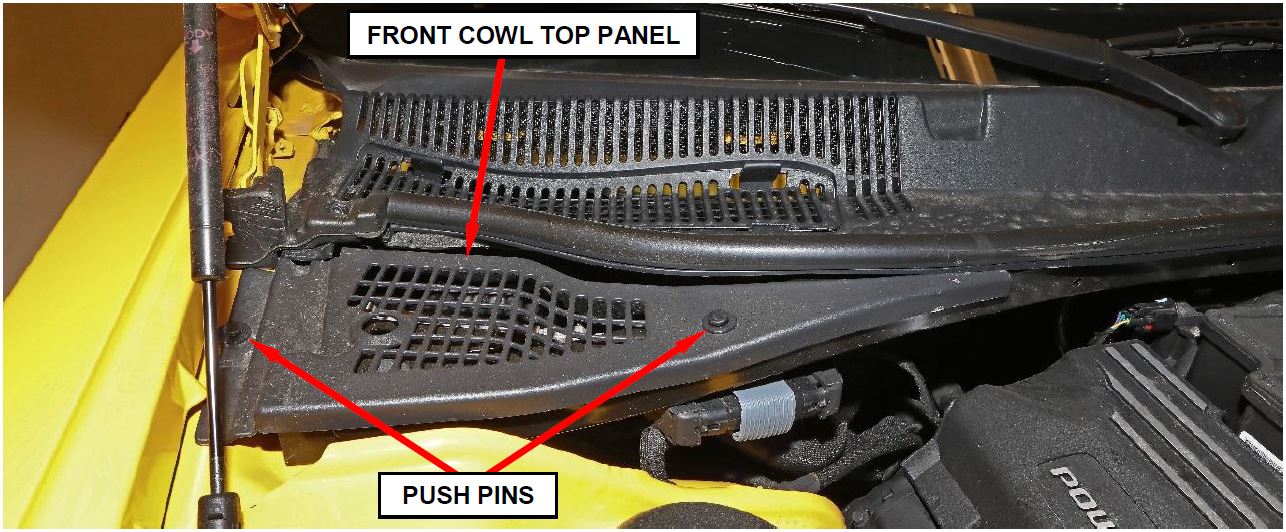
Figure 1 – Front Cowl Top Push Pins
- Working from the top of the PCM mounting bracket on the upper radiator cross member, squeeze the two hood ajar switch latch tabs together far enough to pull the switch upward (Figure 2).
- Pull the hood ajar switch up through the hole in the PCM mounting bracket far enough to access and disconnect the wire harness electrical connector from the switch (Figure 2).
- Remove the hood ajar switch from the vehicle (Figure 2).
- Remove the Powertrain Control Module (PCM) retaining bolt (Figure 2).
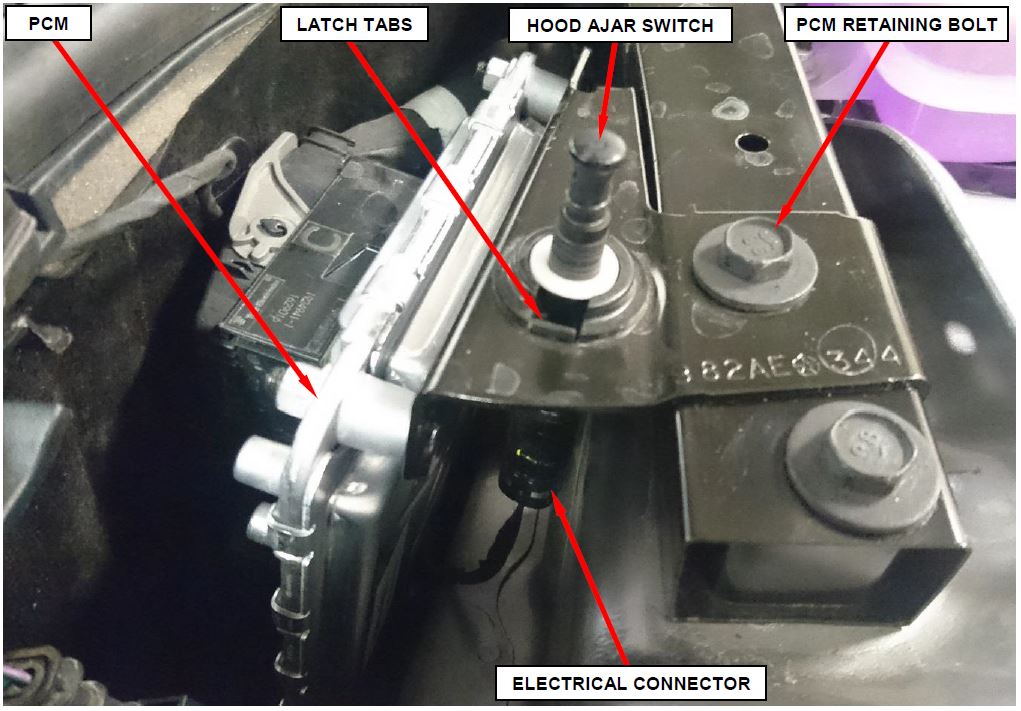
Figure 2 – Hood Ajar Switch
- Disconnect the PCM electrical connectors (Figure 3).
- Remove the production PCM from the vehicle (Figure 3).
- Connect the PCM electrical connectors to the Demon Crate PCM (Figure 3).
- Reconnect the vehicle battery. If equipped with an IBS, connect the IBS connector (Figure 3). Proceed to Section Reprogram PCM.
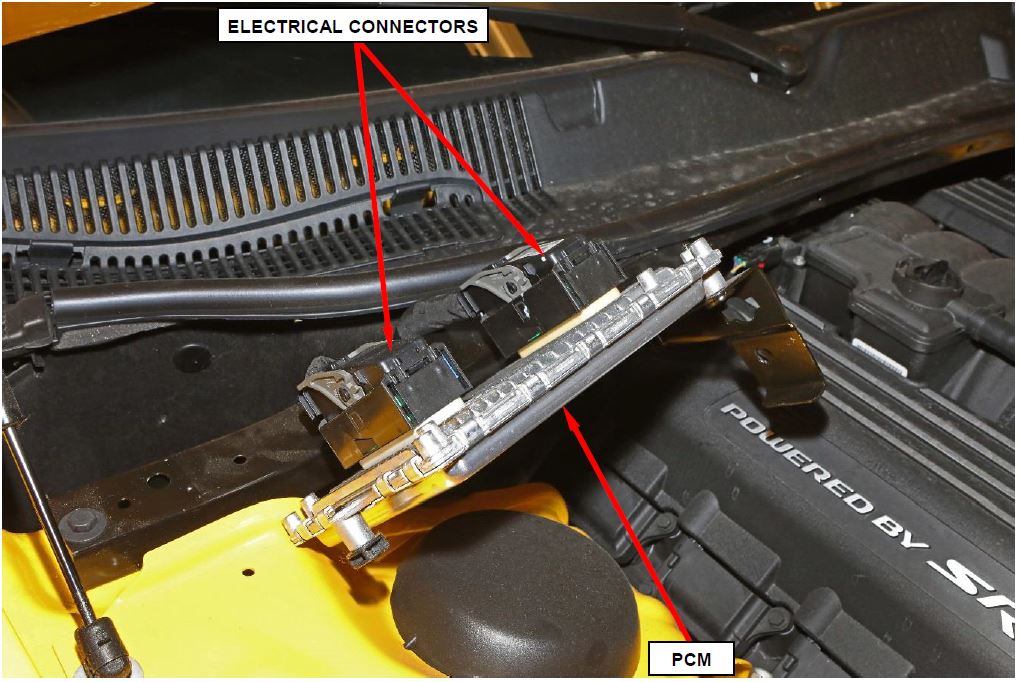
Figure 3 – Powertrain Control Module (PCM)
B. Reprogram PCM
NOTE: The wiTECH scan tool must be used to perform this recall. The wiTECH software is required to be at the latest release level before performing this procedure. If the reprogramming flash for the PCM is aborted or interrupted, repeat the procedure.
- Install a battery charger and verify that the charging rate provides 13.0 to 13.5 volts. Do not allow the charger to time out during the flash process. Set the battery charger timer (if so equipped) to continuous charge.
NOTE: Use an accurate stand-alone voltmeter. The battery charger volt meter may not be sufficiently accurate. Voltages outside of the specified range will cause an unsuccessful flash. If voltage reading is too high, apply an electrical load by activating the park or headlamps and/or HVAC blower motor to lower the voltage.
- Connect the wiTECH micro pod II to the vehicle data link connector.
- Place the ignition in the “RUN” position.
- Open the wiTECH 2.0 website.
- Enter your “User id” and “Password” and your “Dealer Code”, then select “Sign In” at the bottom of the screen. Click “Accept”.
- From the “Vehicle Selection” screen, select the vehicle to be updated.
- From the “Action Items” screen, select the “Topology” tab.
NOTE: The PCM must be at the latest software calibration level after completing this recall.
- From the “Topology” tab, select the “PCM” module icon.
- From the “Flash” tab, compare the “Current Electronic Control Unit (ECU) Part Number” with the “New ECU Part Number” listed.
- If the “Current ECU part Number” is the same as the “New Part Number”, proceed to Step 15.
- If the “Current ECU part Number” is NOT the same as the “New Part Number”, continue with Step 10.
- From the PCM tab, select the PCM flash part number. Read the flash special instructions page. Select “OK” to continue.
- From the flash ECU agreement page, agree to terms by checking the box.
- Select “Flash ECU” and then follow the wiTECH screen instructions to complete the flash.
- Confirm the software is at the latest available calibration level.
- Click “View DTCs”, select “Clear All DTCs”, click “Continue” and then click “Close”.
- Place the ignition in the “OFF” position and then remove the wiTECH micro pod II device from the vehicle.
- Remove the battery charger from the vehicle.
- Return vehicle to customer:
- If the Demon Crate PCM was temporally installed for reprogramming, reinstall the production PCM in the vehicle, proceed to Section C. Install Production PCM. Return the Demon Crate PCM to the customer.
- If the Demon Crate PCM was installed by the vehicle owner leave the Demon Crate PCM installed, do not install the production PCM.
C. Install Production PCM
- Disconnect and isolate the negative battery cable. If equipped with an Intelligent Battery Sensor (IBS), disconnect the IBS electrical connector first.
- Disconnect the PCM electrical connectors from the Demon Crate PCM (Figure 3).
- Ensure the reprogrammed Demon Crate PCM is returned to the customer.
- Connect the PCM electrical connectors to the production PCM (Figure 3).
- Position the PCM bracket to the cross support, install the retaining bolt and tighten to 16 N·m (12 ft. lbs.) (Figure 2).
- Position the hood ajar switch near the switch mounting hole in the PCM mounting bracket on the upper radiator cross member (Figure 2).
- Pull the hood ajar switch wire harness connector through the switch mounting hole and connect it to the hood ajar switch (Figure 2).
- From the top of the mounting bracket, press the hood ajar switch downward into the mounting hole until the two integral switch latch tabs lock it into place (Figure 2).
- Position the front cowl top panel to the right rear corner of the engine compartment (Figure 1).
- Install the two push-pins that secure the front cowl top panel (Figure 1).
- Connect the negative battery cable. If equipped with an IBS, connect the IBS connector.
- This recall is now complete.
Completion Reporting and Reimbursement
Claims for vehicles that have been serviced must be submitted on the DealerCONNECT Claim Entry Screen located on the Service tab. Claims paid will be used by FCA to record recall service completions and provide dealer payments.
Use one of the following labor operation numbers and time allowances:
NOTE: See the Warranty Administration Manual, Recall Claim Processing Section, for complete recall claim processing instructions.
Dealer Notification
To view this notification on DealerCONNECT, select “Global Recall System” on the Service tab, then click on the description of this notification.
| Labor Operation Number | Time Allowance | |
|---|---|---|
| Inspect PCM Software Level | 18-U8-31-81 | 0.2 hours |
| Inspect PCM Software Level and Perform Software Update | 18-U8-31-82 | 0.3 hours |
| Related Operation | ||
| Temporally Install Demon Crate PCM for Software Update | 18-U8-31-50 | 0.2 hours |
Owner Notification and Service Scheduling
All involved vehicle owners known to FCA are being notified of the service requirement by first class mail. They are requested to schedule appointments for this service with their dealers. A generic copy of the owner letter is attached.
Vehicle Lists, Global Recall System, VIP and Dealer Follow Up
All involved vehicles have been entered into the DealerCONNECT Global Recall System (GRS) and Vehicle Information Plus (VIP) for dealer inquiry as needed.
GRS provides involved dealers with an updated VIN list of their incomplete vehicles. The owner’s name, address and phone number are listed if known. Completed vehicles are removed from GRS within several days of repair claim submission.
To use this system, click on the “Service” tab and then click on “Global Recall System.” Your dealer’s VIN list for each recall displayed can be sorted by: those vehicles that were unsold at recall launch, those with a phone number, city, zip code, or VIN sequence.
Dealers must perform this repair on all unsold vehicles before retail delivery. Dealers should also use the VIN list to follow up with all owners to schedule appointments for this repair.
Recall VIN lists may contain confidential, restricted owner name and address information that was obtained from the Department of Motor Vehicles of various states. Use of this information is permitted for this recall only and is strictly prohibited from all other use.
Additional Information
If you have any questions or need assistance in completing this action, please contact your Service and Parts District Manager.
Customer Services / Field Operations
FCA US LLC
U83/NHTSA 18E-053
YOUR SCHEDULING OPTIONS
- RECOMMENDED OPTION Call your authorized Chrysler / Dodge / Jeep® / RAM Dealership
- Call the FCA Recall Assistance Center at 1-800-853-1403. An agent can help schedule an appointment
DEALERSHIP INSTRUCTIONS
Please reference Safety Recall U83.
IMPORTANT SAFETY RECALL
Reprogram Powertrain Control Module
Dear [Name],
This notice is sent to you in accordance with the National Traffic and Motor Vehicle Safety Act.
FCA has decided that a defect, which relates to motor vehicle safety, exists in certain MOPAR high performance Powertrain Control Modules (PCM) included in the Demon Crate. This PCM is intended for use with 2018 Model Year Dodge Challenger SRT Demon vehicles.
It is extremely important to take steps now to repair your vehicle to ensure the safety of you and your passengers.
WHY DOES MY DEMON CRATE PCM NEED REPAIR?
FCA records indicate that you may have purchased a Demon Crate for your vehicle [1]. The Demon Crate includes a MOPAR high performance Powertrain Control Module (PCM) which you may have installed in your vehicle. The fault handling strategy of this PCM software does not remove positive torque requests from the engine controller if the CAN-C bus stops communicating while the cruise control is requesting positive torque. In the instance of a short in the vehicle causing the CAN-C bus to stop communicating while the cruise control is active and the vehicle speed is below the set speed such that the cruise control system is requesting positive torque at the exact moment of the short, it is possible for a positive torque request to be locked on the PCM which may result in either the vehicle maintaining its current speed or possibly accelerating. If the driver does not shift to neutral or apply the brakes to stop the vehicle this condition can cause a vehicle crash without warning.
HOW DO I RESOLVE THIS IMPORTANT SAFETY ISSUE?
Please bring your Demon Crate PCM and the vehicle to your dealer for remedy.
Your vehicle’s original PCM is covered by Safety Recall U60 / NHTSA 18V-332.
FCA will repair your vehicle [2] free of charge (parts and labor). To do this, your dealer will inspect the software level of the Powertrain Control Module (PCM) and if necessary, reprogram the PCM. No other Demon Crate components require removal, installation, or reinstallation to accommodate the PCM reprogramming operation. In addition, your dealer will require your vehicle for proper check-in, preparation, and check-out during your visit. Your time is important to us; please be aware that these steps may require more time. The estimated repair time is one hour. We recommend that you schedule a service appointment to minimize your inconvenience. Please bring this letter with you to your dealership.
Do not use cruise control on your vehicle until your PCM has been remedied.
TO SCHEDULE YOUR FREE REPAIR CALL
YOUR CHRYSLER, DODGE, JEEP OR RAM DEALER TODAY
WHAT IF I ALREADY PAID TO HAVE THIS REPAIR COMPLETED?
If you have already experienced this specific condition and have paid to have it repaired, you may visit www.fcarecallreimbursement.com to submit your reimbursement request online. [3] Once we receive and verify the required documents, reimbursement will be sent to you within 60 days. If you have had previous repairs performed and/or already received reimbursement, you may still need to have the recall repair performed.
We apologize for any inconvenience, but are sincerely concerned about your safety. Thank you for your attention to this important matter.
Customer Assistance/Field Operations
Fiat Chrysler Automobiles US LLC
Mr. Mrs. Customer
1234 Main Street
Hometown, MI 48371
[1] If you no longer own this vehicle, please help us update our records. Call the FCA Recall Assistance Center at 1-800-853-1403 to update your information.
[2] If your dealer fails or is unable to remedy this defect without charge and within a reasonable time, you may submit a written complaint to the Administrator, National Highway Traffic Safety Administration, 1200 New Jersey Ave., S.E., Washington, DC 20590, or you can call the toll-free Vehicle Safety Hotline at 1-888-327-4236 (TTY 1-800-4249153), or go to safercar.gov.
[3] You can also mail in your original receipts and proof of payment to the following address for reimbursement consideration: FCA Customer Assistance, P.O. Box 21-8004, Auburn Hills, MI 48321-8007, Attention: Recall Reimbursement.
Note to lessors receiving this recall notice: Federal regulation requires that you forward this recall notice to the lessee within 10 days.
Equipment Safety Recall U83
NHTSA 18E-053
Reprogram Powertrain Control Module
July 2018
Safety Recall Advanced Communication – U82
07/19/2018
Safety Recall Advanced Communication – U82
07/19/2018
Owner Notification Letter
Interim Owner Notification Letter
Recall Acknowledgement
July 25, 2018
Chrysler Reprogramming
Chrysler J2534 Application Overview
Flash Availability - J2534/Pass Thru Device
Vehicle to Diagnostic Tool Reference Chart
Chrysler Recommended J2534 Devices
For Chrysler recommended J2534 device, see below table.
| J2534 Device | Firmware Version |
| CTC Vehicle Box * | 1.9 |
| UCAN 2 | 1.0 |
| Blue Streak -2534 Global Programmer | 2.10 |
| Actia I+ME Passthru | 2.07 |
* Chrysler recommends the CTC Vehicle Box Device for Chrysler SCI ECU reprogramming. SCI reprogramming is used on most PCMs and TCMs prior to the introduction of CAN bus vehicles which began in 2004 (Durango).
Click on the link below to:
Download J2534 Application
(Install the wiTECH 2.0 J2534 Application on your computer)
Download the Setup Utility
(Configure your microPod/MDP device)
Launch wiTECH 2.0
(Once subscription and users are assigned to a tool please follow this link to access wiTECH)
https://www.mopartsp.com/support

- J2534 Pass-Thru Programmer: TOPDON RLink J2534 is an advanced diagnostic and reprogramming tool that support all J2534 protocols, as well as D-PDU, CAN-FD and DoIP, ensuring compatibility with a wide range of modern vehicles. It offers extensive versatility with support for over 18 major automotive brands, including Chrysler, Ford, GM, Nissan, Toyota, Honda, Subaru, Land Rover/Jaguar, Volvo, Wuling, Volkswagen/Audi, Mercedes-Benz, and BMW. NOTE: Not compatible with Ford IDS diagnostic software
- All-in-One OEM Diagnostics: This J2534 ECU programming tool elevates your automotive repair capabilities to new heights by delivering complete OEM diagnosis. Boasting comprehensive full-system diagnostics, intuitive repair guides, advanced ECU programming and coding, common reset services, a vast library of repair information and more, this all-in-one solution empowers technicians to effortlessly tackle complex vehicle issues with ease. *Not compatible with 24V vehicles
- Proven Performance You Can Trust: Backed by over 10000 real vehicle tests and benefit from a wealth of practical experience, this OEM reprogramming tool guarantees stable and exceptional performance. Supported by TOPDON's dedicated technical experts with in-depth knowledge of both auto repair and J2534 Pass-Thru programming, the RLink J2534 provides prompt and professional assistance, ensuring a smooth setup and reliable compatibility
- Integrated Excellence, Always Up-to-Date: Featuring the exclusive RLink Platform to provide a streamlined experience with one-click driver installation and management, ensuring flawless integration with your OE software, maintaining the original performance quality. The built-in operation guide makes mastering OE software quick and easy, so you can get started right away. Plus, with lifetime free updates, your diagnostics will stay current with the latest drivers and innovations
- Efficiency Meets Versatility: Engineered to support three CAN channels simultaneously - CAN FD and CAN-CC included, giving you the edge in fast troubleshooting. To perfectly synchronized with the OE software, please diagnose with active subscriptions and make sure your computer system is running a compatible 64-bit Windows version (7, 8, 10 or later) to fully leverage the power of RLink J2534. *We don't provide extra OE software

- Advanced VCI Box, Industry-leading J2534 Pass-Thru Technology: This J2534 Pass-Thru Programmer is designed espically for technicians, independent shop owners, and DIY enthusiasts, enables fast, reliable computer-based programming. It supports all J2534 protocols—including the latest DoIP and CAN FD—ensuring full compatibility with both legacy and next-generation vehicles.
- High-Speed OEM-Level Diagnostics & Programming: Unlock true OEM functionality with comprehensive system diagnostics, guided troubleshooting, coding, adaptations, resets, and programming—all designed to slash repair time. This all-in-one tool eliminates the need for multiple OEM devices, boosting efficiency and cutting costs. Equipped with High-Speed USB, it delivers 10x more data per second than competing solutions
- Coverage for 17 Car Brands & Ultra Reliability: Works seamlessly for Chrysler, for Ford(Forscan), for GM, for Nissan, for Toyota, for Honda, for Subaru(SSM4), for Land Rover/Jaguar, for Volvo, for Wuling, for Volkswagen, for Mercedes-Benz, and for BMW. Backed by over 10000 real vehicle tests and benefit from a wealth of practical experience, this OEM reprogramming tool guarantees stable and exceptional performance
- User-Friendly RLink Platform & Expert Support: TOPDON’s proprietary driver management platform offers a clean interface and lifetime free updates. Access a rich library of real-world case studies to stay ahead of the curve. Backed by a support team with 10+ years of J2534 and automotive repair experience, we provide one-on-one assistance to resolve any technical issue.
- 6.6 ft USB-C Cable & Portable Storage Case: The RLink J2534 diagnostic tool features a 6.6ft USB 2.0 Cable and a 1.2 ft OBDII Extension Cable, allows to connection your computer easily outside the vehicle. The included handled carry case offers easy portability, storage, and hanging options—keeping your gear clean and ready to go, anywhere.

- Dual WiFi & 10.1" Touchscreen: Provides a stable, high-speed wireless link 3x faster than bluetooth, and a responsive, professional interface. Topdon ONE obd2 scanner diagnostic tool ensures smooth, non-lagging diagnostic scan, boosting mechanic efficiency
- J2534 Pass-Thru Support: The included ONE VCI supports the J2534 standard, allowing it to function as a pass-thru device when paired with OEM diagnostic software.Through TOPDON’s RLink platform, technicians can perform dealer-level coding, expanding in-house capabilities without investing in multiple factory automotive scan tools
- OE Topology Mapping: Visualize the vehicle’s ECU network exactly as it’s built.Zoom, pan, and highlight specific modules to pinpoint component issues with precision.Topology mapping displays real-time communication between modules
- 50+ Service Functions: Covers high-demand services like ADAS calibration, DPF regen, TPMS reset, ABS bleed, and throttle adaptation.Expands your service menu, allows you to charge premium rates, and turns away zero jobs due to lack of tooling. Vehicle-specific functionality may vary
- Advaned ECU Coding: 10 of the most serviced brands in North America, including full ECU coding and flash hidden support for BMW, VW, Au-di, Benz, Porsche, Toyota, Ni ssan and more. Enables module replacement, feature customization, and personal settings with automatic backup or restore.Lets your shop safely offer high-margin customization services, attracting more customers and boosting profit

- [J2534 Pass-Thru Programmer] - TOPDON RLink J2534 is engineered for professional technicians, delivering OEM diagnostic and reprogramming capabilities. It supports all J2534 protocols, CAN-FD, DoIP, D-PDU. Compatible with 17 vehicle brands—such as Chrysler, Ford, GM, KIA, Hyundai, Nissan, Toyota, Honda, Subaru, Mitsubishi, MAZDA, Land Rover/Jaguar, Volvo, Volkswagen/Audi, Mercedes-Benz, and BMW. RLink J2534 can help reduce the cost of purchasing equipment from different brands.
- [All-in-One OEM Reprogramming and Diagnostics] - When seamlessly integrated with OEM diagnostic software, this dongle enables you to perform a wide range of functions, including ECU programming and coding, DTC reading and clearing, active tests, component matching, adaptations, rewriting, guided troubleshooting, and more. This all-in-one tool eliminates the need for multiple OEM devices, significantly boosting work efficiency.
- [Tested, Trusted, and Proven for Accuracy] - TOPDON RLink J2534 is renowned for its reliability, having successfully completed over 10,000 real-vehicle tests. The wealth of data and hands-on experience behind it ensures consistent performance and accurate results. You can trust this tool to deliver optimal performance.
- [One-Click Installation, Continuous Updates] - The exclusive TOPDON RLink platform streamlines installation with a one-click driver setup, allowing you to quickly access OEM software for diagnostic and reprogramming tasks. With lifetime free updates, your RLink J2534 stays current without any additional cost, ensuring reliable performance for the long term. *We don't provide extra OE software.
- [Works with Windows Compatibility and OEM Software Subscription] - The RLink J2534 supports three CAN channels - including CAN FD and CAN-CC, providing advantages in the process of rapid troubleshooting. Compatible with Windows 7, 8 and 10 (64-bit) and higher versions of the system. For full functionality, an active OEM software subscription is required for each supported vehicle brand. Please note that the dongle does not include OEM software, which must be purchased separately to access brand-specific diagnostic and reprogramming features.

- 【J2534 Pass-Thru Device】 This budget-friendly J2534 pass-thru device delivers OEM diagnostics and reprogramming capabilities for dealerships, repair shops and automotive DIY enthuisasts, enables you diagnose, program and repair the vehicles more efficiently and precisely. Supporting J2534, D-PDU, CAN-FD and DoIP, this J2534 passthru tool ensures wide vehicle coverage. It's compatible with OE software application, ensuring seamless integration and original performance quality
- 【All-in-One Diagnostic Tool】 Simplify your workflow and tackle the complex diagnostics and repairs with confidence! This J2534 passthrough tool provides full system diagnosis, bi-directional control, maintenance reset services, ECU programming and ECU coding to run advanced diagnostics and programming. Equipped with the specialized platform, this J2534 pass-thru tool is fully compatible with OE software that helps technicians confidently handle complicated vehicle repair issues
- 【J2534 Diagnostic Tool】 The Tabscan J2534 pass-thru device is built with a dedicated platform, making it ideal for both professional and personal use. Simply download the driver for your ford vehicle within the platform—ensuring only one driver is installed at a time. Then connect the device to your vehicle’s OBD2 port and link it to your computer using the included USB A to USB C cable. Finally launch your OE software, select Tabscan J2534 VCI as interface, and begin diagnose and program
- 【Universal Compatibility】 Tabscan J2534 reprogramming tool is designed to be compatible with Ford vehicles for advanced diagnostics and programming. It supports J2534 protocols, along with D-PDU, CAN-FD and DoIP, ensuring seamless connectivity with older or modern vehicles. This J2534 diagnostic tool only works with computer running on windows 7/10/11. Vehicle compatibility varies by model or year, please confirm with us before purchase. Note: It's not compatible with 24V vehicles
- 【Professional Technical Support】 Tabscan J2534 pass-thru device provides a stable and seamless connection between your vehicle and computer for diagnostics, programming, and coding. But that's not all—we go beyond hardware. Our dedicated technical support team brings deep expertise in automotive diagnostics and programming. Whether you need help with setup, troubleshooting or latest diagnostic resources and upgrades, we provide fast, professional and reliable support every step of the way
- 💯【Conta.ct us for Support Directly】For any issues experienced after purchase, please reach out to: 📞autelsupply@ outlook. com🛣️. Our team will provide perfect solution for you. For tech support or [explore additional accessory], please cont.act our team: 📞autelsupply@ outlook. com🛣️.
- 🌎【Autel J2534 Pass-Thru Progra.mmer】As an OEM Pass-Thru Progra.mmer Vehicle interface for multiple makes, Autel MaxiFlash J2534 support all J2534 protocols, D-PDU, CAN-FD and DoIP protocols. 2026 newer Autel MaxiFlash J2534 VCI can works with P-C and download OEM vehicle software, seamlessly conduct OE-level diagnostic-progra.mming-c0ding. Also, Work with Elite II Pro/ Ultra Lite/ MS909/ MS909CV/ MS909EV to directly pro.gram on Merce.des-Be.nz & BM.W. Autel J2534 Progr.ammer is a multi-functional device and supports 10+ major brands, including for Hond.a, G.M, LandRo.ver, BM.W, Chrysl.er, For.d, Hyun.dai, Ki.a, Merc.edes B.enz, Toyot.a, Volksw.agen etc.
- 🌎【Enhanced Protocol: J2534/D-PDU/RP1210/CAN FD/DoIP】Autel MaxiFlash JVCI is a blueto.oth communicate device, it supports latest CAN FD DoIP CAN protocols, compliant with automotive D-PDU/ J2534/ RP1210 standards. It can perform standard PassThru J2534 functions: compatible with Toyota Techstream, Volvo VIDA, Honda HDS, Jaguar Land Rover IDS and BM.W 3G for OEM diagnostics. CAN FD protocol is mainly for GM 2019+, DoIP protocol is mainly for Volvo 2018+, for L-and Rover/for Jaguar 2017+, for BM.W F chassis and G chassis.
- 🌎【Compatible with P-C/ WIND.OWS 】The Autel J2534 VCI can be connected to a compu.ter via a data cable; once the corresponding OEM software is installed, it enables do advanced progr.amming and c0ding on your vehicles. Easy Steps: 1) Connect to P-C via a USB cable 2) download OEM vehicle software 3) Start Diagnose. Take For.d for example, you can download OEM software on mot.orcraft.erservi.ce website, such as: For.d Diagnostic Software downloads, As B.uilt Data, Updated Cali.bration information, then use different software do relevant features.
- 🌎【Work with Autel Elite II Pro/ Ultra Lite/ MS909/ MS909CV/ MS909EV】This 2026 latest Autel J2534 Pass-Thru VCI is 100% compatible with Autel Elite II Pro Ultra Lite MS909 MS909CV MS909EV to perform advanced functions from diagnose to progra.mming.
This product presentation was made with AAWP plugin.