
NHTSA ID Number: 10110609
Manufacturer Communication Number: SMB127
Summary
Service Manual Bulletin – Vapor Doors Proximity Switch Adjustment
1 Affected Product
SMB-127
ISSUE DATE: Sep 06 2013
Vapor Doors Proximity Switch Adjustment
16 – Entrance & Exit Door
This Bulletin provides revised information on the adjustment of the proximity switches located on the baseplate of the front and rear Vapor Slide Glide doors as installed on your New Flyer vehicle.
This information supersedes any prior information on this subject already provided in your New Flyer Manuals. Make this Service Bulletin available to service personnel to inform them of changed information.
SEOCONTENT-START
SMB-127 Copyright © 2013 New Flyer Industries Canada ULC Cover
SERVICE MANUAL BULLETIN
This Service Manual Bulletin is prepared by the Publications Department of New Flyer Industries
Canada ULC. Refer to details below.
ISSUE DATE: Sep 06 2013
SMB-127
APPLICABILITY
VEHICLE LENGTH 30ft. 35ft. 40ft. 60ft. ALL
VEHICLE TYPE High Floor Low Floor Invero Xcelsior ALL
FUEL TYPE
Diesel Electric CNG LNG
ALL
Diesel/Electric Gas/Electric Fuel Cell
SUBJECT Vapor Doors Proximity Switch Adjustment
SECTION TITLE 16 – Entrance & Exit Door
DETAILS This Bulletin provides revised information on the adjustment of the proximity
switches located on the baseplate of the front and rear Vapor Slide Glide
doors as installed on your New Flyer vehicle.
This information supersedes any prior information on this subject
already provided in your New Flyer Manuals. Make this Service Bulletin
available to service personnel to inform them of changed information.
SMB-127 Copyright © 2013 New Flyer Industries Canada ULC 1 of 3
SERVICE MANUAL BULLETIN
SMB-127
1. Entrance Door Switch Plate
& Proximity Switches
1.1. Installation
1. Install the switch into the front plate of the
door operator in reverse of removal.
1.2. Proximity Switch Adjustment
Adjust the distance between the switch
and the teeter plate to ensure correct actuation
of the entrance door. Ensure the following
conditions are met prior to
proceeding with adjustments:
❒ Using a digital multimeter (DMM), verify
each proximity switch is receiving power
and ground.
❒ Open the hinged access panel above the
entrance door and operate the emergency
release control to exhaust air from the door
system.
1. Manually move door panels to the fully
closed position and ensure output lever is
rotated fully clockwise (as viewed from the
bottom looking up.
2. Use a feeler gauge to measure gap
between teeter lever and bottom of the
LS1 proximity switch. Loosen switch lock
nuts as required and adjust switch to
obtain a gap of 0.080 ± 0.010 inches (2.00
± 0.13 mm) (Dim “A”). See “Fig. 1: Proximity
Switch Adjustment (Door Closed).” on
page 2.
3. Manually open the door and ensure the
output shaft is rotated fully counter-clockwise
as viewed from the bottom looking up.
The LS2 proximity switch should actuate
just prior to the door being fully opened,
and remain actuated with the door fully
open, illuminating the LED light at the rear
of the switch. This actuation point is
referred to as 85° open.
4. Use a feeler gauge to measure gap
between teeter lever and bottom of the
LS2 proximity switch. Loosen switch lock
nuts as required and adjust switch to
obtain a gap of 0.080 ± 0.010 inches
(2.00±0.13 mm) Dimensions in Fig 1
applies to LS2
5. Manually close the door and ensure the
output shaft is rotated fully clockwise as
viewed from the bottom looking up. The
LS1 proximity switch should actuate just
prior to the door being fully closed, and
remain actuated with the door fully closed,
illuminating the LED light at the rear of the
switch. This actuation point is referred to
as 5° closed.
6. Manually operate the door mechanism
several times between fully open and fully
closed to ensure proper actuation of the
switches.
7. Torque switch lock nuts to 130 in-lb.
8. Close the emergency release control to
apply system air pressure to door motor.
9. Cycle door controller several times
between open and closed to ensure proper
operation of the door mechanism and limit
switches.
2 of 3 Copyright © 2013 New Flyer Industries Canada ULC SMB-127
SERVICE MANUAL BULLETIN
SMB-127
Fig. 1: Proximity Switch Adjustment (Door Closed).
2. Exit Door Switch Plate &
Proximity Switches
☞ NOTE:
The following procedure only applies to Slide
Glide style rear (exit) doors.
2.1. Installation
1. Install proximity switches in their positions
on the baseplate.
2. Connect wiring to switches
???????????? ????????????
????????????????????????????????????????????????????????????
????????????????????????????????????????????????????????????????????
????????????
????????????????????????????????
s033913c.svg
SMB-127 Copyright © 2013 New Flyer Industries Canada ULC 3 of 3
SERVICE MANUAL BULLETIN
SMB-127
2.2. Proximity Switch Adjustment
Adjust the distance between the switch
and the output lever to ensure correct actuation
of the entrance door. Ensure the following
conditions are met prior to
proceeding with adjustments:
❒ Using a digital multimeter (DMM), verify
each proximity switch is receiving power
and ground.
❒ Open the exit door emergency valve cover
and operate the emergency release control
to exhaust air from the door system.
1. Manually close the exit door to rotate the
output lever fully clockwise to the closed
position. Position the 5° (lower) proximity
switch so that the head of the proximity
switch is centered over the flat of the output
lever and install lock nut.
2. Adjust proximity switch in or out as
required to obtain a 0.080 ± 0.010 inches
(2.00±0.13 mm) (Dim. “A”) gap between
the end of the switch and the flat of the output
lever. See “Fig. 2: Proximity Switch
Adjustment – Door Closed” on page 3.
3. Manually open the exit door to rotate the
output lever fully counter-clock-wise to the
open position. Position the 85° (upper) limit
switch so that the head of the proximity
switch is centered over the flat of the output
lever and install lock nut.
4. Adjust proximity switch in or out as
required to obtain a 0.080 ± 0.010 inches
(2.00 ± 0.13 mm) gap between the end of
the switch and the flat of the output lever.
The Dimensions in Fig 2 also applies to the
door open proximity switch.
5. Manually operate the door mechanism
several times between fully open and fully
closed to ensure proper actuation of the
switches.
6. Torque switch lock nuts to 130 in-lb.
7. Close the emergency release control to
apply system air pressure to door motor.
8. Cycle door controller several times
between open and closed to ensure proper
operation of the door mechanism and limit
switches.
Fig. 2: Proximity Switch Adjustment – Door Closed
????????????
????????????????????????????????????
????????????????????????????????????????????????????????????????
????????????????????????????????????????
????????????????????????????????????????????????????????????????
s033921a.svg
SMB127

- Inductive Proximity Switch Type: SN04-N, 3 Wire NPN NO. Detecting Distance: 4mm. Supply Voltage: 5-30VDC, Current Output: 300mA.
- LED working indicator: signal indicator, when sensing metal objects the light is on for normally open, the light is off for normally closed.
- Wiring Method: Brown connect to Positive, Blue connect to Negative, Black connect to Load (signal output).
- When proximity switch is close to some target object, it will send out control signal. Widely used for machine tool industry, frequency counters and other automatic control system, or you can use it for DIY 3D Printer.
- You will get 4pcs inductive proximity switch + 4pcs SN Bracket

- EASYGUARD Smart Key PKE car alarm system with remote engine start, push start button and passive keyless entry function. The PKE feature will automatically lock or unlock the door when walk away or approach the car in 3-6 feet with key fob
- IMPORTANT: This item not compatible with cars with double pulse for unlock, not work with pneumatic or vacuum locking system, not work with cars with factory push start button.
- With push start button can start/stop your vehicle easier and no need to insert the key into ignition cylinder anylonger once properly installed
- An extra bypass module(like ASIN: B07NSLPBG7 or B00MEHBVIC) is required if there is chip immobilizer in your factory OEM key fob
- Compatible with most DC12V petrol cars on the market, include auto gear or manual gear cars, please do not install it on luxury vehicles. Professional car alarm installer installation is required.
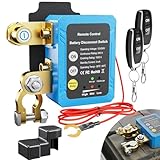
- Heavy Duty: This remote battery disconnect switch handles 240A continuous current at 12V and withstands 1000A instant current. It protects your battery by cutting power at critically low voltage 11.8V, all while drawing only 3mA in standby mode. This switch only manages battery power and will not modify original vehicle emission systems
- Energy Efficient: Featuring an advanced magnetic latching relay, kill switch operates with ultra low 3mA standby consumption. The magnetic actuation ensures reliable circuit control with minimal power drain, making it ideal for vehicles that sit for extended periods
- Protect and Prolong Your Battery's Life: This power shut off switch helps reduce common causes of drain such as long term parking, aging wiring, forgotten lights, or standby electronics. It cuts power when voltage drops too low at 11.8V, helps reduce deep discharge damage and supports longer overall battery lifespan
- Safe Driving Guard: For driving safety, the remote is disabled during engine cranking or when voltage exceeds safe levels 13.2V to 25V, ensuring you can never accidentally shut off power while on the road
- Easy Installation: This 12V battery cut off switch is designed for easy installation, just connect it to the negative battery terminal for reliable performance. Always remember to turn off power before installing to ensure safety. Ideal for use in cars, trucks, RVs, and boats
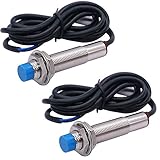
- Product Name : Inductive Proximity Switch;Model : LJ12A3-4-Z/AX;Theory : Inductive Sensor;Wire Type : 3 Wire Type (Brown, Blue, Black)
- Switch Appearance Type : Cylinder Type, Metal Shell;Output Type : NPN NC;
- Detecting Distance : 4mm(+/-10%);Supply Voltage : DC 6-36V Output Current : 300mA;Detect Object : Iron;Column Sensor Diameter : 10.4mm/0.4";Thread Diameter : 12mm/0.5"
- Total Size : 66 x 21mm/ 2.6'' x 0.8'' (L*Max.D);Cable Length : 1.16m/35.7'';External Material : Plastic, Metal
- Net Weight :100g;Color : Blue Tone, Black ;Package Content : 2 x Inductive Proximity Switch

- Inductive proximity switch type: LJ12A3-4-Z/BX, 3 Wire NPN NO. Detecting Distance: 4mm, Diameter: 12mm.
- Supply Voltage: 6-36VDC, Current Output: 300mA, Frequency: 500Hz.
- Wiring Method: Brown connect to Positive, Blue connect to Negative, Black connect to Load (signal output).
- When proximity switch is close to some target object, it will send out control signal.
- It is widely used in machine, paper making, light industry for limiting station, orientation taking count, speeding trial ect.
This product presentation was made with AAWP plugin.