
November 30, 2022 NHTSA CAMPAIGN NUMBER: 22V887000
Liquid in Battery Packs May Cause Fire
The accumulation of liquid inside the battery pack enclosure increases the risk of a fire.
NHTSA Campaign Number: 22V887
Manufacturer Proterra Operating Company, Inc.
Components ELECTRICAL SYSTEM
Potential Number of Units Affected 19
Summary
Proterra Operation Company, Inc. (Proterra) is recalling certain 2017-2019 Catalyst and Roadrunner transit buses. One or more battery packs may allow liquid to leak into and accumulate in the battery pack enclosure.
Remedy
Proterra will update software, inspect, and replace the battery pack, free of charge. Interim owner notification letters informing owners of the safety risk were January 8, 2023. Remedy parts are expected in mid-November. Owners may contact Proterra’s customer service at 1-864-438-0000.
Notes
Owners may also contact the National Highway Traffic Safety Administration Vehicle Safety Hotline at 1-888-327-4236 (TTY 1-800-424-9153), or go to www.nhtsa.gov.
400V E2Ver1 Body and ESM Software Update
Retrofit Description:
This software update enables the following features when certain fault codes associated with Battery Pack liquid accumulation and/or a thermal event are detected. (1) prevent the vehicles Battery Pack from being charged, (2) engage a “limp mode” that imposes limitation on the Battery Pack regen and power discharge levels, and (3) trigger a flashing red warning light on the driver’s dash display and an audible alarm (collectively, the “Updated Software Features”).
400V E2Ver2 Body and ESM Software Update
Retrofit Description:
This software update enables the following features when certain fault codes associated with Battery Pack liquid accumulation and/or a thermal event are detected. (1) prevent the vehicles Battery Pack from being charged, (2) engage a “limp mode” that imposes limitation on the Battery Pack regen and power discharge levels, and (3) trigger a flashing red warning light on the driver’s dash display and an audible alarm (collectively, the “Updated Software Features”).
Chronology :
On November 9, 2022, a Battery Pack installed on a Proterra vehicle experienced a thermal event. After an initial investigation of this incident, Proterra believes that the thermal event was caused by the presence of liquid inside the Battery Pack enclosure based on fault codes on the vehicle and other data indicators. Proterra reviewed and analyzed its fleet-wide telemetry data to identify any Battery Packs with fault codes and other data indicators that may indicate that there is liquid inside the Battery Pack enclosure, which over time may accumulate and present the risk of a thermal event. Proterra identified 28 Battery Packs in nineteen vehicles (less than 1% of the fleet-wide Battery Packs) with a fault code and other data that signals there may be liquid inside one or more Battery Packs on the vehicles.
Based on Proterra’s investigation, on November 22, 2022, Proterra’s Safety Committee voted to recall the nineteen vehicles with one or more of these Battery Packs to allow Proterra to physically inspect and analyze each Battery Pack to determine if liquid is present in the Battery Packs and determine the root cause of the fault code and other data indicators that signal there may be liquid inside one or more Battery Packs.
As of November 30, 2022, Proterra has received no warranty claims and no other field or service reports related to this issue; Proterra knows of no injuries related to this issue.
6 Affected Products
Vehicles
| MAKE | MODEL | YEAR |
| PROTERRA | CATALYST | 2017-2019 |
| PROTERRA | ROADRUNNER | 2017-2019 |
8 Associated Documents
Defect Notice 573 Report
RCLRPT-22V887-8908.PDF 214.499KB
Recall Acknowledgement
RCAK-22V887-1710.pdf 646.154KB
Recall 573 Report – 12/23/22
RCLRPT-22V887-7735.PDF 214.538KB
ISSUED Interim Owner Notification Letter(Part 577)
RIONL-22V887-4771.pdf 285.929KB
ISSUED Interim Owner Notification Letter(Part 577)
RIONL-22V887-0503.pdf 285.929KB
Remedy Instructions and TSB
RCRIT-22V887-3431.pdf 2921.138KB
Remedy Instructions and TSB
RCRIT-22V887-0399.pdf 2917.543KB
Recall 573 Report-Amendment 2 – 10/18/2023
RCLRPT-22V887-8793.PDF 215.631KB
Latest Recalls Documents

- Flex Level 1 EV Charger - The EVDANCE Level 1 electric car charger is compatible with J1772 electric vehicles and plug-in hybrid vehicles (North American Standard). *Tesla requires a SAE J1772 adapter.
- Convenient to Use - This charger has both NEMA 6-20 plug for 16A 240V charging (3.68kW, 10-12 mi/h) and a NEMA 6-20 to 5-15 plug adapter for 12A 120V charging (1.44kW, 2-5 mi/h). The included bag makes it easier to carry on the go. It also has a 25ft cable length, you can use it flexibly from anywhere in the garage or driveway.
- Check Your Outlet Type -This charger works with standard 120V NEMA 5-15/5-20 outlets (2-5 mph charging speed) and 240V NEMA 6-20 outlets (10-12 mph) . It's not compatible with NEMA 6-15/10-30/14-30/14-50/6-50 outlets – you'll need a NEMA 14-50/14-30/10-30/6-50 to 6-20 adapter (sold separately) to connect.
- Compatible EV Models -This EV charger works with most major electric vehicles, including Ford, Chevrolet, Hyundai, Audi, Nissan Ariya, Rivian R1S, Kia, and others. However, it's not compatible with Mini Cooper Electric Hardtop,Toyota Prus Prime/Z4X/RAV4Prime, Porsche Taycan Base/4S/Turbo/Turbo S or Tesla models (Tesla requires a J1772 to Tesla Adapter, sold separately). For a full list of compatible models, check out the Full Compatibility List on our product page.
- Indication Displays - LED display that can tell you the status as well as indicate errors while charging your electric vehicle.

- WORKS WITH EVERY NON-TESLA EV: Standard J1772 connector plugs straight into Ford, Chevrolet, Hyundai, Kia, Nissan, BMW, Volkswagen, Audi, Rivian, Lucid and every other EV or plug-in hybrid sold with a J1772 port - no adapter needed. Tesla drivers can charge too, using the J1772 adapter that comes with the car.
- PLUG IN, NO HARDWIRING: Level 2 charger delivers up to 40A to fully charge most EVs overnight. Plugs into a 240V, 4-prong NEMA 14-50 outlet (the RV/range type - NOT a dryer outlet) on a dedicated 50A circuit. The extra-long 25 ft cable easily reaches across a garage or driveway. Before ordering, check your car's port type and that you have the right outlet.
- CONTROL & SAVE FROM YOUR PHONE: A stronger built-in antenna keeps the charger online even in a garage or basement. Use the free app to start/stop charging, set speed (6-40A), get reminders, and track energy use and cost. Schedule off-peak overnight charging to cut your electric bill. Requires 2.4 GHz WiFi.
- SAFETY-CERTIFIED & WEATHERPROOF: Independently tested and certified (UL, ETL, FCC, Energy Star). A fully sealed IP66 / NEMA 4 housing stands up to rain, snow, heat and dust indoors or out, and internal steel shielding protects the electronics for years of reliable use.
- GLOW-IN-THE-DARK HOLSTER: The included high-visibility holster glows in the dark so you can find and dock the plug easily at night. Holds the connector securely when not in use.
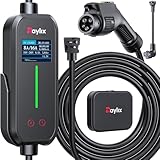
- [2026 INTELLIGENT CHARGING UPGRADE — PRECISION CONTROL MEETS SMART SCHEDULING] After surveying 100K+ U.S. EV owners, the Raylix R&D team found that nearly all drivers recognized the necessity of adjustable current and scheduled charging. Our upgraded J1772 charger features 4-level adjustable current (8A/10A/12A/16A) and a 1–12 hour smart delay timer. Whether you're charging overnight or during off-peak hours, enjoy smarter energy use, lower costs, and total convenience—on your schedule.
- [ONE CHARGER, ALL J1772 EVs/PHEVs READY!] Compatible with all SAE J1772 electric vehicles and plug-in hybrids—whether it’s Ford, GM, Nissan, Audi, BMW, Kia, Hyundai, Honda, Chevy, or more. Perfect for home or on-the-road charging, our 16A Level 1 & 2 charger ensures your EV is always powered and ready for any journey.
- [CHARGE 4× FASTER — NO MORE WAITING] In a rush? Our 16A Level 1 & 2 charger delivers charging speeds up to 4× faster than standard 8A Charger Level 1. Whether it's an early commute, a spontaneous trip, or last-minute errands, your EV will be ready when you are.
- [LEVEL 1 & 2 PORTABLE CHARGER — CHARGE ANYWHERE, ANYTIME] Designed for maximum flexibility, Raylix Level 1 & 2 EV charger features both 5-15 and 6-20 plug compatibility. Whether you're charging in your garage, at a friend's house, or at a roadside motel. NEMA 6-20 plug for Level 2 ev charging (240V, 16A, 3.68kW, 9-12 miles/hr) and a NEMA 5-15 adapter for Level 1 ev charging (120V, 12A, 1.44kW, 3-5 miles/hr) NOTE: In compliance with North American electrical safety standards, the charger automatically limits current to 12A when using a 5-15 outlet—protecting both your vehicle and your home’s electrical system.
- [AT-A-GLANCE CHARGING COMMAND: TOTAL CONTROL, INSTANTLY] While most ev chargers solutions confine vital data to in-car screens, the Raylix tesla charger breaks free with its enhanced TFT color display. This Raylix-exclusive feature delivers crystal-clear, real-time updates—voltage, current, power load, AND critical charging temperature—directly on the unit. Just one glance gives you complete charging insight. It’s not just information; it's the empowering peace of mind and satisfying control that transforms every charge into a masterfully managed experience.

- [Up to 9x Faster Charging Speed]: Provides up to 46 miles/hour charging speed via hardwired connection (48 amp - up to 9x faster than a standard wall outlet) or up to 38 miles/hour via the NEMA 14-50 plug (40 amp). Professional installation recommended for optimal safety and performance. [Install The Power Outlet Cord]: No smaller than 8AWG if charge 40-48A, we suggest 6AWG cord.(1.The input side is belongs to the electrician electric automobile regulation scope, need to use three 6AWG cable wires for 48A; 2.The charging cable belongs to the automotive connector certification standard, so the 8AWG cable can meet the 48A.)
- [DESIGNED WITH J1772 Connector for All North America j1772 Connector EVs/PHEVs. Not fits for Tesla/Nacs Connector Cars(j1772 to Tesla adapter needed)]: Compatible with Tesla cars (Adapter needed, not included), Ford, GM, Audi, Kia, Honda, Kia, Hyundai, Gmc, Chevrolet Bolt, VW ID 4, Nissan Leaf, Ford Mustang Mach-E, IONIQ 5 2024 and before, BMW i3, i4, iX, Jeep Wrangler 4xe, etc. [Not fits for Nac connector cars-Kia EV6 2025/EV9,Ariya 2025&2025 loniq 5(J1772 to Tesla adapter needed)]
- [Safety & Faster Charging with ETL, FCC, Energy Star Certified]: Meets the Safety Criteria Defined by: SAE J1772, UL2231-1/-2, UL 991, UL 2231, UL 2251, UL1998 and UL 2594. (ETL and FCC certified EV car charger with 3-year Warranty)
- [Plug-play Mode(The Default Setting), Smart Touch Screen, No APP Needed]: Clearly show the charging amperage, charging speed, input voltage, delay time, etc. For the touch buttons: 1. Pull out the charging gun before press the buttons, otherwise no respond; 2. Long press "Ⓐ" or "Time" button to enter the setting interface, then you can adjust the amperage from 16A to 48A freely or Set the charging start time; 3. You can do "factory reset" if doesn't charging.
- [Smart WIFI APP, You can Set the Charging Period]: By APP, you can wirelessly check the charging cost, history, fully-charged notification, track the charging status, during off-peak period, etc. [Wi-Fi Reset/Factory Reset Function, Add New Device Quickly]: If you can't find your device or you have replaced a new phone, just pull out the charging latches, simultaneously long press the Ⓐ button and time adjustment button on the product screen until it shows "Factory Reset", then wait 3-5 seconds and re-start your device.


- WORKS WITH EVERY NON-TESLA EV: Standard J1772 connector plugs straight into Ford, Chevrolet, Hyundai, Kia, Nissan, BMW, Volkswagen, Audi, Rivian, Lucid and every other EV or plug-in hybrid sold with a J1772 port - no adapter needed. Tesla drivers can charge too, using the J1772 adapter that comes with the car. The extra-long 25 ft cable easily reaches across a garage or driveway.
- HARDWIRED - PROFESSIONAL INSTALL: This Level 2 charger is hardwired (not plug-in), so a licensed electrician installs it per National Electrical Code. It delivers up to 48A on a dedicated 60A, 240V circuit - enough to charge most EVs fully overnight. Want more speed? You can set DIP switches 4 and 5 to unlock 50A on a dedicated 70A circuit. Before ordering, check your car's port type and that your electrical panel can support the circuit.
- CONTROL FROM YOUR PHONE: A stronger built-in antenna keeps the charger online even in a garage or basement. Use the free app to start and stop charging, set the charging speed (6-48A), get reminders, and track how much energy and money each charge uses. Requires a 2.4 GHz home WiFi network.
- SAFETY-CERTIFIED & WEATHERPROOF: Independently tested and certified (UL, ETL, FCC, Energy Star). A fully sealed IP66 / NEMA 4 housing stands up to rain, snow, heat and dust indoors or out, and internal steel shielding protects the electronics for years of reliable use.
- GLOW-IN-THE-DARK HOLSTER: The included high-visibility holster glows in the dark so you can find and dock the plug easily at night. Holds the connector securely when not in use.
SEOCONTENT-START
OMB Control No.: 2127-0004 Part 573 Safety Recall Report 22V-887 The information contained in this report was submitted pursuant to 49 CFR §573 Manufacturer Name : Proterra Operating Company, Inc. Submission Date : NOV 30, 2022 NHTSA Recall No. : 22V-887 Manufacturer Recall No. : TBD Manufacturer Information : Manufacturer Name : Proterra Operating Company, Inc. Address : 1815 Rollins Road Burlingame CA 94010 Company phone : 4380000 Population : Number of potentially involved : 19 Estimated percentage with defect : 85 % Vehicle Information : Vehicle 1 : 2017-2019 Proterra Catalyst and Roadrunner Vehicle Type : BUSES, MEDIUM & HEAVY VEHICLES Body Style : OTHER Power Train : HYBRID ELECTRIC Descriptive Information : Vehicles within the recall population have reported a fault code and other data that signals there may be liquid inside one or more 400V battery packs (the “Battery Pack”) onboard these vehicles. Over time, the accumulation of liquid inside the Battery Pack enclosure may reach a level that could result in the occurrence of a thermal event. The recall population was determined by reviewing fleet-wide telemetry data to identify a fault code and other data that signals there may be liquid inside one or more Battery Packs onboard a vehicle. Battery Packs which exhibit a fault code and other data indicating that there may be liquid inside the Battery Pack enclosure are included in the recall population. Battery Packs which do not exhibit such a fault code and other data indicators of the presence of liquid are not included in the recall population. Nineteen vehicles are in the recall population. The root cause of the defect is not currently known. Once the recalled Battery Packs are returned to Proterra, Proterra will physically inspect and analyze each recalled Battery Pack to determine if liquid is present inside the Battery Pack and the root cause of the issue. Production Dates : OCT 02, 2017 – DEC 31, 2019 VIN Range 1 : Begin : NR End : NR Not sequential Description of Defect : Description of the Defect : Vehicles within the recall population have one or more Battery Packs that may allow liquid to leak into and accumulate in the Battery Pack enclosure. FMVSS 1 : NR Part 573 Safety Recall Report 22V-887 Page 2 The information contained in this report was submitted pursuant to 49 CFR §573 FMVSS 2 : NR Description of the Safety Risk : Over time, the accumulation of liquid inside a Battery Pack enclosure may reach a level that could result in the occurrence of a thermal event, which may cause personal injury or property damage. Description of the Cause : The root cause of the defect is not currently known. Once the subject batteries are returned to Proterra, Proterra will physically inspect and analyze each Battery Pack to determine if liquid is present inside the Battery Pack and the root cause of the issue. Identification of Any Warning that can Occur : A malfunction indicator lamp in the driver’s display will light up when a battery fault is detected. Involved Components : Component Name 1 : Proterra Battery Pack Component Description : Battery Pack Component Part Number : 022300, 033464, 046575 Supplier Identification : Component Manufacturer Name : NR Address : NR NR Country : NR Chronology : On November 9, 2022, a Battery Pack installed on a Proterra vehicle experienced a thermal event. After an initial investigation of this incident, Proterra believes that the thermal event was caused by the presence of liquid inside the Battery Pack enclosure based on fault codes on the vehicle and other data indicators. Proterra reviewed and analyzed its fleet-wide telemetry data to identify any Battery Packs with fault codes and other data indicators that may indicate that there is liquid inside the Battery Pack enclosure, which over time may accumulate and present the risk of a thermal event. Proterra identified 28 Battery Packs in nineteen vehicles (less than 1% of the fleet-wide Battery Packs) with a fault code and other data that signals there may be liquid inside one or more Battery Packs on the vehicles. Based on Proterra’s investigation, on November 22, 2022, Proterra’s Safety Committee voted to recall the nineteen vehicles with one or more of these Battery Packs to allow Proterra to physically inspect and analyze Part 573 Safety Recall Report 22V-887 Page 3 The information contained in this report was submitted pursuant to 49 CFR §573 each Battery Pack to determine if liquid is present in the Battery Packs and determine the root cause of the fault code and other data indicators that signal there may be liquid inside one or more Battery Packs. As of November 30, 2022, Proterra has received no warranty claims and no other field or service reports related to this issue; Proterra knows of no injuries related to this issue. Description of Remedy : Description of Remedy Program : Until Proterra is able to remove the Battery Packs from the vehicles in the recall population and perform a physical inspection, the root cause of the defect and remedy are unknown. How Remedy Component Differs from Recalled Component : The remedied Battery Pack will not allow liquid to leak into and accumulate in the Battery Pack enclosure. Identify How/When Recall Condition was Corrected in Production : The root cause of the defect is not currently known. Proterra will supplement its response to this question once the root cause has been determined. Recall Schedule : Description of Recall Schedule : Proterra will notify affected owners about this recall on or before January 29, 2023. Planned Dealer Notification Date : NR – NR Planned Owner Notification Date : JAN 01, 2023 – JAN 29, 2023 * NR – Not Reported
**************************************************************************************************************
INTERIM LETTER IMPORTANT SAFETY RECALL NHTSA Recall Number: 22V-887 This notice applies to vehicles with the following vehicle VIN numbers: (Insert VIN or VINs)December 16, 2022 Dear Proterra Transit Bus Owner: This notice is sent to you in accordance with the requirements of the National Traffic and Motor Vehicle Safety Act. What is the reason for this notice? Proterra has decided that a defect that relates to motor vehicle safety exists in certain 2017-2019 Catalyst Transit Buses. Vehicles within the recall population have reported a fault code and other data that signals there may be liquid inside one or more 400V battery packs (the “Battery Pack”) onboard these vehicles. Over time, the accumulation of liquid inside a Battery Pack enclosure may reach a level that could result in a fire. Why is your vehicle being recalled? The recall population was determined by reviewing fleet-wide telemetry data to identify a fault code and other data that signals there may be liquid inside one or more Battery Packs onboard a vehicle. Your vehicle was identified through this method. Proterra will need to physically inspect the Battery Packs subject to this recall to see if liquid is in fact present inside the Battery Pack and determine the root cause of the issue. Based upon the results of Proterra’s physical inspection of the Battery Pack, Proterra will provide the appropriate remedy at no cost to you. We apologize for the inconvenience. We are committed to your safety, the safety of your customers, and your continued satisfaction with our products, and we will work with you to promptly remedy the recalled vehicles. IMPORTANT •Your Proterra vehicle is subject to NHTSA Safety Recall No. 22V-887 because it has reporteda fault code and other data that signals there may be liquid inside one or more Battery Packsonboard the vehicle. Over time, the accumulation of liquid inside a Battery Pack enclosuremay reach a level that could result in the occurrence of a thermal event. •Proterra is investigating the issue in order to develop a remedy. Additional instructions willbe provided after the remedy has been developed. •This remedy will be provided free of charge. •Contact Proterra’s customer service department at 864-438-0000 [email protected] if you have any questions. What will Proterra Do? Proterra is investigating this matter in order to develop a remedy. Proterra will contact you to make arrangements to remove the subject Battery Pack(s) from the vehicle and to physically inspect them. A second notification letter with additional instructions will be issued when the remedy becomes available. What Should You Do? Until a remedy has been provided by Proterra, please park the vehicle outside in a safe location and refrain from further use of the vehicle, including but not limited to driving the vehicle or charging the vehicle’s batteries. Contact your Proterra Transit field service representative at 864-438-0000 or [email protected] if you have any questions regarding these instructions. What If You Have Already Repaired the Defect? If you have previously paid for a repair that addresses the defect described in this letter, you still need to ensure the correct parts and procedures were used. However, you may be eligible for a reimbursement of the previous repair. Please contact Proterra’s customer service team at 864-438-0000 or [email protected] to verify eligibility and process your reimbursement request. What If You Have Other Questions? Please contact Proterra’s customer service department at 864-438-0000 or [email protected] with any questions or concerns about this notice. If, after contacting Proterra’s customer service department, you are still not satisfied we have done our best to remedy this condition without charge and within a reasonable time, you may wish to write the Administrator, National Highway Traffic Safety Administration, 1200 New Jersey Avenue, SE, Washington, DC 20590, or call the toll-free Vehicle Safety Hotline at 1.888.327.4236 (TTY 1.800.424.9153), or go to http://www.safercar.gov. The National Highway Traffic Safety Administration Campaign ID Number for this recall is 22V-887. Federal regulation requires that any vehicle lessor receiving this recall notice must forward a copy of this notice to the lessee within ten days. VP of Transit Continuous Improvement and Quality Proterra Operating Company, Inc.
**************************************************************************************************************
1 | Page Headquarters: East Coast Manufacturing: West Coast Manufacturing: ORIGINAL CREATION DATE: 08/30/2023 REVISION DATE: 09/11/2023 SUBJECT: 400V E2Ver2 Body and ESM Software Update RATIONALE: Updates to vehicle response when certain fault codes associated with battery pack liquid accumulation and/or a thermal event are detected. VINs or MODELS AFFECTED: Service Specified Buses COMPLETE BY: Earliest Service Opportunity SERVICE CAMPAIGN #: SC-23-127 NHTSA RECALL NUMBER: 22V887 REMEDY KIT NAME / NUMBER: 065661 ESTIMATED LABOR TIME: .75 LABOR OP CODE: HB50V NOTICE! It is expected that this process may require up to ¾ Hour per bus. Please schedule appropriately to minimize vehicle downtime. 400V E2Ver2 Body and ESM Software Update Retrofit Description: This software update enables the following features when certain fault codes associated with Battery Pack liquid accumulation and/or a thermal event are detected. (1) prevent the vehicles Battery Pack from being charged, (2) engage a “limp mode” that imposes limitation on the Battery Pack regen and power discharge levels, and (3) trigger a flashing red warning light on the driver’s dash display and an audible alarm (collectively, the “Updated Software Features”). 2 | Page Headquarters: 1815 Rollins Road, Burlingame, CA 94010 East Coast Manufacturing: 1 Whitlee Court, Greenville, SC 29607 West Coast Manufacturing: 383 Cheryl Lane, City of Industry, CA 91789 For additional details regarding the Updated Software Features including but not limited to recommended owner/bus driver actions in response to the Updated Software Features warnings, please refer to the enclosed Proterra EV Battery Fire Safety Guide. If you have questions about the procedures specified in this bulletin for performing the Software Update for this safety recall campaign, please contact Proterra directly for clarification at: Proterra Customer Service Team 864-438-0000 [email protected] Reporting Work Completion: PROTERRA REPORTING REQUIREMENT: The provided form MUST BE COMPLETED for each vehicle undergoing this procedure. Perform the Body and ESM Software Recall procedure before reporting work completion. Please collect all relevant data regarding the repair as specified on the Verification Form and report all work completion to Proterra using the PROTERRA – 400V E2Ver2 Body and ESM Software Recall (provided in this bulletin and as a separate document) promptly upon completion of the work. NOTICE: Customers performing this recall campaign must also submit the Proterra Warranty Form provided in this bulletin and as a separate document for any labor costs incurred. 3 | Page Headquarters: 1815 Rollins Road, Burlingame, CA 94010 East Coast Manufacturing: 1 Whitlee Court, Greenville, SC 29607 West Coast Manufacturing: 383 Cheryl Lane, City of Industry, CA 91789 Tools/Parts Required: Tools and Supplies Required: T-30 Torx Driver Customer Service Laptop With Proterra Diagnostic Tool Nexiq USB Link2 Device Kit Parts Required: 065661 Service Retrofit Kit, BATTERY DIAGNOSTICS ENHANCEMENT, 400V E2 Ver1 Tachograph Odometer 065621 SOFTWARE, BODY CONTROLLER 400V ZR32A, V60.09X05 Firmware 065749 SOFTWARE, E2 ESM, v3.0.2 4 | Page Headquarters: 1815 Rollins Road, Burlingame, CA 94010 East Coast Manufacturing: 1 Whitlee Court, Greenville, SC 29607 West Coast Manufacturing: 383 Cheryl Lane, City of Industry, CA 91789 Procedure: . 1. Turn ON the 12/24V rear Vehicle Master Disconnect located behind the vehicle curbside rear charge port access panel. 2. Turn ON the bus Master Run Switch at the Driver’s Workplace and ensure the Dash screen is ON to display “KEY ON”. a. This places the vehicle into Key On / Low Voltage state for controller versions to be checked prior to software flash. 3. Using a T30 Torx screwdriver or appropriate tools, remove the two access covers. a. Street side wheel well electronics cabinet (ECAB) panel for access to the OBDII Port b. Rear deck access panel for OBDII Diagnostic port (NOTE: on E2-35 foot buses this is located behind the rear barn doors on the left hand side). 4. Power up (boot) the Proterra-supplied laptop containing the Proterra Diagnostic Tool. 5. Connect the Nexiq USB Link2 device to the laptop and to the appropriate OBDII Diagnostic Port. 5 | Page Headquarters: 1815 Rollins Road, Burlingame, CA 94010 East Coast Manufacturing: 1 Whitlee Court, Greenville, SC 29607 West Coast Manufacturing: 383 Cheryl Lane, City of Industry, CA 91789 6. For example, here is the Nexiq USB Link connected to the Diagnostic Port located on the street side wheel well electronics cabinet (eCab). 7. On the laptop, double-click on the Proterra Diagnostics Tool software icon to start the software. 8. When the program opens, read and click OK for the prompt. 9. On the Home tab, select the appropriate device from the drop down and click “Connect”. 10. Once the diagnostic tool has connected to the vehicle, you will have a VIN number and connection status displayed on the home screen, and tabs available to navigate. 6 | Page Headquarters: 1815 Rollins Road, Burlingame, CA 94010 East Coast Manufacturing: 1 Whitlee Court, Greenville, SC 29607 West Coast Manufacturing: 383 Cheryl Lane, City of Industry, CA 91789 Update Body Controller Software This procedure updates the Body Controller software version and maintains the body controller parameter configuration data across the flash download of new software. 11. Ensure you have the latest software file “CatalystBody_60_09x05_PN065621” in a known location on the service technician’s computer (Folder or Desktop). IMPORTANT! NEVER access the software from a remote server or from a USB memory device, ALWAYS copy the software files to your computer hard drive and access the software from this location. 12. Turn ON the 12/24V rear Vehicle Master Disconnect located behind the vehicle curbside rear upper access panel 13. Turn OFF the bus Master Switch at the Driver’s Workplace and ensure the Dash screen is OFF. 14. Turn ON the bus “programming switch” inside the street side wheel well box. 15. After connecting to the vehicle using the Proterra Diagnostic tool at the front OBDII Port (SSWW Ecab), navigate to the Configuration Tab. 16. Wait at least 10 seconds after starting the tool, then click the “Get Parameters” button at the top of the page. 7 | Page Headquarters: 1815 Rollins Road, Burlingame, CA 94010 East Coast Manufacturing: 1 Whitlee Court, Greenville, SC 29607 West Coast Manufacturing: 383 Cheryl Lane, City of Industry, CA 91789 a. NOTE: This ensures that we have a backup copy of the original configuration parameters stored in a “zip” file, contained in the C:/Logs folder on your computer in case you have to refer to it later. 17. Now we are ready to click the Body Firmware “Start Flash” Button. 18. The following screen will be displayed. Navigate to the location where you stored the configuration file earlier. Select the software file downloaded previously and click “Open” to load the file. Note: The file name displayed should be “CatalystBody_60_09x05_PN065621”. Beside Body Beside Body Firmware, Click Firmware, Click Start FlashStart Flash 8 | Page Headquarters: 1815 Rollins Road, Burlingame, CA 94010 East Coast Manufacturing: 1 Whitlee Court, Greenville, SC 29607 West Coast Manufacturing: 383 Cheryl Lane, City of Industry, CA 91789 19. The Proterra Diagnostic Tool will connect to the device, and the following screens are displayed. 9 | Page Headquarters: 1815 Rollins Road, Burlingame, CA 94010 East Coast Manufacturing: 1 Whitlee Court, Greenville, SC 29607 West Coast Manufacturing: 383 Cheryl Lane, City of Industry, CA 91789 20. The software update will take several minutes to complete. When the update is complete the following screen will be displayed. Click the “Finish” button to complete the update process. 21. Turn off the vehicle at the rear master switch. Update the Charge Controller Software for Customer Vehicles (using Proterra Diagnostic Tool): The purpose of this procedure is to update the Charge Controller software version using the Proterra Diagnostics Tool. Access the following file to obtain the new configuration file: On ServiceMax Campaign file attachments. “esm-production_Catalyst_E2_Bootloader_20230925_1609.srec” 22. Copy the software file esm-production_Catalyst_E2_Bootloader_20230925_1609.srec to a known location on the service technician’s computer (Folder or Desktop a. IMPORTANT! NEVER access the software from the USB memory device, ALWAYS copy the software files to your computer hard drive and access the software from this location. 23. Turn ON the 12/24V rear Master Disconnect located behind the vehicle curbside rear upper access panel. 24. Turn OFF the bus High-Voltage Master Switch at the Driver’s Workplace and ensure the Dash screen is OFF. 25. Turn ON the bus “programming switch” inside the street side wheel well box. 26. Power up (boot) the Proterra-supplied laptop containing the Proterra Diagnostic Tool. Connect the Nexiq USB Link to the laptop. Note: Using a USB cable connection, rather than Wi-Fi is required. 1 0| Page Headquarters: 1815 Rollins Road, Burlingame, CA 94010 East Coast Manufacturing: 1 Whitlee Court, Greenville, SC 29607 West Coast Manufacturing: 383 Cheryl Lane, City of Industry, CA 91789 27. On the laptop, double-click on the Proterra Diagnostics Tool software icon to start the software. 28. On the Proterra Diagnostics screen, select “USB-LINK 2” in the drop-down box then click the “Connect Button”. 29. The Home screen will open. Click on the “Configuration Button” to open the Configuration screen and then click the Battery Master Controller “Start Flash” Button 1 1| Page Headquarters: 1815 Rollins Road, Burlingame, CA 94010 East Coast Manufacturing: 1 Whitlee Court, Greenville, SC 29607 West Coast Manufacturing: 383 Cheryl Lane, City of Industry, CA 91789 30. The following screen will be displayed. Navigate to the location where you stored the configuration file earlier. Select the file and click “Open” to load the file. . 31. The Proterra Diagnostic Tool will attempt to connect to the device. NOTE: You may receive an error on the first attempt. If so, retry by clicking the Battery Master Controller Start Flash button again. 32. When the software update begins, and the following screens will be displayed. 1 2| Page Headquarters: 1815 Rollins Road, Burlingame, CA 94010 East Coast Manufacturing: 1 Whitlee Court, Greenville, SC 29607 West Coast Manufacturing: 383 Cheryl Lane, City of Industry, CA 91789 33. The software update may take several minutes to complete. When the update is complete the following screen will be displayed. Click the “OK” button to complete the update process. 34. The software update is now complete. 35. Remove all flashing equipment and return vehicle to service. 1 | P a g e SEPTEMBER 2023 Proterra EV Battery Fire Safety Guide Thermal Event Diagnostics, Prevention & Response LEGAL DISCLAIMER PLEASE READ This document provides general guidance to the owner/customer (“Owner”) to develop its own safe work procedures related to Proterra’s electric vehicle and electric vehicle battery pack (individually and collectively, the “Product”). Any reference to standards, regulations or laws is not exhaustive, nor intended to advise the Owner of its legal duties or compliance obligations. This document is not based on a specific Product configuration. Proterra assumes that all who purchase the Product have expertise to properly and safely receive, handle, store, use, and service the Product. Accordingly, this document is intended as a helpful supplement for the Owner and not a substitute for the Owner’s expertise or responsibility regarding these topics. If any Owner lacks such expertise or does not agree to the foregoing limited purpose, such Owner should immediately notify Proterra in writing and should not procure, take delivery of, or use the Product. This document is provided “as is,” and Proterra assumes no liability or responsibility for any loss, damage or expense resulting from the Owner’s, or any agent or affiliate of the Owner’s, reliance upon, or use of, this document. Proterra makes no warranty or representation, and expressly disclaims any such warranties or representations, that the content of this document is complete, accurate, reliable or error free, to the fullest extent permitted by applicable law. Each Owner assumes the entire risk as to its reliance upon, or use of, this document. Proterra is not responsible to update the content of this document at any time, including based on changes, combinations, or conversions of the Product. 2 | P a g e SEPTEMBER 2023 1 FIRE-SAFETY GUIDELINES FOR AN EV BATTERY a) In the event there is a battery fire, immediately stop operating or working in/around the vehicle. All individuals should move at least twenty feet away from the vehicle. b) Immediately call the local emergency number (e.g., “911”) to report the battery fire and ask for assistance from fire, police, and medical departments. See First Responder Guide below. c) It requires specialized training and personal protective equipment (“PPE”) to safely extinguish a battery fire. The Owner should establish a site-specific safety plan related to EV vehicles and all on-site first responders should be trained to execute the safety plan. The safety-plan should take the following factors into consideration: i) A battery fire may require application of large amounts of water to the battery pack for a long period of time from a safe distance to extinguish a battery fire. Do not: • Stand close to the vehicle while attempting to extinguish a battery fire. • Attempt to open a battery pack for purposes of cooling it with water. • Attempt to extinguish a battery fire with a small, limited quantity of water. • Use an “ABC” rated fire extinguisher to put out a battery fire. ii) Always wear the appropriate PPE, including full body covering fire-fighting clothing and self-contained breathing apparatus. Hot metals may be ejected from the battery during a fire, and materials contained inside the battery pack are flammable, corrosive, and should not be inhaled or allowed to contact the eyes or skin. iii) The battery pack may vent hot gases composed of volatile organic compounds such as alkyl-carbonates, methane, ethylene, and ethane, as well as hydrogen gas, carbon dioxide, carbon monoxide, soot, and particulates containing oxides of nickel, aluminum, lithium, copper, and cobalt. Vented gas temperatures may exceed 600°C. The gases may cause burns upon contact. The gases may ignite unexpectedly creating a fire or explosion. iv) Battery pack fires may require up to 24 hours to extinguish. It may be necessary to allow the battery pack to burn while protecting structures or other objects in the vicinity. When all smoke and fire has visibly subsided and cleared, a thermal imaging camera should be used to actively measure the temperature of the high voltage battery and monitor temperature trends — i.e., is the battery consistently cooling down over time, or is it heating up again? v) The battery pack must be completely cooled and there must not be fire, smoke, or heat present in the high voltage battery for at least one hour before the vehicle can be released to second responders (such as vehicle transporters). Second responders must be advised that 3 | P a g e SEPTEMBER 2023 there is a risk of battery pack re-ignition. Damaged high voltage lithium ion batteries require special transportation measures, and therefore are prohibited from regular transportation. vi) Do not contact any high voltage components and always use insulated tools during overhaul. vii) A battery fire may damage the vehicle’s airbag inflators, stored gas inflation cylinders, gas struts, and other components which can result in an unexpected explosion. A full “knock down” procedure should be performed. d) First Aid Measures i) Electric Shock/Electrocution: Seek immediate medical attention (suspected or confirmed); call 911. ii) Contact with Leaked Material (Electrolyte, Coolant): The contents of an open or broken constituent battery cell may cause skin irritation and/or chemical burns. In the event of contact, immediately flush skin with water and wash affected area with soap/water. Seek immediate medical attention if a burn or other irritation does not resolve. For eye contact, immediately flush with a significant amount of water for at least 15 minutes without rubbing and seek immediate medical attention; call 911. iii) Vapor or Gas Inhalation (Electrolyte Vapor, Vent Gas): Immediately move to fresh air source. If not breathing, perform artificial respiration and call 911. 4 | P a g e SEPTEMBER 2023 2 FIRST RESPONDER GUIDE Information for first responders to respond to a battery fire involving an electric vehicle can be found at the National Fire Protection Association website: https://www.nfpa.org/Training-and-Events/By-topic/Alternative-Fuel-Vehicle-Safety-Training/Emergency-Response-Guides/Proterra A sample of the information for first responders located at this website is shown below for reference. First responders may also contact Proterra at [email protected] if they have any questions. 5 | P a g e SEPTEMBER 2023 3 BACKGROUND 3.1 THERMAL EVENT VS. THERMAL RUNAWAY. Each Proterra battery consists of multiple battery cells. Proterra’s diagnostic system is set up to detect a battery “thermal event” where a single battery cell fails in a manner that may cause an unintended chemical reaction to occur inside the cell. The battery pack is designed to contain a single battery cell “thermal event” and prevent a “thermal runaway” (or fire) that involves neighboring battery cells. A “thermal runaway” may occur if other abnormal conditions exist such that the single cell “thermal event” is not contained (e.g., physical impact that causes significant damage to the battery pack). A “thermal runaway” is detectable by smoke, a burning smell, a flame, and other indications of a fire. If there are any signs that the battery pack may be experiencing a “thermal runaway,” or fire (e.g. smoke, a burning smell, abnormal popping or whistling noises, a flame, etc.), then you must immediately discontinue use of the vehicle and follow the emergency guidelines outlined in the above Fire-Safety Guidelines for an EV Battery. 3.2 DIAGNOSTICS, DRIVER NOTIFICATION & VEHICLE RESPONSE Proterra vehicles have battery sensors and diagnostics used to detect signals related to temperature, humidity, internal pack air pressure and isolation. If an abnormal battery condition is detected, Proterra’s diagnostic system will transmit a message on the vehicle CAN bus. This information will be communicated to the driver via the vehicle dash as described below. Critical battery faults which indicate the potential for a thermal event will result in a Fast Flash Red Stop Lamp in the vehicle dash that blinks at a rate of two times per second, and an audible alarm that pulses twice per second (collectively, the “Critical Battery Fault Warnings”). Critical Battery Fault Warnings indicate a critical battery failure which could result in a thermal event. When the Critical Battery Fault Warnings are active, please immediately follow the procedures set forth in the Operator/Driver Guidelines section below, as well as the instructions in any applicable sections of the Proterra Driver’s manual. For any other types of driver’s dash display warning lights (including but not limited to solid, non-flashing red or yellow “warning” lights) and/or audible alarms, please refer to the vehicle owner’s manual for an explanation of these warnings and recommended actions. Figure 1 below shows the Red Stop Lamp as presented on the original Proterra dash. Figure 2 below shows the Red Stop Lamp as presented on the updated Proterra digital dash. 6 | P a g e SEPTEMBER 2023 Figure 1 – Red Stop Lamp on Original Dash Figure 2 – Red Stop Lamp on Digital Dash 7 | P a g e SEPTEMBER 2023 OWNERS SHOULD ALWAYS MONITOR AND RESPOND TO DASH FAULT LIGHTS AS PART OF THE VEHICLE OPERATION AND MAINTENANCE ROUTINE. OWNERS MUST PERFORM FOLLOW-UP INVESTIGATION WHEN DASH FAULT LIGHTS PRESENT. DO NOT IGNORE A DASH FAULT LIGHT. In addition to the Critical Battery Fault Warnings, a critical battery fault will prevent the vehicle from charging and cause the vehicle to immediately enter a “limp home” state where the propulsion system is limited to 50 kW. The “limp home” state will provide enough power to launch the vehicle and maintain 35 mph on a flat road with an unloaded bus. In addition to the Critical Battery Fault Warnings, the Owner’s service technicians should be trained by Proterra in use of Proterra’s diagnostic tool to identify and detect abnormal battery conditions (see https://www.proterra.com/proterra-diagnostics-tool/ to download the tool and access training material). The Owner’s consistent and routine use of the Proterra diagnostic tool is recommended to identify and monitor issues that may require further investigation. 8 | P a g e SEPTEMBER 2023 4 OPERATOR/DRIVER GUIDELINES Prior to operating the vehicle, the driver must perform all recommended safety checks set forth in the Proterra Driver’s Manual. This inspection includes, but is not limited to, a visual inspection for signs of damage/malfunction and confirmation that the fault lights in the dashboard display are not illuminated. If there are any signs of fire prior to operation or while the vehicle is in use (e.g., smoke, a burning smell, abnormal popping or whistling noises, a flame, etc.), the driver must immediately stop the vehicle in a safe location and evacuate all passengers in accordance with the emergency guidelines in Fire-Safety Guidelines for an EV Battery (Section 1). Note — the vehicle may be in a “limp home” state with limited propulsion as described above. If the Critical Battery Fault Warnings are active as described in Section 3.2 (but there is no smoke, burning smell, abnormal popping or whistling noises, flame, etc.), the vehicle should be promptly parked in a safe outdoor location at least 20 feet away from other objects such as buildings, trees and other vehicles, and at least 100 feet away from highly flammable items such as gas stations or propane tanks. Once the vehicle has been moved to a safe location, the operator and passengers may exit the vehicle and the vehicle should be removed from service. The vehicle high voltage system may be left in either state; on or turned off. However, DO NOT open the 12/24 Master Disconnect Switch or Battery Saver Switch (if equipped). Keeping these switches closed will allow the battery coolant pumps to operate as intended to mitigate heat buildup as well as providing power to telemetry systems for remote data review. Next Steps • Call the Proterra Regional Field Service Representative (FSR) as soon as possible to report the issue. Proterra will respond within 2 hours (Mon- Fri between 6 am-6pm ET) or by 9 AM ET the following business day. • DO NOT attempt to charge the vehicle. • Continue to monitor the vehicle for signs that there could be a thermal runaway (smoke, burning smell, abnormal popping or whistling noises, flame, etc.). • DO NOT operate or work on the vehicle until Proterra’s service personnel have had the opportunity to assess the situation and the parties have an agreed action plan. If there are any signs of a fire (e.g., smoke, a burning smell, abnormal popping or whistling noises, a flame, etc.), follow the emergency guidelines outlined in Fire-Safety Guidelines for an EV Battery (Section 1). 5 MONITORING BATTERIES WITH DIAGNOSTIC TOOL The Proterra Diagnostic Tool (the “Diagnostic Tool”) enables customers to monitor the humidity and isolation levels of a battery pack that may indicate a critical battery safety condition. These metrics are used by the software systems described above. As part of a customer’s routine maintenance program, the Diagnostic Tool should be used every three months to monitor the humidity and internal isolation levels of each battery pack as described below. If a vehicle has been turned off for three months or 9 | P a g e SEPTEMBER 2023 more, the customer must use the Diagnostic Tool to check each battery pack prior to starting, operating or charging the vehicle. Steps to Use Diagnostic Tool to Check Humidity and Internal Isolation of Battery Packs Step 1: Connect the Diagnostic tool to a vehicle diagnostic port that has BCAN access. NOTE: The diagnostic port location varies based on the vintage of the vehicle. Step 2: View the “Battery Thermal” screen on the left-hand side. Example: Step 3: View the humidity level of each module per battery pack; the pack ID is located on the graphic of the A-Bay. If the module humidity levels are less than 70%, the battery pack check is complete. If there is one or more module(s) that exceeds 70% humidity, you must proceed to the next step. Example: S1P1, S1P2, S2P1 and S2P2 as shown below. NOTE: your screen and Pack ID may look different based on the vintage of vehicle. 10 | P a g e SEPTEMBER 2023 Step 4: (i) View the “Battery Packs” screen (see the “Battery Thermal” screen on the left-hand side below); and (ii) select the Pack ID of any battery pack(s) with a humidity level that exceeds 70% (see the pull-down menu in the upper right-hand corner below). Example: If S2P2 has humidity of 70%, select “String 2 Pack 2” in the pull-down window. 11 | P a g e SEPTEMBER 2023 Step 5: With the relevant Pack ID selected in the pulldown menu, the internal isolation value should be recorded. Step 6: If either of the following conditions are met, proceed to Step 7 below. a. Condition 1: • Humidity greater than 90% b. Condition 2: • Humidity greater than 70% AND • Internal Isolation less than 20,000 Kohms If neither of these conditions are met, no issue has been found with respect to the recorded battery pack(s) humidity and internal isolation levels, and the battery pack check is complete. Step 7: If Condition 1 or 2 are present: The vehicle should be promptly parked in a safe outdoor location at least 20 feet away from other objects such as buildings, trees and other vehicles, and at least 100 feet away from highly flammable items such as gas stations or propane tanks. Once the vehicle has been moved to a safe location, the operator and passengers may exit the vehicle and the vehicle should be removed from service. The vehicle high voltage system may be left in either state; on or turned off. However, DO NOT open the 12/24 Master Disconnect Switch or Battery Saver Switch (if equipped). Keeping these switches closed will allow the battery coolant pumps to operate as intended to mitigate heat buildup as well as providing power to telemetry systems for remote data review. 12 | P a g e SEPTEMBER 2023 • Call the Proterra Regional Field Service Representative (FSR) as soon as possible to report the issue. Proterra will respond within 2 hours (Mon- Fri between 6 am-6pm ET) or by 9 AM ET the following business day. • DO NOT attempt to charge the vehicle. • Continue to monitor the vehicle for signs that there could be a thermal runaway (smoke, burning smell, abnormal popping or whistling noises, flame, etc.). • DO NOT operate or work on the vehicle until Proterra’s service personnel have had the opportunity to assess the situation and the parties have an agreed action plan. If there are any signs of a fire (e.g., smoke, a burning smell, abnormal popping or whistling noises, a flame, etc.), follow the emergency guidelines outlined in Fire-Safety Guidelines for an EV Battery (Section 1). Completion Verification: In signing this form, the signatory verifies that the Software Update has been completed and appropriate personnel at the transit agency have read and understand the Proterra EV BatteryFire Safety Guide provided with the Software Update service bulletin. Print Name: _________________________________________ Signature: __________________________________________ REQUIRED: When this Verification Form has been completed, send to: Perry Bolick (Proterra Field Service)1 Whitlee Court, Greenville, SC [email protected] (864) 243-7572 Include in the email Subject line: 22V887 CompletionProterra – 400V E2Ver2 Body and ESM Software Update (Service Campaign SC-23-127) NHTSA ID: 22V887 IMPORTANT! This form MUST BE COMPLETED for each vehicle retrofitted. (One (1) Claim Form per Vehicle) Transit Agency: _______________________ Date Claim Completed: _________________ Fleet Number: _________________________ VIN Number: __________________________ Vehicle Mileage: ________________________ Vehicle In-Service Date: ________________
**************************************************************************************************************
1 | Page Headquarters: East Coast Manufacturing: West Coast Manufacturing: ORIGINAL CREATION DATE: 08/30/2023 REVISION DATE: 09/11/2023 SUBJECT: 400V E2Ver1 Body and ESM Software Update RATIONALE: Updates to vehicle response when certain fault codes associated with battery pack liquid accumulation and/or a thermal event are detected. VINs or MODELS AFFECTED: Service Specified Buses COMPLETE BY: Earliest Service Opportunity SERVICE CAMPAIGN #: SC-23-126 NHTSA RECALL NUMBER: 22V887 REMEDY KIT NAME / NUMBER: 065660 ESTIMATED LABOR TIME: .75 LABOR OP CODE: HB49V NOTICE! It is expected that this process may require up to ¾ Hour per bus. Please schedule appropriately to minimize vehicle downtime. 400V E2Ver1 Body and ESM Software Update Retrofit Description: This software update enables the following features when certain fault codes associated with Battery Pack liquid accumulation and/or a thermal event are detected. (1) prevent the vehicles Battery Pack from being charged, (2) engage a “limp mode” that imposes limitation on the Battery Pack regen and power discharge levels, and (3) trigger a flashing red warning light on the driver’s dash display and an audible alarm (collectively, the “Updated Software Features”). 2 | Page Headquarters: 1815 Rollins Road, Burlingame, CA 94010 East Coast Manufacturing: 1 Whitlee Court, Greenville, SC 29607 West Coast Manufacturing: 383 Cheryl Lane, City of Industry, CA 91789 For additional details regarding the Updated Software Features including but not limited to recommended owner/bus driver actions in response to the Updated Software Features warnings, please refer to the enclosed Proterra EV Battery Fire Safety Guide. If you have questions about the procedures specified in this bulletin for performing the Software Update for this safety recall campaign, please contact Proterra directly for clarification at: Proterra Customer Service Team 864-438-0000 [email protected] Reporting Work Completion: PROTERRA REPORTING REQUIREMENT: The provided form MUST BE COMPLETED for each vehicle undergoing this procedure. Perform the Body and ESM Software Recall procedure before reporting work completion. Please collect all relevant data regarding the repair as specified on the Verification Form and report all work completion to Proterra using the 400V E2Ver1 Body and ESM Software Recall FORM (provided in this bulletin and as a separate document) promptly upon completion of the work. NOTICE: Customers performing this recall campaign must also submit the Proterra Warranty Form provided in this bulletin and as a separate document for any labor costs incurred. 3 | Page Headquarters: 1815 Rollins Road, Burlingame, CA 94010 East Coast Manufacturing: 1 Whitlee Court, Greenville, SC 29607 West Coast Manufacturing: 383 Cheryl Lane, City of Industry, CA 91789 Tools/Parts Required: Tools and Supplies Required: T-30 Torx Driver Customer Service Laptop With Proterra Diagnostic Tool Nexiq USB Link2 Device Kit Parts Required: 065660 Service Retrofit Kit, BATTERY DIAGNOSTICS ENHANCEMENT, 400V E2 Ver1 Tachograph Odometer 065620 SOFTWARE, BODY CONTROLLER 400V ZR32A, V40.33X04 Firmware 065749 SOFTWARE, E2 ESM, v3.0.2 4 | Page Headquarters: 1815 Rollins Road, Burlingame, CA 94010 East Coast Manufacturing: 1 Whitlee Court, Greenville, SC 29607 West Coast Manufacturing: 383 Cheryl Lane, City of Industry, CA 91789 Procedure: . 1. Turn ON the 12/24V rear Vehicle Master Disconnect located behind the vehicle curbside rear charge port access panel. 2. Turn ON the bus Master Run Switch at the Driver’s Workplace and ensure the Dash screen is ON to display “KEY ON”. a. This places the vehicle into Key On / Low Voltage state for controller versions to be checked prior to software flash. 3. Using a T30 Torx screwdriver or appropriate tools, remove the two access covers. a. Street side wheel well electronics cabinet (ECAB) panel for access to the OBDII Port b. Rear deck access panel for OBDII Diagnostic port (NOTE: on E2-35 foot buses this is located behind the rear barn doors on the left hand side). 4. Power up (boot) the Proterra-supplied laptop containing the Proterra Diagnostic Tool. 5. Connect the Nexiq USB Link2 device to the laptop and to the appropriate OBDII Diagnostic Port. 5 | Page Headquarters: 1815 Rollins Road, Burlingame, CA 94010 East Coast Manufacturing: 1 Whitlee Court, Greenville, SC 29607 West Coast Manufacturing: 383 Cheryl Lane, City of Industry, CA 91789 6. For example, here is the Nexiq USB Link connected to the Diagnostic Port located on the street side wheel well electronics cabinet (eCab). 7. On the laptop, double-click on the Proterra Diagnostics Tool software icon to start the software. 8. When the program opens, read and click OK for the prompt. 9. On the Home tab, select the appropriate device from the drop down and click “Connect”. 10. Once the diagnostic tool has connected to the vehicle, you will have a VIN number and connection status displayed on the home screen, and tabs available to navigate. 6 | Page Headquarters: 1815 Rollins Road, Burlingame, CA 94010 East Coast Manufacturing: 1 Whitlee Court, Greenville, SC 29607 West Coast Manufacturing: 383 Cheryl Lane, City of Industry, CA 91789 Update Body Controller Software This procedure updates the Body Controller software version and maintains the body controller parameter configuration data across the flash download of new software. 11. Ensure you have the latest software file “SOFTWARE, BODY CONTROLLER 400V ZR32A, V40.33X04 Firmware” in a known location on the service technician’s computer (Folder or Desktop). IMPORTANT! NEVER access the software from a remote server or from a USB memory device, ALWAYS copy the software files to your computer hard drive and access the software from this location. 12. Turn ON the 12/24V rear Vehicle Master Disconnect located behind the vehicle curbside rear upper access panel 13. Turn OFF the bus Master Switch at the Driver’s Workplace and ensure the Dash screen is OFF. 14. Turn ON the bus “programming switch” inside the street side wheel well box. 15. After connecting to the vehicle using the Proterra Diagnostic tool at the front OBDII Port (SSWW Ecab), navigate to the Configuration Tab. 16. Wait at least 10 seconds after starting the tool, then click the “Get Parameters” button at the top of the page. 7 | Page Headquarters: 1815 Rollins Road, Burlingame, CA 94010 East Coast Manufacturing: 1 Whitlee Court, Greenville, SC 29607 West Coast Manufacturing: 383 Cheryl Lane, City of Industry, CA 91789 a. NOTE: This ensures that we have a backup copy of the original configuration parameters stored in a “zip” file, contained in the C:/Logs folder on your computer in case you have to refer to it later. 17. Now we are ready to click the Body Firmware “Start Flash” Button. 18. The following screen will be displayed. Navigate to the location where you stored the configuration file earlier. Select the software file downloaded previously and click “Open” to load the file. Note: The file name displayed should be “CatalystBody_40_33x04_PN065620”. Beside Body Beside Body Firmware, Click Firmware, Click Start FlashStart Flash 8 | Page Headquarters: 1815 Rollins Road, Burlingame, CA 94010 East Coast Manufacturing: 1 Whitlee Court, Greenville, SC 29607 West Coast Manufacturing: 383 Cheryl Lane, City of Industry, CA 91789 19. The Proterra Diagnostic Tool will connect to the device, and the following screens are displayed. 9 | Page Headquarters: 1815 Rollins Road, Burlingame, CA 94010 East Coast Manufacturing: 1 Whitlee Court, Greenville, SC 29607 West Coast Manufacturing: 383 Cheryl Lane, City of Industry, CA 91789 20. The software update will take several minutes to complete. When the update is complete the following screen will be displayed. Click the “Finish” button to complete the update process. 21. Turn off the vehicle at the rear master switch. Update the Charge Controller Software for Customer Vehicles (using Proterra Diagnostic Tool): The purpose of this procedure is to update the Charge Controller software version using the Proterra Diagnostics Tool. Access the following file to obtain the new configuration file: On ServiceMax Campaign file attachments. “esm-production_Catalyst_E2_Bootloader_20230925_1609” 22. Copy the software file esm-production_Catalyst_E2_Bootloader_20230925_1609 to a known location on the service technician’s computer (Folder or Desktop a. IMPORTANT! NEVER access the software from the USB memory device, ALWAYS copy the software files to your computer hard drive and access the software from this location. 23. Turn ON the 12/24V rear Master Disconnect located behind the vehicle curbside rear upper access panel. 24. Turn OFF the bus High-Voltage Master Switch at the Driver’s Workplace and ensure the Dash screen is OFF. 25. Turn ON the bus “programming switch” inside the street side wheel well box. 26. Power up (boot) the Proterra-supplied laptop containing the Proterra Diagnostic Tool. Connect the Nexiq USB Link to the laptop. Note: Using a USB cable connection, rather than Wi-Fi is required. 1 0| Page Headquarters: 1815 Rollins Road, Burlingame, CA 94010 East Coast Manufacturing: 1 Whitlee Court, Greenville, SC 29607 West Coast Manufacturing: 383 Cheryl Lane, City of Industry, CA 91789 27. On the laptop, double-click on the Proterra Diagnostics Tool software icon to start the software. 28. On the Proterra Diagnostics screen, select “USB-LINK 2” in the drop-down box then click the “Connect Button”. 29. The Home screen will open. Click on the “Configuration Button” to open the Configuration screen and then click the Battery Master Controller “Start Flash” Button 1 1| Page Headquarters: 1815 Rollins Road, Burlingame, CA 94010 East Coast Manufacturing: 1 Whitlee Court, Greenville, SC 29607 West Coast Manufacturing: 383 Cheryl Lane, City of Industry, CA 91789 30. The following screen will be displayed. Navigate to the location where you stored the configuration file earlier. Select the file and click “Open” to load the file. . 31. The Proterra Diagnostic Tool will attempt to connect to the device. NOTE: You may receive an error on the first attempt. If so, retry by clicking the Battery Master Controller Start Flash button again. 32. When the software update begins, and the following screens will be displayed. 1 2| Page Headquarters: 1815 Rollins Road, Burlingame, CA 94010 East Coast Manufacturing: 1 Whitlee Court, Greenville, SC 29607 West Coast Manufacturing: 383 Cheryl Lane, City of Industry, CA 91789 33. The software update may take several minutes to complete. When the update is complete the following screen will be displayed. Click the “OK” button to complete the update process. 34. The software update is now complete. 35. Remove all flashing equipment and return vehicle to service. 1 | P a g e SEPTEMBER 2023 Proterra EV Battery Fire Safety Guide Thermal Event Diagnostics, Prevention & Response LEGAL DISCLAIMER PLEASE READ This document provides general guidance to the owner/customer (“Owner”) to develop its own safe work procedures related to Proterra’s electric vehicle and electric vehicle battery pack (individually and collectively, the “Product”). Any reference to standards, regulations or laws is not exhaustive, nor intended to advise the Owner of its legal duties or compliance obligations. This document is not based on a specific Product configuration. Proterra assumes that all who purchase the Product have expertise to properly and safely receive, handle, store, use, and service the Product. Accordingly, this document is intended as a helpful supplement for the Owner and not a substitute for the Owner’s expertise or responsibility regarding these topics. If any Owner lacks such expertise or does not agree to the foregoing limited purpose, such Owner should immediately notify Proterra in writing and should not procure, take delivery of, or use the Product. This document is provided “as is,” and Proterra assumes no liability or responsibility for any loss, damage or expense resulting from the Owner’s, or any agent or affiliate of the Owner’s, reliance upon, or use of, this document. Proterra makes no warranty or representation, and expressly disclaims any such warranties or representations, that the content of this document is complete, accurate, reliable or error free, to the fullest extent permitted by applicable law. Each Owner assumes the entire risk as to its reliance upon, or use of, this document. Proterra is not responsible to update the content of this document at any time, including based on changes, combinations, or conversions of the Product. 2 | P a g e SEPTEMBER 2023 1 FIRE-SAFETY GUIDELINES FOR AN EV BATTERY a) In the event there is a battery fire, immediately stop operating or working in/around the vehicle. All individuals should move at least twenty feet away from the vehicle. b) Immediately call the local emergency number (e.g., “911”) to report the battery fire and ask for assistance from fire, police, and medical departments. See First Responder Guide below. c) It requires specialized training and personal protective equipment (“PPE”) to safely extinguish a battery fire. The Owner should establish a site-specific safety plan related to EV vehicles and all on-site first responders should be trained to execute the safety plan. The safety-plan should take the following factors into consideration: i) A battery fire may require application of large amounts of water to the battery pack for a long period of time from a safe distance to extinguish a battery fire. Do not: • Stand close to the vehicle while attempting to extinguish a battery fire. • Attempt to open a battery pack for purposes of cooling it with water. • Attempt to extinguish a battery fire with a small, limited quantity of water. • Use an “ABC” rated fire extinguisher to put out a battery fire. ii) Always wear the appropriate PPE, including full body covering fire-fighting clothing and selfcontained breathing apparatus. Hot metals may be ejected from the battery during a fire, and materials contained inside the battery pack are flammable, corrosive, and should not be inhaled or allowed to contact the eyes or skin. iii) The battery pack may vent hot gases composed of volatile organic compounds such as alkylcarbonates, methane, ethylene, and ethane, as well as hydrogen gas, carbon dioxide, carbon monoxide, soot, and particulates containing oxides of nickel, aluminum, lithium, copper, and cobalt. Vented gas temperatures may exceed 600°C. The gases may cause burns upon contact. The gases may ignite unexpectedly creating a fire or explosion. iv) Battery pack fires may require up to 24 hours to extinguish. It may be necessary to allow the battery pack to burn while protecting structures or other objects in the vicinity. When all smoke and fire has visibly subsided and cleared, a thermal imaging camera should be used to actively measure the temperature of the high voltage battery and monitor temperature trends — i.e., is the battery consistently cooling down over time, or is it heating up again? v) The battery pack must be completely cooled and there must not be fire, smoke, or heat present in the high voltage battery for at least one hour before the vehicle can be released to second responders (such as vehicle transporters). Second responders must be advised that 3 | P a g e SEPTEMBER 2023 there is a risk of battery pack re-ignition. Damaged high voltage lithium ion batteries require special transportation measures, and therefore are prohibited from regular transportation. vi) Do not contact any high voltage components and always use insulated tools during overhaul. vii) A battery fire may damage the vehicle’s airbag inflators, stored gas inflation cylinders, gas struts, and other components which can result in an unexpected explosion. A full “knock down” procedure should be performed. d) First Aid Measures i) Electric Shock/Electrocution: Seek immediate medical attention (suspected or confirmed); call 911. ii) Contact with Leaked Material (Electrolyte, Coolant): The contents of an open or broken constituent battery cell may cause skin irritation and/or chemical burns. In the event of contact, immediately flush skin with water and wash affected area with soap/water. Seek immediate medical attention if a burn or other irritation does not resolve. For eye contact, immediately flush with a significant amount of water for at least 15 minutes without rubbing and seek immediate medical attention; call 911. iii) Vapor or Gas Inhalation (Electrolyte Vapor, Vent Gas): Immediately move to fresh air source. If not breathing, perform artificial respiration and call 911. 4 | P a g e SEPTEMBER 2023 2 FIRST RESPONDER GUIDE Information for first responders to respond to a battery fire involving an electric vehicle can be found at the National Fire Protection Association website: https://www.nfpa.org/Training-and-Events/By-topic/Alternative-Fuel-Vehicle-Safety- Training/Emergency-Response-Guides/Proterra A sample of the information for first responders located at this website is shown below for reference. First responders may also contact Proterra at [email protected] if they have any questions. 5 | P a g e SEPTEMBER 2023 3 BACKGROUND 3.1 THERMAL EVENT VS. THERMAL RUNAWAY. Each Proterra battery consists of multiple battery cells. Proterra’s diagnostic system is set up to detect a battery “thermal event” where a single battery cell fails in a manner that may cause an unintended chemical reaction to occur inside the cell. The battery pack is designed to contain a single battery cell “thermal event” and prevent a “thermal runaway” (or fire) that involves neighboring battery cells. A “thermal runaway” may occur if other abnormal conditions exist such that the single cell “thermal event” is not contained (e.g., physical impact that causes significant damage to the battery pack). A “thermal runaway” is detectable by smoke, a burning smell, a flame, and other indications of a fire. If there are any signs that the battery pack may be experiencing a “thermal runaway,” or fire (e.g. smoke, a burning smell, abnormal popping or whistling noises, a flame, etc.), then you must immediately discontinue use of the vehicle and follow the emergency guidelines outlined in the above Fire-Safety Guidelines for an EV Battery. 3.2 DIAGNOSTICS, DRIVER NOTIFICATION & VEHICLE RESPONSE Proterra vehicles have battery sensors and diagnostics used to detect signals related to temperature, humidity, internal pack air pressure and isolation. If an abnormal battery condition is detected, Proterra’s diagnostic system will transmit a message on the vehicle CAN bus. This information will be communicated to the driver via the vehicle dash as described below. Critical battery faults which indicate the potential for a thermal event will result in a Fast Flash Red Stop Lamp in the vehicle dash that blinks at a rate of two times per second, and an audible alarm that pulses twice per second (collectively, the “Critical Battery Fault Warnings”). Critical Battery Fault Warnings indicate a critical battery failure which could result in a thermal event. When the Critical Battery Fault Warnings are active, please immediately follow the procedures set forth in the Operator/Driver Guidelines section below, as well as the instructions in any applicable sections of the Proterra Driver’s manual. For any other types of driver’s dash display warning lights (including but not limited to solid, non-flashing red or yellow “warning” lights) and/or audible alarms, please refer to the vehicle owner’s manual for an explanation of these warnings and recommended actions. Figure 1 below shows the Red Stop Lamp as presented on the original Proterra dash. Figure 2 below shows the Red Stop Lamp as presented on the updated Proterra digital dash. 6 | P a g e SEPTEMBER 2023 Figure 1 – Red Stop Lamp on Original Dash Figure 2 – Red Stop Lamp on Digital Dash 7 | P a g e SEPTEMBER 2023 OWNERS SHOULD ALWAYS MONITOR AND RESPOND TO DASH FAULT LIGHTS AS PART OF THE VEHICLE OPERATION AND MAINTENANCE ROUTINE. OWNERS MUST PERFORM FOLLOW-UP INVESTIGATION WHEN DASH FAULT LIGHTS PRESENT. DO NOT IGNORE A DASH FAULT LIGHT. In addition to the Critical Battery Fault Warnings, a critical battery fault will prevent the vehicle from charging and cause the vehicle to immediately enter a “limp home” state where the propulsion system is limited to 50 kW. The “limp home” state will provide enough power to launch the vehicle and maintain 35 mph on a flat road with an unloaded bus. In addition to the Critical Battery Fault Warnings, the Owner’s service technicians should be trained by Proterra in use of Proterra’s diagnostic tool to identify and detect abnormal battery conditions (see https://www.proterra.com/proterra-diagnosticstool/ to download the tool and access training material). The Owner’s consistent and routine use of the Proterra diagnostic tool is recommended to identify and monitor issues that may require further investigation. 8 | P a g e SEPTEMBER 2023 4 OPERATOR/DRIVER GUIDELINES Prior to operating the vehicle, the driver must perform all recommended safety checks set forth in the Proterra Driver’s Manual. This inspection includes, but is not limited to, a visual inspection for signs of damage/malfunction and confirmation that the fault lights in the dashboard display are not illuminated. If there are any signs of fire prior to operation or while the vehicle is in use (e.g., smoke, a burning smell, abnormal popping or whistling noises, a flame, etc.), the driver must immediately stop the vehicle in a safe location and evacuate all passengers in accordance with the emergency guidelines in Fire-Safety Guidelines for an EV Battery (Section 1). Note — the vehicle may be in a “limp home” state with limited propulsion as described above. If the Critical Battery Fault Warnings are active as described in Section 3.2 (but there is no smoke, burning smell, abnormal popping or whistling noises, flame, etc.), the vehicle should be promptly parked in a safe outdoor location at least 20 feet away from other objects such as buildings, trees and other vehicles, and at least 100 feet away from highly flammable items such as gas stations or propane tanks. Once the vehicle has been moved to a safe location, the operator and passengers may exit the vehicle and the vehicle should be removed from service. The vehicle high voltage system may be left in either state; on or turned off. However, DO NOT open the 12/24 Master Disconnect Switch or Battery Saver Switch (if equipped). Keeping these switches closed will allow the battery coolant pumps to operate as intended to mitigate heat buildup as well as providing power to telemetry systems for remote data review. Next Steps • Call the Proterra Regional Field Service Representative (FSR) as soon as possible to report the issue. Proterra will respond within 2 hours (Mon- Fri between 6 am-6pm ET) or by 9 AM ET the following business day. • DO NOT attempt to charge the vehicle. • Continue to monitor the vehicle for signs that there could be a thermal runaway (smoke, burning smell, abnormal popping or whistling noises, flame, etc.). • DO NOT operate or work on the vehicle until Proterra’s service personnel have had the opportunity to assess the situation and the parties have an agreed action plan. If there are any signs of a fire (e.g., smoke, a burning smell, abnormal popping or whistling noises, a flame, etc.), follow the emergency guidelines outlined in Fire-Safety Guidelines for an EV Battery (Section 1). 5 MONITORING BATTERIES WITH DIAGNOSTIC TOOL The Proterra Diagnostic Tool (the “Diagnostic Tool”) enables customers to monitor the humidity and isolation levels of a battery pack that may indicate a critical battery safety condition. These metrics are used by the software systems described above. As part of a customer’s routine maintenance program, the Diagnostic Tool should be used every three months to monitor the humidity and internal isolation levels of each battery pack as described below. If a vehicle has been turned off for three months or 9 | P a g e SEPTEMBER 2023 more, the customer must use the Diagnostic Tool to check each battery pack prior to starting, operating or charging the vehicle. Steps to Use Diagnostic Tool to Check Humidity and Internal Isolation of Battery Packs Step 1: Connect the Diagnostic tool to a vehicle diagnostic port that has BCAN access. NOTE: The diagnostic port location varies based on the vintage of the vehicle. Step 2: View the “Battery Thermal” screen on the left-hand side. Example: Step 3: View the humidity level of each module per battery pack; the pack ID is located on the graphic of the A-Bay. If the module humidity levels are less than 70%, the battery pack check is complete. If there is one or more module(s) that exceeds 70% humidity, you must proceed to the next step. Example: S1P1, S1P2, S2P1 and S2P2 as shown below. NOTE: your screen and Pack ID may look different based on the vintage of vehicle. 10 | P a g e SEPTEMBER 2023 Step 4: (i) View the “Battery Packs” screen (see the “Battery Thermal” screen on the left-hand side below); and (ii) select the Pack ID of any battery pack(s) with a humidity level that exceeds 70% (see the pull-down menu in the upper right-hand corner below). Example: If S2P2 has humidity of 70%, select “String 2 Pack 2” in the pull-down window. 11 | P a g e SEPTEMBER 2023 Step 5: With the relevant Pack ID selected in the pulldown menu, the internal isolation value should be recorded. Step 6: If either of the following conditions are met, proceed to Step 7 below. a. Condition 1: • Humidity greater than 90% b. Condition 2: • Humidity greater than 70% AND • Internal Isolation less than 20,000 Kohms If neither of these conditions are met, no issue has been found with respect to the recorded battery pack(s) humidity and internal isolation levels, and the battery pack check is complete. Step 7: If Condition 1 or 2 are present: The vehicle should be promptly parked in a safe outdoor location at least 20 feet away from other objects such as buildings, trees and other vehicles, and at least 100 feet away from highly flammable items such as gas stations or propane tanks. Once the vehicle has been moved to a safe location, the operator and passengers may exit the vehicle and the vehicle should be removed from service. The vehicle high voltage system may be left in either state; on or turned off. However, DO NOT open the 12/24 Master Disconnect Switch or Battery Saver Switch (if equipped). Keeping these switches closed will allow the battery coolant pumps to operate as intended to mitigate heat buildup as well as providing power to telemetry systems for remote data review. 12 | P a g e SEPTEMBER 2023 • Call the Proterra Regional Field Service Representative (FSR) as soon as possible to report the issue. Proterra will respond within 2 hours (Mon- Fri between 6 am-6pm ET) or by 9 AM ET the following business day. • DO NOT attempt to charge the vehicle. • Continue to monitor the vehicle for signs that there could be a thermal runaway (smoke, burning smell, abnormal popping or whistling noises, flame, etc.). • DO NOT operate or work on the vehicle until Proterra’s service personnel have had the opportunity to assess the situation and the parties have an agreed action plan. If there are any signs of a fire (e.g., smoke, a burning smell, abnormal popping or whistling noises, a flame, etc.), follow the emergency guidelines outlined in Fire-Safety Guidelines for an EV Battery (Section 1). 13| Page Headquarters: East Coast Manufacturing: West Coast Manufacturing: Completion Verification: In signing this form, the signatory verifies that the Software Update has been completed and appropriate personnel at the transit agency have read and understand the Proterra EV BatteryFire Safety Guide provided with the Software Update service bulletin. Print Name: _________________________________________ Signature: __________________________________________ REQUIRED: When this Verification Form has been completed, send to: Perry Bolick (Proterra Field Service)1 Whitlee Court, Greenville, SC [email protected] (864) 243-7572 Include in the email Subject line: 22V887 CompletionProterra – 400V E2Ver1 Body and ESM Software Update (Service Campaign SC-23-126) NHTSA ID: 22V887 IMPORTANT! This form MUST BE COMPLETED for each vehicle retrofitted. (One (1) Claim Form per Vehicle) Transit Agency: _______________________ Date Claim Completed: _________________ Fleet Number: _________________________ VIN Number: __________________________ Vehicle Mileage: ________________________ Vehicle In-Service Date: ________________
**************************************************************************************************************
OMB Control No.: 2127-0004 Part 573 Safety Recall Report 22V-887 The information contained in this report was submitted pursuant to 49 CFR §573 Manufacturer Name : Proterra Operating Company, Inc. Submission Date : OCT 18, 2023 NHTSA Recall No. : 22V-887 Manufacturer Recall No. : TBD Manufacturer Information : Manufacturer Name : Proterra Operating Company, Inc. Address : 1815 Rollins Road Burlingame CA 94010 Company phone : 4380000 Population : Number of potentially involved : 300 Estimated percentage with defect : 13 % Vehicle Information : Vehicle 1 : 2017-2019 Proterra Catalyst Vehicle Type : BUSES, MEDIUM & HEAVY VEHICLES Body Style : OTHER Power Train : HYBRID ELECTRIC Descriptive Information : Vehicles within the recall population are equipped with certain battery packs manufactured between 2017-2019 with spines from the suppliers identified in this report. Each vehicle is equipped with software (the “Software”) and sensors that detect if there is an accumulation of liquid inside the battery pack enclosure. When liquid accumulation inside the battery pack enclosure is detected, the Software will turn on a warning light in the driver’s dash display and provide fault code information through the vehicle diagnostics tool. The recall population was determined by reviewing production records, vehicle telemetry data, battery pack fault code data, and physically inspecting battery packs returned to Proterra to identify which battery packs have an accumulation of liquid inside the battery pack enclosure. A total of 300 vehicles are in the recall population. Production Dates : OCT 02, 2017 – DEC 31, 2019 VIN Range 1 : Begin : NR End : NR Not sequential Part 573 Safety Recall Report 22V-887 Page 2 The information contained in this report was submitted pursuant to 49 CFR §573 Description of Defect : Description of the Defect : The spine of a battery pack in the recalled vehicle may have a defect which allows liquid coolant to slowly seep out of the spine and accumulate in the battery pack enclosure. Over time, if left unaddressed, the accumulation of liquid inside the battery pack enclosure may reach a level that could result in the occurrence of a thermal event. FMVSS 1 : NR FMVSS 2 : NR Description of the Safety Risk : Over time, the accumulation of liquid inside a battery pack enclosure may reach a level that could result in the occurrence of a thermal event, which may cause personal injury or property damage. Description of the Cause : The spine of a battery pack in the recall population may have a defect which allows liquid coolant to slowly seep out of the spine and accumulate in the battery pack enclosure. Identification of Any Warning that can Occur : The Software will turn on a warning light in the driver’s dash display and provide fault code information retrievable through the vehicle diagnostics tool when liquid accumulation is detected in a battery pack. Depending upon the amount of liquid present, liquid may also be observed in or around the battery pack enclosure, such as in the desiccant bags or ports of the battery pack. Involved Components : Component Name 1 : Battery Spine Component Description : Battery Spine Component Part Number : 22328 Supplier Identification : Component Manufacturer Name : Sigma Machine Address : 3358 Center Park Plaza Kalamazoo Michigan 49048 Country : United States Chronology : On November 9, 2022, a battery pack installed on a Proterra vehicle experienced a thermal event. After Part 573 Safety Recall Report 22V-887 Page 3 The information contained in this report was submitted pursuant to 49 CFR §573 conducting its investigation of this incident, Proterra believes that the thermal event was caused by the accumulation of liquid coolant inside the battery pack enclosure over the course of several years due to the spine defect described in this report. The liquid accumulation was detected by the battery pack sensors and the Software triggered the driver’s dash display warning light and generated the corresponding fault codes. Nevertheless, the thermal event occurred when the battery pack was operated without first addressing the liquid accumulation that was present. There were no injuries as a result of this incident. On November 22, 2022, Proterra’s Safety Committee voted to initiate this recall and investigate the root cause of the issue. Between late November 2022 and October 2023, Proterra conducted its investigation, identified root cause of the incident, and devised an effective remedy. Proterra’s investigation included physical inspection of the returned battery packs and the associated fault codes generated by the Software. Prior to the initiation of this recall, Proterra received 15 warranty claims and the same number of field or service reports related to this recall. Other than the November 9, 2022 event described in the first paragraph of this section, as of October 18, 2023, Proterra has received no reports of any other battery pack experiencing a thermal event. Proterra knows of no injuries caused by or related to the spine defect described in this report. Description of Remedy : Description of Remedy Program : For any vehicle that detects the accumulation of liquid inside the battery pack enclosure due to the spine defect described in this report, Proterra will remove and replace the defective battery pack with a non-defective battery pack at no cost to the owner. Affected owners should immediately discontinue use of a vehicle and contact Proterra for service if there are any indications of liquid accumulation inside the battery pack, including but not limited to the observation of a warning light, diagnostic fault codes, or leaks around the battery pack enclosure. In addition, at no cost to the owner, all vehicles in the recall population will receive an update to the Software that enables the following features when certain fault codes associated with battery pack liquid accumulation and/or a thermal event are detected: (1) prevent the vehicle’s battery pack from being charged, (2) engage a “limp mode” that imposes limitations on the battery pack regen and power discharge levels, and (3) trigger a flashing red warning light on the driver’s dash display and an audible alarm (collectively, the “Updated Software Features”). Once the Updated Software Features are applied, the vehicle will need to be serviced by Proterra before it is returned to normal operating conditions. How Remedy Component Differs from Recalled Component : The remedy battery pack does not have a spine that allows coolant to slowly seep out of the spine and accumulate in the battery pack enclosure. Identify How/When Recall Condition was Corrected in Production : The battery pack spine at issue in this recall was no longer in production at the time this recall was initiated. Part 573 Safety Recall Report 22V-887 Page 4 The information contained in this report was submitted pursuant to 49 CFR §573 Recall Schedule : Description of Recall Schedule : Proterra will notify affected owners about this recall on or before November 14, 2023. Planned Dealer Notification Date : NOV 07, 2023 – NOV 14, 2023 Planned Owner Notification Date : NOV 07, 2023 – NOV 14, 2023 * NR – Not Reported
**************************************************************************************************************
OMB Control No.: 2127-0004 Part 573 Safety Recall Report 22V-887 The information contained in this report was submitted pursuant to 49 CFR §573 Manufacturer Name : Proterra Operating Company, Inc. Submission Date : DEC 23, 2022 NHTSA Recall No. : 22V-887 Manufacturer Recall No. : TBD Manufacturer Information : Manufacturer Name : Proterra Operating Company, Inc. Address : 1815 Rollins Road Burlingame CA 94010 Company phone : 4380000 Population : Number of potentially involved : 18 Estimated percentage with defect : 85 % Vehicle Information : Vehicle 1 : 2017-2019 Proterra Catalyst Vehicle Type : BUSES, MEDIUM & HEAVY VEHICLES Body Style : OTHER Power Train : HYBRID ELECTRIC Descriptive Information : Vehicles within the recall population have reported a fault code and other data that signals there may be liquid inside one or more 400V battery packs (the “Battery Pack”) onboard these vehicles. Over time, the accumulation of liquid inside the Battery Pack enclosure may reach a level that could result in the occurrence of a thermal event. The recall population was determined by reviewing fleet-wide telemetry data to identify a fault code and other data that signals there may be liquid inside one or more Battery Packs onboard a vehicle. Battery Packs which exhibit a fault code and other data indicating that there may be liquid inside the Battery Pack enclosure are included in the recall population. Battery Packs which do not exhibit such a fault code and other data indicators of the presence of liquid are not included in the recall population. Eighteen vehicles are in the recall population. The root cause of the defect is not currently known. Once the recalled Battery Packs are returned to Proterra, Proterra will physically inspect and analyze each recalled Battery Pack to determine if liquid is present inside the Battery Pack and the root cause of the issue. Production Dates : OCT 02, 2017 – DEC 31, 2019 VIN Range 1 : Begin : NR End : NR Not sequential Description of Defect : Description of the Defect : Vehicles within the recall population have one or more Battery Packs that may allow liquid to leak into and accumulate in the Battery Pack enclosure. FMVSS 1 : NR Part 573 Safety Recall Report 22V-887 Page 2 The information contained in this report was submitted pursuant to 49 CFR §573 FMVSS 2 : NR Description of the Safety Risk : Over time, the accumulation of liquid inside a Battery Pack enclosure may reach a level that could result in the occurrence of a thermal event, which may cause personal injury or property damage. Description of the Cause : The root cause of the defect is not currently known. Once the subject batteries are returned to Proterra, Proterra will physically inspect and analyze each Battery Pack to determine if liquid is present inside the Battery Pack and the root cause of the issue. Identification of Any Warning that can Occur : A malfunction indicator lamp in the driver’s display will light up when a battery fault is detected. Involved Components : Component Name 1 : Proterra Battery Pack Component Description : Battery Pack Component Part Number : 022300 Supplier Identification : Component Manufacturer Name : Proterra Operating Company, Inc. Address : 1815 Rollins Road Burlingame California 94010 Country : United States Chronology : On November 9, 2022, a Battery Pack installed on a Proterra vehicle experienced a thermal event. After an initial investigation of this incident, Proterra believes that the thermal event was caused by the presence of liquid inside the Battery Pack enclosure based on fault codes on the vehicle and other data indicators. Proterra reviewed and analyzed its fleet-wide telemetry data to identify any Battery Packs with fault codes and other data indicators that may indicate that there is liquid inside the Battery Pack enclosure, which over time may accumulate and present the risk of a thermal event. Proterra identified 28 Battery Packs in eighteen vehicles (less than 1% of the fleet-wide Battery Packs) with a fault code and other data that signals there may be liquid inside one or more Battery Packs on the vehicles. Based on Proterra’s investigation, on November 22, 2022, Proterra’s Safety Committee voted to recall the eighteen vehicles with one or more of these Battery Packs to allow Proterra to physically inspect and analyze Part 573 Safety Recall Report 22V-887 Page 3 The information contained in this report was submitted pursuant to 49 CFR §573 each Battery Pack to determine if liquid is present in the Battery Packs and determine the root cause of the fault code and other data indicators that signal there may be liquid inside one or more Battery Packs. As of November 30, 2022, Proterra has received no warranty claims and no other field or service reports related to this issue; Proterra knows of no injuries related to this issue. Description of Remedy : Description of Remedy Program : Until Proterra is able to remove the Battery Packs from the vehicles in the recall population and perform a physical inspection, the root cause of the defect and remedy are unknown. How Remedy Component Differs from Recalled Component : The remedied Battery Pack will not allow liquid to leak into and accumulate in the Battery Pack enclosure. Identify How/When Recall Condition was Corrected in Production : The root cause of the defect is not currently known. Proterra will supplement its response to this question once the root cause has been determined. Recall Schedule : Description of Recall Schedule : Proterra will notify affected owners about this recall on or before January 29, 2023. Planned Dealer Notification Date : NR – NR Planned Owner Notification Date : JAN 01, 2023 – JAN 29, 2023 * NR – Not Reported
SEOCONTENT-END
This product presentation was made with AAWP plugin.