
NHTSA ID Number: 10162038
Manufacturer Communication Number: Wb19-11
Summary
On the vehicles affected by this bulletin, the vehicle program might need to be upgraded to prevent batteries drain when ISM (Intelligent Sleep Mode) is enabled.
11 Affected Products
Vehicles
PREVOST | H3-41 | 2019 |
| PREVOST | H3-45 | 2019 |
| PREVOST | H3-VIP | 2019 |
| PREVOST | X3 | 2017-2019 |
| PREVOST | X3-45 COMMUTER | 2018-2019 |
| PREVOST | X3VIP | 2017-2019 |
SEOCONTENT-START
Writer: ML <QF7720952_Rev 9>
First Release O6-19-2019
APPLICATION
NOTICE TO SERVICE CENTERS
Verify vehicle eligibility by checking warranty bulletin status with SAP or via ONLINE WARRANTY SYSTEM available on Service / Warranty tab of Prevost website.
Model VIN
X3-45 VIP commercial
use
Model Year : 2017 – 2019
From 2PCCS3495HC736180 up to 2PCCS3491KC736457 incl.
X3-45 VIP motorhomes
Model Year : 2017 – 2019
From 2PCBS3492HC736181 up to 2PCBS3491KC736437 incl.
X3-45 coaches
Model Year : 2017 – 2019
From 2PCG33490HC736182 up to 2PCG33495KC736461 incl.
and
From 4RKG33491H9737417 up to 4RKG33498K9737633 incl.
X3-45 Commuter
Model Year : 2018 – 2019
From 4RKJ33492J9737485 up to 4RKJ33495K9737546 incl.
and
2PCJ33493JC736317 2PCJ33491KC736432
X3-45 incomplete
Model Year : 2017 – 2019
From 2PCS33491HC736203 up to 2PCS33498KC736416 incl.
H3-41, H3-45 coaches
Model Year : 2019
From 2PCH33493KC710185 up to 2PCH3349XKC720700 incl.
H3-45 VIP motorhomes
Model Year : 2019
From 2PCV33496KC710295 up to 2PCVS3499KC720693 incl.
This bulletin does not necessarily apply to all the above-mentioned vehicles, some vehicles may have been modified before delivery. The owners of the vehicles affected by this bulletin will be advised by a letter indicating the Vehicle Identification Number (VIN) of each vehicle concerned.
DATE : June 2019 SECTION : 06 ELECTRICAL
EXPIRATION: June 2021
SUBJECT : ISM IMPROVEMENT (VEHICLE PROGRAM UPDATE)
WARRANTY
BULLETIN
WB19-11
DESCRIPTION
On the vehicles affected by this bulletin, the vehicle program might need to be upgraded to prevent batteries drain when ISM is enabled.
You need to make an appointment in a Prevost Service Center or contact your Prevost Service representative to have the vehicle program to be upgraded. It requires VPG (Vehicle Program Generator) software.
If you have the equipment required, contact your Prevost Service representative to have the vehicle program last update.
PROCEDURE
DANGER
Park vehicle safely, apply parking brake, stop the engine.
NOTE
If the bulletin is performed by a Prevost Service Center, use computer and VPG software for the program revision number checking and program upgrade.
VERIFICATION OF THE VEHICLE PROGRAM REVISION NUMBER
1. Check the vehicle program revision number with the Driver Information Display (DID) in the dash.
2. Select the Diagnostics menu.
Figure 1
3. Select Part Number menu.
Figure 2
4. Select Electrical System menu.
Figure 3
5. The DID shows the software number (program\ number) and the actual revision number just after the ‘’P’’ letter for the vehicle.
6. Note the program number and the revision number.
NOTE
Be careful, the vehicle program number start with ‘’06’’
Figure 4
7. Table 1 shows the minimum revision number needed, according to the program number.
8. Compare the vehicle program number and revision number shown in the DID with the corresponding numbers in Table 1.
9. If the vehicle has the program revision number shown in Table 1 or a higher number, the bulletin is complete.
10. If you need your vehicle program to be upgraded, move next section of the bulletin.
Table 1
MINIMUM REVISION NUMBER PER VEHICLE
PROGRAM REVISION
06100076 P33
06100110 P23
06100111 P25
06100113 P19
06100122 P10
06100123 P10
06100124 P10
06100173 P04
VEHICLE PROGRAM UPGRADE PROCEDURE
NOTE
Some owners make the vehicle program update by their own, but it is recommended to let a Prevost service center to make the work.
SPECIAL TOOL REQUIRED TO UPGRADE PROGRAM
Use the following components:
PART NO. DESCRIPTION QTY
N/A LAPTOP 1
N/A RS232 SERIAL INTERFACE CABLE 1
N/A VIRTUAL SERIAL PORT ADAPTER USB TO RS232 1
066009 INTERFACE HARNESS DB9 PC/MASTER ID-MU 1
VEHICLE PROGRAM UPDGRADE
11. If a program upgrade on the vehicle is needed, make an appointment in a Prevost Service Center or contact a Prevost Service representative.
12. If you have the special tools required and you want to process the vehicle program upgrade on your own, you will need the vehicle last version program file. Contact your Prevost Service representative to have the vehicle program last update and refer the personal for the procedure shown bulletin SCI19-20, how to send you the file.
13. Connect the 110 power line on the vehicle.
14. Turn the ignition to ‘’ON’’ position.
15. Activate the Hazard flashers.
16. Locate the RS232 serial port into the front service compartment at the right top corner.
Figure 5
17. Remove the cap and keep in a safe place.
18. Connect the computer on the vehicle into the RS232 port.
19. Open the computer management application on your computer.
20. Right click on “My Computer” on the desk and click on Manage menu.
Figure 6
21. Click on ‘Device manager’’.
22. Expand the ports list.
23. Check the COM port number and note the number.
Figure 7
24. Double click on ‘’COM’’ element to open the
properties dialog box.
25. Click on ‘’Port Setting’’ tab.
26. Select 115200 for the Bits per second.
27. Select Hardware for the Row control.
28. Click ‘’OK’’.
Figure 8
29. Make sure you have the vehicle program update, supplied by the Prevost service center, on your computer.
30. Rename the file and remove the last digits ‘’.txt’’. Keep only the extension ‘’.exe’’
NOTE
The name of the file that you received should match with the VIN of the vehicle you are about to update. It should look like this example:
MP_00142546A06.exe.txt. The four numbers before the last letter are the last 4 numbers of the VIN (short VIN).
31. Launch the vehicle program (double click on the file name or right click on the file name and select Open).
32. Select the port number noted before.
33. Click ‘’Continue’’ button.
Figure 9
34. Select the destination of the backup file that will be generated with the update processing.
35. Click on ‘’Continue’’ button.
Figure 10
36. Program processes.
Figure 11
37. Wait until you get the message ‘’TRANSFER COMPLETED’’.
38. Click ‘’Finish’’ button.
Figure 12
39. Disconnect the computer.
40. From the rear electrical compartment, trip circuit breaker CB6 and reset after 5 seconds.
41. The system needs some time to complete the update. Wait until the head lights shut down or until you have access to information on the DID.
42. Check in the DID the Software number (program number) and compare again with the table 1.
NOTE
Be careful, the vehicle program number starts with ‘’06’’
Figure 13
43. Reinstall the RS232 serial port cap.
44. Bulletin is complete.
Figure 14
WARRANTY
This modification is covered by Prevost’s normal warranty. If you make the vehicle program update on your own, we will reimburse you 30 minutes of labor upon receipt of a warranty claim. Please submit claim via our Online Warranty System, available at www.prevostcar.com (under Service \ Warranty section). Use Claim Type: “Bulletin/Recall” and select ‘’Warranty Bulletin. WB19-11 “.
OTHER
VBC Bulletin N/A Access all our Service Bulletins on
https://techpub.prevostcar.com/en/
or scan the QR-Code with your smart phone.
Are you a vehicle owner? E-mail us at
technicalpublications_prev@volvo.com and type “ADD” in the subject to receive warranty bulletins applicable to your vehicle(s) by e-mail.
Fail Code 06.27
Defect Code 49
Syst. Cond B
Causal Part 7770029
WB19-11
06-19-2019
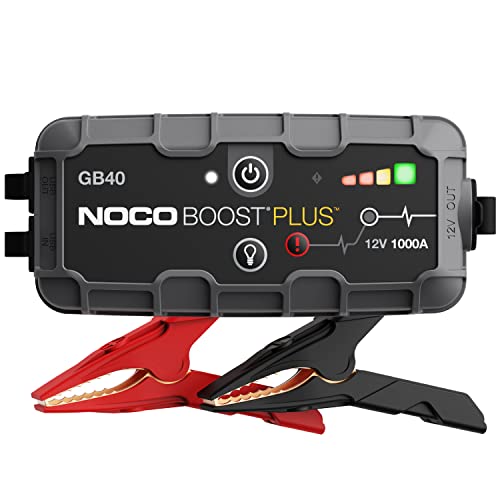
- START DEAD BATTERIES — Instantly start dead batteries with 1000 amps of peak lithium power. Up to 20 starts per charge on engines up to 6.0L gas and 3.0L diesel.
- ULTRASAFE TECHNOLOGY — Engineered with patented spark-proof and reverse polarity protection for foolproof connections to any 12V vehicle - no sparks, no wrong connections.
- PORTABLE POWER BANK — Integrated power bank delivers emergency power to smartphones, tablets, and more. Recharges in 3 hours so it’s ready when it matters most.
- INTEGRATED LED FLASHLIGHT — Precision-engineered 100-lumen LED with 7 light modes, including SOS and strobe. Illuminate repairs, emergencies, or low-light environments.
- COMPACT YET POWERFUL — High-discharge lithium technology delivers exceptional starting performance in a compact 2.5 lb form factor - perfectly sized for glove boxes and emergency kits.


- [Emergency Save Dead Batteries] - Safely, stable and powerful, you can start a dead car battery in seconds, Gehopow jump starter with 6000A peak current for up to 10.0L gasoline or 8.0L diesel, suitable for 12v vehicles like car, suv, truck, van, motorcycle.
- [Waterproof Protection] - We hope users feel 100% safe when using our car battery jump starter. So we design the car jump starter with IP66 waterproof and dustproof, you can use it even in the rainy day.
- [Not Just a Car Tool] - This jump box is equipped with USB output port, can charge for phones, tablets, and other USB devices. Press 3 seconds can start the LED flashlight, with 3 light modes, including lighting, flash and SOS. The red sos light can be used as a emergency light.
- [Humanized and Advanced] - powerful and compact, the size of car jumper starter portable is 7.0*3.5*1.6 inches. Almost the size of a phone and with 1.7pound of weight is easy to carry. Featuring high-discharge lithium technology for safe, stable and efficient operation in any climate.
- [Package include] - A9 car jump starter*1, jumper cables*1, USB Type-C charging Cable*1, user maunel*1, storage case*1. Our after-sales customer service is available at any time. Please contact us for help.

- 【More Powerful Booster】This 5000-Amp peak lithium car battery jump starter battery pack can start a vehicle(10.0L Gas and 9.0L Diesel) in seconds, suitable for car, motorcycle, RV or tractor and so on. Operation Steps: 1.Insent the jumper cable into the booster, the traffic lights of the smart clip will flash alternately. 2.Connect the clamps to your car battery,the green light indicates a successful connection 3.Start your car engine 4.Remove the jumper cable.
- 【Portable Power Supply】With dual USB (5V/2A) output, this car starter battery pack can be used as a power bank to charge smartphone, laptop, and other USB devices.
- 【Multi-Protection】 Sharmeal Jump starter uses design of Integrated Battery and Intelligent Clamps, which is fully insulated and safe enough. 14 types of protection include spark-proof, reverse-polarity protection to protect you from failure problems such as short circuits or sparks.
- 【 800 Lumen Lighting】 Say goodbye to old bulky jump start battery pack! Sharmeal is more lightweight and portable. The battery starter utilizes 800-lumen lighting lasting 48h with 3 modes :Flash Light, Strobe Light, and SOS Light.
- 【 What You Get】Our Brand is specialized in vehicle emergency starter with 24 months warranty. Sharmeal jump pack (1* jump starter, 1* smart jumper cables, 1* type-C charging cable, 1* user manual, 1* portable carrying case). Regarding how to charge this product: to ensure charging performance, it is recommended to use the original charging cable provided with the product for charging.

- START DEAD BATTERIES — Instantly start dead batteries with 2000 amps of peak lithium power. Up to 40 starts per charge on engines up to 8.0L gas and 6.0L diesel.
- ULTRASAFE TECHNOLOGY — Engineered with patented spark-proof and reverse polarity protection for foolproof connections to any 12V vehicle - no sparks, no wrong connections.
- PORTABLE POWER BANK — Integrated power bank delivers emergency power to smartphones, tablets, and more. Recharges in 6 hours so it’s ready when it matters most.
- INTEGRATED LED FLASHLIGHT — Precision-engineered 400-lumen LED with 7 light modes, including SOS and strobe. Illuminate repairs, emergencies, or low-light environments.
- COMPACT YET POWERFUL — High-discharge lithium technology delivers exceptional starting performance in a compact 5.0 lb form factor - perfectly sized for glove boxes and emergency kits.
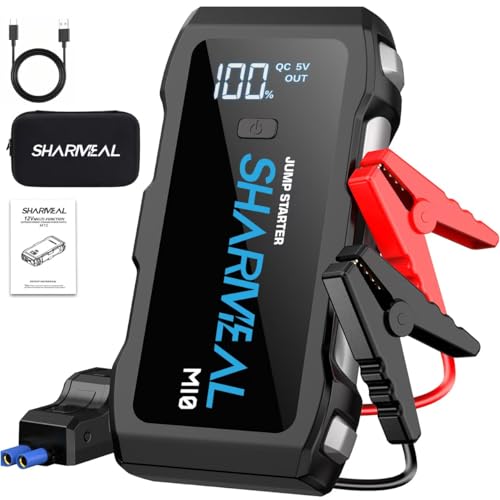
- 【Start Dead Batteries】The Sharmeal car battery jump starter power pack with 6000A peak, safely start the 12V vehicles in seconds with this booster(up to All Gas/10.0L Diesel engines). It is suitable for cars, trucks, motorcycles, etc. Operation Steps: 1. Insent the jumper cable into the booster, the traffic lights of the smart clip will flash alternately. 2. Connect the clamps to your car battery,the green light indicates a successful connection 3. Start your car engine 4. Remove the jumper cable.
- 【Upgraded Jump Starter】The traditional jump starters only have 10 integrated protections. But our car battery jump starter portable has 14 integrated protections including reverse polarity, reverse connection, overcurrent, overvoltage, overload, overcharge, over discharge, short circuit protection, spark resistance, impedance match, shock absorption, low temperature protection, over temperature protection and over-power protection. Ensure your trip is safe and smooth.
- 【Forced Start Button】The Traditional jump starter on the market can't jump the car battery under 9V , but our jump starter can start a car when the voltage is below 9V. Because our smart clamp extra design the "Forced Start Button", when your car battery under 9V, you can press "Forced Start Button", you can continue your journey and wilderness exploration smoothly.
- 【Large Smart Screen】Many traditional jump starters on the market that do not have a display screen, making it difficult to see their operating status, which can be frustrating, But our jump starter have large smart screen, you can clearly to see the battery level and operational status.
- 【Multi-Function】Portable power bank with led flashlight. It's a car battery jump starter, portable power bank, and LED flashlight. Recharge smartphones, tablets, and other USB devices. The jump starter LED work light has three modes: Flashlight, Strobe Light, and SOS Light. Usage Tutorial:Press and hold to illuminate the light, click to flash, click to sos, and press and hold to turn off flashlight.
Last update on 2026-06-26 / Affiliate links / Images from Amazon Product Advertising API
This product presentation was made with AAWP plugin.