
NHTSA ID Number: 10161729
Manufacturer Communication Number: IS-19915
Summary
MP-1000 MULTIMEDIA PLAYER INSTALLATION
61 Affected Products
Vehicles
PREVOST | H3-45 | 2003-2019 |
| PREVOST | H3-45 VIP | 2006-2013 |
| PREVOST | H3-45VIP | 2004-2005 |
| PREVOST | X3 | 2010-2019 |
| PREVOST | X3-45 | 2002-2013 |
| PREVOST | X3-45 VIP | 2008-2013 |
| PREVOST | X3-45 VIP ENTERTAINER | 2008-2013 |
Prevost Technical Publications
SEOCONTENT-START
Writer: <QF7720959 rev 5>
mg
Instruction Sheet IS-19915
MP-1000 MULTIMEDIA PLAYER INSTALLATION
First Release :
06-27-2019
MATERIAL
Order kit # IS19915 which includes the following parts:
Part No.
Description
Qty
901575
MULTIMEDIA PLAYER (MP-1000)
1
901576
CABLE W/P.BUTTON LH DASH BOARD (MED.PLAY)
1
901564
ADAPTOR, RCA MALE TO BNC FEMALE
1
900856
PAIR CABLE RCA MALE TO MALE 3’
1
901347
CABLE BNC 1 FOOT M-M
1
500965
SCR TC BDG PH N500 8-32X1/2
4
563071*
CONN. MOLEX MINI-FIT 4C SH
1
562483*
TERMINAL FEMALE MOLEX (16ga)
2
561689*
SOCKET, TERM.
2
561565*
CABLE SEAL, PED CONN. – GREEN
2
561783*
CAVITY PLUG PED W-PACK GRN
1
562592*
Wire, 16 AWG, TXL, YELW.
3ft
562586*
Wire, 16 AWG, TXL, BLK.
3ft
561782*
CONNECTOR, WEATHER PACK SHP-3C
1
901135
CABLE, RCA TRIPLE MALE TO MALE 3′
1
505537
TAPE AD1 VELCRO N/A BK 0.14″X2″X50 YD
0.5ft
IS-19915
Instruction Sheet (EN)
1
FI-19915
Instruction Sheet (FR)
1
* Parts required for vehicles prior to OBD13 (build before H-Series D-2364 and X-Series E-5459)
Other parts that may be required:
Part No.
Description
Qty
564099
Cloth Electrical Tape
As Req.
NOTE
Material can be obtained through regular channels.
IS-19915
Page 2 / 9
Writer: mg <QF7720959 rev 5>
PROCEDURE
DANGER
Park vehicle safely, apply parking brake, stop engine. Prior to working on the vehicle, set the ignition switch to the OFF position and trip the main circuit breakers equipped with a trip button. On Commuter type vehicles, set the battery master switch (master cut-out) to the OFF position.
Lock out & Tag out (LOTO) must be performed during set-up, maintenance or repair activities. Refer to your local procedure for detailed information regarding the control of hazardous energy.
PART 1: ACTIVATION BUTTON INSTALLATION
1. Install the multimedia player activation button on the driver’s lateral console.
– Drill a 19 mm (3/4in) hole through the side of the console (see images for correct positioning).
a) H3 Series vehicles: next to the lateral glove box compartment.
Height: 50 to 70mm (2 to 2.75in) from the lower glove box edge (horizontal edge).
Length: 70mm (2.75in) from the vertical glove box edge.
b) X3 Series vehicles: below the transmission control pad.
Height: In the middle height of the plastic trim.
Length: 70mm (2.75in) from the edge of the trim (middle of first switch row).
IS-19915
Page 3 / 9
Writer: mg <QF7720959 rev 5>
– Remove the window pillar cover (trim).
– Route the activation button cable inside the front junction box (FJB).
Insert the button side with the 4 PIN connector first (disconnect button from the cable).
– From the front junction box, pass the button cable 4 PIN connector inside the drilled 3/4in hole in the lateral console (H3 vehicles: route cable under the lateral glove box compartment as shown).
– Connect the activation button to the cable. Make sure to insert the cable in the button lock nut first.
– Secure the button to the lateral console using the lock nut (secure cable with cable ties as required).
IS-19915
Page 4 / 9
Writer: mg <QF7720959 rev 5>
2. Route the other end of the cable (3 PIN connector) inside the parcel rack front compartment.
– Secure the cable to the pillar beam using cable ties up to the parcel rack access.
– Insert the cable in the parcel rack. Pass the cable behind the installed electronic components but do not secure the cable at this point.
IS-19915
Page 5 / 9
Writer: mg <QF7720959 rev 5>
PART 2: MP-1000 INSTALLATION & CONNECTION
1. Find a suitable location for the MP-1000 multimedia player (next to the DVD player is recommended).
Do not secure the MP-1000 at this point.
NOTE
• MP-1000 location will vary depending on the vehicle audio video equipment & configuration in the parcel rack (two recommended positions shown).
• When mounting the MP-1000 directly on top of other equipment, make sure that it has no detrimental effect on cooling (does not obstruct cooling fins or grilles).
2. Connect the power source to the multimedia player.
– Connect the power source to the square 4 PIN Molex connector at the back of the MP-1000 (power).
a) OBD13 Vehicles: Connect directly to the vehicle 12V C_AUX connector (Molex type) in the parcel rack.
The C_AUX connector is located behind the black cover plate in the parcel rack.
IS-19915
Page 6 / 9
Writer: mg <QF7720959 rev 5>
b) Vehicles build before OBD13: Connect to the PED type C_AUX 12V connector.
NOTE
A harness adaptor must be fabricated to connect the MP-1000 to a PED type connector.
Instructions and part list are included at the end of this procedure (parts are included).
See: MP-1000 HARNESS ADAPTOR FABRICATING INSTRUCTION
– Connect the PED side of the fabricated harness adaptor to the vehicle C_AUX connector.
– Connect the Molex side of the harness adaptor to the MP-1000 power connection.
3. Connect the MP-1000 to the vehicle audio/video components.
– Set the AUX VIDEO switch to the ON position.
NOTE
Two types of video connection are possible:
a) Video connection using regular RCA cables (usually yellow connector).
– Use included 901135 RCA cable.
b) Video connection using BNC (coaxial) cables.
– Use included 900856 RCA cable and 901347 BNC cable connected to 901564 BNC to RCA adaptor.
IS-19915
Page 7 / 9
Writer: mg <QF7720959 rev 5>
– Disconnect the DVD player output (OUT) connections (both audio and video cables).
– Reconnect the cables disconnected from the DVD outputs to the MP-1000 outputs (OUT).
– Connect the DVD player outputs (OUT) to the MP-1000 inputs (IN).
NOTE
It is recommended to wrap electrical tape around the RCA cable to cable connections.
– Connect the activation button cable (previously routed in the parcel rack) to the 3 PIN connector (control) at the back of the MP-1000.
IS-19915
Page 8 / 9
Writer: mg <QF7720959 rev 5>
4. Check that the multimedia player is operating properly.
– Power ON the vehicle electrical circuit and start the audio video system (MP-1000, DVD & screens).
– Push the activation button and make sure that the priority video is playing (a SIM card with a demo video is included and al-ready installed in the MP-1000).
5. Secure the MP-1000 inside the vehicle parcel rack.
– Secure the MP-1000 to one of the available locations (mounting bracket or floor) using the supplied 500965 mounting screws.
– Optionally, secure the MP-1000 using the supplied 505537 high-strength Velcro (cut supplied strip in two; apply one strip to the underside of MP-1000 and other to the selected mounting point). Press firmly to ensure full contact between Velcro strips.
IS-19915
Page 9 / 9
Writer: mg <QF7720959 rev 5>
MP-1000 HARNESS ADAPTOR FABRICATING INSTRUCTION
This harness adaptor is required to connect a MP-1000 Multimedia Player to the C_AUX PED type connector used in vehicles build before OBD13 (prior to: H-Series D-2364 and X-Series E-5459)
1. Splice both ends of the supplied 562592 yellow & 562586 black wires.
2. Crimp a 562483 Molex terminal to one end of both yellow and black wires.
3. Insert the black wire Molex terminal in the 563071 Molex connector # 2 cavity.
4. Insert the yellow wire Molex terminal in the 563071 Molex connector # 3 cavity.
5. Crimp a 561689 PED type terminal at the end of the other wire ends. Install the 561565 cable seals before crimping.
6. Insert the yellow wire PED terminal in cavity A of the 561782 weather pack (PED) connector.
7. Insert the black wire PED terminal in cavity B of the 561782 weather pack (PED) connector.
8. Insert the 561783 plug in cavity C of the connector and lock the wires in place with the connector clip.
NOTE
A 561782 connector (with installed 561783 plugs) may already be available at the end of the C_AUX connector inside the vehicle parcel rack.
9. Wrap electrical cloth tape around the black and yellow wires to finish the harness adaptor.
PARTS / WASTE DISPOSAL
Discard waste according to applicable environmental regulations (Municipal/State[Prov.]/ Federal)
IS-19915
06-27-2019
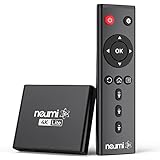
- 【SIMPLE, POWERFUL, COMPACT】- Easily play videos, photos, and music files from USB drives, hard drives, and SD cards. Simple and intuitive to use with no complicated settings. Takes up very little space - it’s smaller than a deck of playing cards!
- 【4K/UHD VIDEO PLAYBACK】- Stunning HDMI video quality up to 2160p/60Hz with support for the latest video formats such as H.265/HEVC. Feeds digital surround sound to home theater receivers for a cinema-like movie experience. Includes analog AV output for connecting to an older TV or for sending audio to a stereo system.
- 【READS USB DRIVES AND SD CARDS】- Reads USB flash drives and hard drives up to 8TB and SD cards up to 1TB. Supports FAT32, exFAT, and NTFS file systems. Automatic playback, continuous looping and repeat, and the ability to resume video playback from the last stop point.
- 【TRIGGER SENSOR INPUT】- Ability to loop one video continuously and play a different video when triggered by an optional push-button or motion sensor. Build an interactive digital signage display, art gallery or museum on-demand video player, or a Halloween special effect in just a few steps. Push-button and motion sensors sold separately.
- 【MEDIA FORMAT SUPPORT】 - Video: MP4, MKV, AVI, TS/TP, MOV, VOB, and M2TS files using H.265/HEVC, H.264/AVC, VC1, or MPEG2/4 codecs, up to 4096x2304p@30fps, 10-bit color, and 200mbps. Photos: JPG, JPEG, BMP, GIF (non-animated), PNG. Music: MP3, WMA, OGG, FLAC, APE, AAC

- MAKE YOUR TV SMARTER - Enhance any TV with the ability to play videos, music, and photo slideshows from a USB drive or MicroSD Card! It’s so simple and intuitive - anyone can use it. The Micca 4K is amazingly compact and affordable, get one for each TV in the house!
- PLAYS 4K ULTRA-HD VIDEOS - Works with TVs old and new! Smoothly plays videos up to 4096x2304@30fps over UHD 4K/60Hz HDMI output. Sharp and clear video and audio in pure digital format, compatible with 4K and 1080p TVs, projectors, and monitor displays. Composite AV output for use with analog TVs or for sending sound to a stereo system.
- DUAL USB AND MICRO SD READER - Play media files from USB flash drives and USB hard drives up to 8TB, or microSD cards up to 1TB. Supports FAT/FAT32, exFAT and NTFS file systems. Compatible with wireless air mouse remotes for non-line-of-sight control so that the player can be hidden away!
- SIMPLE DIGITAL SIGNAGE - Automatic video playback with endless repeat and looping, and the ability to resume from the last stopping point. Configurable 90/180/270 degree video output rotation. Great for digital signage applications such as restaurant menu boards, lobby welcome videos, art and museum installations.
- MEDIA FORMAT SUPPORT - Videos: MKV, MP4/M4V, AVI, MOV, MPG, VOB, M2TS, TS files encoded with H.265/HEVC, H.264/AVC, MPEG1/2/4, VC1, up to 4096x2304, 30fps, 200mbps. Subtitles: SRT, PGS, IDX+SUB. Music: MP3, WAV, FLAC. Photos: JPG, GIF, BMP, PNG
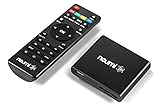
- 【SIMPLE, POWERFUL, COMPACT】- Easily play videos, photos, and music files from USB drives, hard drives, and SD cards. Simple and intuitive to use with no complicated settings. Takes up very little space - it’s smaller than a deck of playing cards!
- 【FULL-HD VIDEO PLAYBACK】- Stunning HDMI video quality up to 1080p/60Hz with support for the latest video formats such as H.265/HEVC. Feeds digital surround sound to home theater receivers for a cinema-like movie experience. Includes analog AV output for connecting to an older TV or for sending audio to a stereo system.
- 【READS USB DRIVES AND SD CARDS】- Reads USB flash drives and hard drives up to 8TB and SD cards up to 1TB. Supports FAT32, exFAT, and NTFS file systems. Automatic playback, continuous looping and repeat, and the ability to resume video playback from the last stop point.
- 【TRIGGER SENSOR INPUT】- Ability to loop one video continuously and play a different video when triggered by an optional push-button or motion sensor. Build an interactive digital signage display, art gallery or museum on-demand video player, or a Halloween special effect in just a few steps. Push-button and motion sensors sold separately.
- 【MEDIA FORMAT SUPPORT】 - Video: MP4, MKV, AVI, TS/TP, MOV, VOB, and M2TS files using H.265/HEVC, H.264/AVC, VC1, or MPEG2/4 codecs, up to 1920x1080p@60fps, 10-bit color, and 100mbps. Photos: JPG, JPEG, BMP, GIF (non-animated), PNG. Music: MP3, WMA, OGG, FLAC, APE, AAC
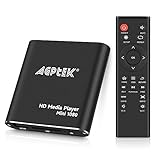
- 【Mini Portable Media player】-- Fits into the palm of your hand, It is a perfect travel partner for those short on space and sockets. Also compact and easy multifunction HD media player for office work and home entertainment;Aluminum alloy material, not easy to damage during carrying
- 【1080P MP4 Player】-- Full HD 1080p@60Hz supports most video decoding formats: RM, RMVB, AVI, DIVX, MKV, MOV, HD MOV, MP4, M4V, PMP, AVC, FLV, VOB, MPG, DAT, MPEG, TS, TP, M2TS, WMV, (H.264,H.263,WMV9/VC-1,MPEG1/2/4),Not support VPR files. Note: Please use our 4K player to play some videos taken with smart phones, ASIN: B07WPY8VKL
- 【HDMI or AV output 】-- 1080p HDMI output for sending sharp and clear video and audio in pure digital format to HDTVs, as well as composite AV output for use with analog TVs. Analog AV cable is included. You can also connect an external speaker with AV output while using HDMI video output
- 【USB 2.0/3.0 Compability】-- Drive external USB 2.0/3.0 storage devices such as USB flash(up to 512G)/SD card(up to 128G) and hard drive(partition should be MBR, up to 8TB), you can also delete or copy files in the USB drive(FAT or FA32) directly, Also plays subtitle files as well as loop videos
- 【Support Multiple Formats of Files and Playback Modes&Multi-functional Remote Control】-- Supports most video, audio, and image formats on the market, supports random playback of video and image modes, and supports loop playback. Supports repeat, zoom, fast forward, fast rewind, rotation, breakpoint playback method, start from scratch playback method and time selection playback method. It is also equipped with a convenient remote control for easy navigation of menu screens (ASIN: B0C9PZPFL8)
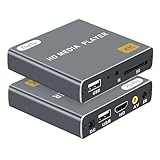
- 【UPGRADED 4K@30Hz H.265 HEVC Decoding】Equipped with advanced H.265/HEVC decoding technology, this 4K media player delivers sharper ultra-HD images and much smoother playback than conventional H.264 and 1080P players. It effectively reduces frame stuttering, blurriness and lagging visuals, bringing you fluent and immersive viewing experience for both commercial signage and home theater use.
- 【Versatile HDMI RCA Output & Multi-Media Playback】Featuring standard HDMI output, the player can be easily connected to TVs, monitors, projectors and more display devices. 4K media player supports direct playback of local videos, background music, photo slideshows and business presentations via USB drives or SD cards, meeting your daily entertainment and office demonstration needs.
- 【Large Storage Support & Broad System Compatibility】Digital media player supports USB hard drives up to 8TB and SD cards up to 1TB, and is fully compatible with mainstream file systems including FAT32, exFAT and NTFS. Supported formats include: H.265/HEVC (MKV, MOV, AVI), MPEG, FLV, RM, 3GP, MP4, WMV, RMVB, DAT, MPG, TS, M2TS, JPG, JPEG, BMP, GIF, PNG, MP3, OGG, FLAC, APE, AAC, WMA, etc.
- 【Smart Custom Playback Modes & Screen Orientation】Packed with practical playback functions: auto-play on power-up, resume playback from last stopped point, repeat/loop playback, sequential photo/video display and random music playback. It supports both horizontal and vertical screen display, perfectly fitting customized advertising broadcast and daily playback demands.
- 【Wide Application Scenarios】Built with high-quality zinc alloy shell, this compact and portable HDMI media player features outstanding heat dissipation, wear resistance and stable long-term operation. It is ideal for home theater, office presentations, restaurant digital signage, lobby welcome screens, art galleries and museum exhibition installations.
This product presentation was made with AAWP plugin.