
NHTSA ID Number: 10081156
Manufacturer Communication Number: TP16107
Summary
THIS TECHNICALY PUBLICATION CONTAINS INSTALLATION INSTRUCTIONS FOR MERITOR WABCO’S NEW REAR AERO AUTO DEPLOYMENT SYSTEM.
1 Affected Product
Equipment
MERITOR WABCO
Technical Bulletin
Installing the Meritor WABCO Rear Aero Auto Deployment System
Requires InfoLink™-Equipped ECU/Valve Assemblies 400 500 105 0 or 400 500 106 0
Hazard Alert Messages
Read and observe all Warning and Caution hazard alert messages in this publication. They provide information that can help prevent serious personal injury, damage to components, or both.
How to Obtain Additional Maintenance, Service and Product Information
If you have any questions about the material covered in this publication, or for more information about the Meritor WABCO product line, please contact the Meritor OnTrac™ Customer Call Center at 1-866-OnTrac1 (866-668-7221) or visit our website: meritorwabco.com
For further information related to installing the rear aerodynamic panels, panel latches and panel linkage, visit https://
www.stemco.com/trailertail-installation/. For any concerns or technical support related to the rear aerodynamic panels, panel latches and panel linkage, contact STEMCO at 1-888-283-TAIL (8245) or email at [email protected].
How to Obtain Tools, Kits and Supplies
To obtain parts, call Meritor’s Commercial Vehicle Aftermarket at 888-725-9355.
For trailer manufacturers, contact Meritor WABCO trailer engineering for the system End of Line tester.
For field service scenarios, no End of Line tester is required. Refer to Meritor WABCO Maintenance Manual MM-0180, Enhanced Easy-Stop™ Trailer ABS with PLC, for system troubleshooting procedures.
NOTE: Application Sheet WT-0212 must be completed and submitted to Meritor WABCO Trailer Engineering for approval prior to installation. Application Sheet WT-0212 can be found at meritorwabco.com.
Introduction
The Rear Aero Auto Deployment system uses the ABS wheel speed signals and generic inputs and outputs to trigger the deployment of the rear aerodynamic panels. Each panel is actuated by a panel-mounted electronic latch, which unlocks once the vehicle speed has exceeded 35 mph (56 kph). The linkage then unfolds the rear aerodynamic panels. The Rear Aero Auto Deployment panels retract automatically when the rear trailer doors are open and latched to the side of the trailer.
Procedures
Installation
WARNING
To prevent serious eye injury, always wear safe eye protection when you perform vehicle maintenance or service.
Remove all pressure from the air system before you disconnect any component. Pressurized air can cause serious personal injury.
Park the vehicle on a level surface. Block the wheels to prevent the vehicle from moving. Support the vehicle with safety stands. Do not work under a vehicle supported only by jacks. Jacks can slip and fall over. Serious personal injury and damage to components can result.
Ensure the trailer has correct electrical grounding; refer to SAE Specification J1908.
When you work on an electrical system, the possibility of electrical shock exists, and sparks can ignite flammable substances. You must always disconnect the battery ground cable before you work on an electrical system to prevent serious personal injury and damage to components.
1. Wear safe eye protection.
2. Park the vehicle on a level surface. Block the wheels to prevent the vehicle from moving.
3. Disconnect the electrical power before starting this procedure.
4. Connect the Rear Aero Auto Deployment cable, part number 449 820 119 0 (1M) or 449 821 119 0 (2M), into the ECU’s modulator connector port and secure it with the locking tab. Ensure there is adequate clearance for deployed Rear Aero Auto Deployment panels, if installed. Figure 1 and Figure 2.
5. For 2S/1M installations only: Remove the shipping cap from the modulator connector and plug it into the single modulator valve. Ensure that the locking collar on the modulator connector is securely locked into place within the mating connector on the modulator valve. Figure 1.
CAUTION
If the connector is not secured correctly to the wire snake during routing, damage can occur to the cable/connector.
NOTE: Review and adhere to all Meritor WABCO cable routing and strain relief guidelines noted at the end of this publication as well as in TP-1593.
6. For slider applications, route the cable down the bogie accordion cord, then over to one side of the trailer as shown in Figure 3. Route the cable harness down the length of the trailer starting at the ABS unit, running the cable towards the rear of the trailer. Figure 4. The ends of the cable split into curb side and street side latch connectors. Use zip ties along the accordion cord as needed to secure the cable.
7. Complete the steps in STEMCO’s AutoDeploy™ Installation Guide before proceeding at:
https://www.stemco.com/f/qbin/ATD003047-Install-Manual-TrailerTail-ZeroTouch.pdf.
8. Secure the cable to the frame of the trailer using zip ties to ensure cable is:
- Not sagging away from the frame
- Providing slack between tie points to compensate for flexing of the trailer sub-frame
Tighten the zip tie such that the cable does not slide freely within the tie, but also not tight enough to overly compress the cable.
Programming the ABS Controller for Rear Aero Auto Deployment
The following process is used to program the InfoLink ABS controller for Rear Aero Auto Deployment functionality using TOOLBOX™ 12.2 or greater.
NOTE: The Rear Aero Auto Deployment function can only be enabled on InfoLink capable ECUs (part numbers 400 500 105 0 and 400 500 106 0).
1. Activate TOOLBOX™ Software on your PC. Select GIO Configuration option from the Modify pull-down menu. Figure 5.
2. Select the Rear Aero Auto Deployment from the GIO Configuration menu and select Download to initiate the programming of the ABS controller. Figure 6.
3. When a confirmation message appears, the programming is complete. Press the Close button to continue. Figure 7.
4. After the ABS controller has been programmed, the ECU programming can be verified by accessing the “Notebook” feature within TOOLBOX™ Software.
To access the “Notebook” section in the TOOLBOX™ Software, perform the following.
A. Select Modify from the top toolbar of the Trailer ABS TOOLBOX™ Software application.
B. Select Notebook to confirm Rear Aero Auto Deployment.tio is shown in the “Service Information” field. Figure 8.
End of Line Functional Test
The Rear Aero Auto Deployment test is performed at the trailer manufacturer after the ABS controller has been correctly programmed and the electrical system has been correctly installed. The trailer must have constant power applied prior to starting the test. Rear Aero Auto Deployment End of Line tester will be used to provide virtual vehicle speed to the system as well as provide some PLC messaging with end user notifications of system status. The vehicle speed signal will be used to verify that the Rear Aero Auto Deployment panel latches unlock once the vehicle speed has exceeded 35 mph (56 kph). The PLC messaging tests optional system functionality for warning the driver when the Rear Aero Auto Deployment panels are open and the vehicle is in reverse.
1. Wire the box to the wheel speed sensor inputs on the ABS controller as well as provide 12V DC power to the box. The virtual wheel speed sensors do not have to be connected to the ECU in any particular order, nor must all of them be utilized. Figure 9.
2. Ensure there is adequate clearance for the Rear Aero Auto Deployment panels, if installed. Ensure that the latches are initially closed at the start of the test. Figure 10.
3. Increase the simulated vehicle speed signal by gently sliding the “Vehicle Speed” slide bar towards the “+” sign until the end stop is reached. Do not move the slide bar faster than 2-inches (50.8 mm) per second, as an acceleration rate faster than this may produce poor test conditions and the system may not function as expected.
4. Once the slide bar has reached the end stop, the Rear Aero Auto Deployment panel latches will open. Figure 11. If the Rear Aero Auto Deployment panels open, the functional test has passed. Continue to Step 5 to test the optional PLC messaging.
5. With the latches open, press and hold the “Reverse” button.
6. With the “Reverse” button pressed, the “Aero Panel WARNING” lamp will illuminate. Figure 9.
NOTE: For system testing in the field, the End of Line tester is not required, rather a short vehicle test can be performed. Prior to beginning the vehicle test, latch the panels in the closed position. Ensure constant power is at the trailer J560 plug and the ABS Warning Lamp is not illuminated. Drive the vehicle until 35 mph (56 kph) has been exceeded. Once 35 mph (56 kph) has been exceeded, the latches should unlock and the panels should open. If the issue persists, refer to Maintenance Manual MM-0180 for a troubleshooting guide or the STEMCO Field Service Guide.
Cable Routing Guidelines
All wires should be tightly secured to a solid member in intervals not greater than 18-inches (457 mm) to avoid excess cable vibration and potential snags with road debris. The correct cable installation should not allow the cable to slide through beam clamps/zip ties, but not tight enough to pinch the internal wires. Refer to technical bulletins TP-20212 and TP-1593 for more information. Figure 12.
Wiring should NEVER go through any bare, unprotected metal holes. Use grommets, caulk or wire wrap to protect wire from premature wear. Figure 13.
When routing the cable through the wiring channel on the edge or center of the trailer, secure the shorter leg of the latch connectors to the longer leg to ease wire routing. Figure 14.
When using a wire snake to pull the cable up through the frame, make sure to tape the connectors correctly to the wire snake. Figure 15.
TP-16107
Issued 07-16
(16579)
TP16107

- Requires no drilling or modifications to the vehicle
- Fits most vehicles (see application guide)
- Up to 3mpg better fuel mileage
- Improved stability and handling
- Eliminates bugs on the trailer

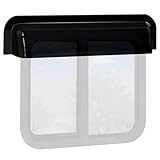
- Great addition to RV: The RV window rain deflector and sun visor can keep the rain from running down the RV windows,no need to worry about rain getting water into the RV camper.
- Fitment: The RV window rain guard (27” ID, 30” OD) is suitable for 24 inch wide RV camper van windows,including RV sliding window/RV vertical window/RV horizontal sliding window.
- Improve Ventilation&Air Flow: RV camper window deflector leaves the windows slightly open to create more airflow, enjoying the gentle breeze as you travel around, improving mood and getting a better RV travel and camping experience.
- Sturdy&Durable: The RV window visor rain guard is made of high quality, impact resistant UV hybrid acrylic, effectively deflectors rain and shade and protects the RV windows, great for all weather conditions.
- Quick&easy installation: No need complicated tools to cut or drill, comes with high quality Automotive-Grade double side tape to install easily and conveniently. The RV window rain visor blade ONLY be installed on a flat surface, not on bent inclined or slanted surface.

- Great addition to RV: The RV window rain deflector and sun visor can keep the rain from running down the RV windows,no need to worry about rain getting water into the RV camper.
- Fitment: The RV window rain guard (33” ID, 36” OD) is suitable for 30 inch wide RV camper van windows,including RV sliding window/RV vertical window/RV horizontal sliding window.
- Improve Ventilation&Air Flow: RV camper window deflector leaves the windows slightly open to create more airflow, enjoying the gentle breeze as you travel around, improving mood and getting a better RV travel and camping experience.
- Sturdy&Durable: The RV window visor rain guard is made of high quality, impact resistant UV hybrid acrylic, effectively deflectors rain and shade and protects the RV windows, great for all weather conditions.
- Quick&easy installation: No need complicated tools to cut or drill, comes with high quality Automotive-Grade double side tape to install easily and conveniently. The RV window rain visor blade ONLY be installed on a flat surface, not on bent inclined or slanted surface.

- RainBlade by GT Styling is a universal RV window rain deflector and sun visor
- Easy installation No Tools, No cutting, No drilling, Attaches to your RV with 3M Double Side Acrylic Tape
- Fits all flat sided recreational vehicles
- Use on sliding and hinged windows
- Tough durable Impact Modified UV blended acrylic construction

- RainBlade by GT Styling is a universal RV window rain deflector and sun visor
- Easy installation No Tools, No cutting, No drilling, Attaches to your RV with 3M Double Side Acrylic Tape
- Fits all flat sided recreational vehicles
- Use on sliding and hinged windows
- Tough durable Impact Modified UV blended acrylic construction
This product presentation was made with AAWP plugin.