
October 21, 2020 NHTSA CAMPAIGN NUMBER: 20V647000
Lighting and HVAC Display May Lock Up
The vehicle operator may not be able to read the LCD screen or use the buttons or both. If the LCD display appears blank, emergency personnel may not have immediate access to the functions and controls operated by the LCD screen which could delay emergency operations, increasing the risk of injury to a patient or increase the risk of a crash.
NHTSA Campaign Number: 20V647
Manufacturer Braun Ambulances
Components ELECTRICAL SYSTEM, BACK OVER PREVENTION
Potential Number of Units Affected 156
Summary
Braun Ambulances (Braun) is recalling certain 2019 Chief XL Type I and 2019-2020 Chief XL Type III, 2018-2020 Express Plus Type I and 2019 Express Type III, Liberty Type I, Raider Type I and Super Chief ambulances. The lighting and HVAC display may lock up affecting functions like the back up camera, emergency warning lights, or patient care devices depending on the application.
Remedy
Braun will notify owners and dealers will remove the defective Vista IV and replace with a new Vista IV, free of charge. The recall began December 18, 2020. Owners may contact Braun Ambulance customer service at 1-877-344-9990.
Notes
Owners may also contact the National Highway Traffic Safety Administration Vehicle Safety Hotline at 1-888-327-4236 (TTY 1-800-424-9153), or go to www.safercar.gov.
Vista IV Reset Instructions for Braun Ambulances (Rev. 1)
Date: November 30, 2020
Vista IV user interface panels subject have a loss of button function and/or blank display screen, per the defects covered in Braun Recall Notice 20V647, can be reset to restore operation. This can be done until the affected Vista IV is replaced under 20V647.
Please follow the reset procedure below for the given Vista IV mounting shown below.
Vista Mounted on Flip-Down Door
A Vista mounted on a flip-down door (Fig. 1) can be reset by removing and then reinserting the single connector shown in Fig. 2, circled in Red. Confirm connector is locked into place.
Vista with Limited Access to Rear of Panel
A Vista with limited access (i.e. mounted to a console or other access panels that require tools to remove) can be set by resetting the Ambulance module power in the Power Distribution Quarters (PDQ). Locate the Modular Disconnect (Fig. 3) in the lower part of the PDQ. Note: this method will reset all ambulance module electrical systems.
Locate the black jumper wire mounted to the lower right hand of the Modular Disconnect, circled in Red in Fig. 4.
Touch the terminal briefly on the black wire to the input terminal on the Modular Disconnect labeled “E”, see Fig. 5. This will reset the complete Ambulance module electrical system. Remove the wire terminal from the input terminal and place it in a location where it cannot inadvertently touch the terminal.
Contact Information
The Braun Industries Service contact information is:
Phone: 877-344-9990 6:00 a.m. – 4:30 p.m. EDT
Email: [email protected]
PROCEDURE TO CHECK IF VISTA IV HAS BEEN RECALLED
Conduct the following steps to verify if both the front and rear Vista IV screens have been recalled:
1. Flip up both the PCB (printed circuit board) Access Port (Left Side) and USB Port (Right Side) as shown.
2. Inspect PCB and USB Port as shown below:
SECONDARY CHECK REQUIRES
ACCESS TO BACK OF VISTA
The recall can also be verified by referencing the provided list of impacted serial numbers as well as the 2020 0XX sticker next to the serial number label on the backside of the unit.
2020-015: UNIT RECALLED
2020-016 UNIT NOT RECALLED
IMPORTANT SAFETY RECALL
This notice applies to your vehicle, 1FDXE4FN2MDC18655
Braun Recall Notice: 20V647
This notice is sent to you in accordance with the National Traffic and Motor Vehicle Safety Act.
Braun Industries has decided that a defect which relates to motor vehicle safety exists in certain Weldon Vista IV user interface panels installed in 2019 and 2020 Braun Ambulances built between April 2020 and October 2020.
The affected system components are the Weldon Vista IV user interface panels installed in the cab and patient compartment of the vehicle. When the supply voltage at the display drops, such as when starting the engine when the battery is already at a lower voltage, the Vista IV interface typically turns off and quickly and automatically restarts. Affected units covered in this recall may not restart on their own if the voltage dips out of range (less than 9 volts DC). This may lead to a blank display and sometimes loss of button function when the LCD display or the CPU does not restart properly. Loss of button functionality and LCD display can result in inoperability of back-up camera, emergency warning lights, and patient care devices, which could delay or impede emergency operations. An inoperable back-up camera can increase the risk of accidents, potentially causing injury to persons outside of the vehicle.
The likelihood of experiencing this loss in functionality can be reduced by ensuring the vehicle voltage stays above 11.0 VDC. This can be done by letting the vehicle engine run or having the vehicle plugged into shore power whenever there is any significant electrical load, or the ambulance is not in service. If you do experience a blank LCD display and/or loss of button functions, the Vista IV can be restarted. The restart procedure is attached to this letter.
Braun Industries will be remedying affected units free of charge. Replacement Vista IV user interface panels will become available starting 01/18/2021. Replacement is done by removing the affected Vista IV(s) and installing replacement Vista IV(s) that have an upgraded circuit board. Replacement labor for Vista IV replacement is 15 minutes per Vista IV. Number of Vista IV varies by vehicle options. Please contact Braun Industries to arrange replacement of the affected Vista IV(s) in your vehicle(s). The Braun Service contact information is as follows:
Phone: 877-344-9990 6:00 a.m. – 4:30 p.m. EDT
Email: [email protected]
If Braun Industries is unable to arrange service as described above without charge within a 60 day period upon contacting Braun Industries, you may submit a complaint to the Administrator, National Highway Traffic Safety Administration, 1200 New Jersey Avenue, S.E., Washington, DC 20590 or call toll-free Auto Safety Hotline at 1-888327-4236 (TTY 1-800-424-9153); or go to https://www.safercar.gov.
Any lessor who receives a notification of a determination of a safety-related defect or noncompliance pertaining to any leased motor vehicle shall send a copy of such notice to the lessee of a leased motor vehicle, by first-class mail to the most recent lessee known to the lessor. Such notification shall be mailed within ten days of the lessor’s receipt of the notification from the vehicle manufacturer. This requirement applies to both initial and follow-up notifications but does not apply where the manufacturer has notified a lessor’s lessees directly.
We apologize in advance for the inconvenience this issue may cause your organization. We will continue to work with Weldon and make every effort to make this as simple as possible on both our Dealers and our Customers.
IMPORTANT SAFETY RECALL
NHTSA Recall Number: 20V647
Date: November 4, 2020
Dear ,
Braun Industries has decided that a defect which relates to motor vehicle safety exists in certain Weldon Vista IV user interface panels installed in 2019 through 2020 Braun Ambulances.
The affected system components are the Weldon Vista IV user interface panels installed in the cab and patient compartment of the vehicle. When the supply voltage at the display drops, such as when starting the engine when the battery is already at a lower voltage, the Vista IV interface typically turns off and quickly and automatically restarts. Affected units covered in this recall may not restart on their own if the voltage dips out of range (less than 9 volts DC). This may lead to a blank display and sometimes loss of button function when the LCD display or the CPU does not restart properly. Loss of button functionality and LCD display can result inoperability of back-up camera, emergency warning lights, and patient care devices, which could delay or impede emergency operations. An inoperable back-up camera can increase the risk of accidents, potentially causing injury to persons outside of the vehicle.
You are receiving this notice because the following vehicle are affected by this recall:
| Dealer | Customer | Truck Number |
It is a violation of Federal law for a dealer to deliver a new motor vehicle or any new or used item of motor vehicle equipment (including a tire) covered by the notification under a sale or lease until the defect or noncompliance is remedied.
The likelihood of experiencing this loss in functionality can be reduced by ensuring the vehicle voltage stays above 11.0 VDC. This can be done by letting the vehicle engine run or having the vehicle plugged into shore power whenever there is any significant electrical load. If you do experience a blank LCD display and/or loss of button functions, the Vista IV can be restarted. The restart procedure is attached to this letter.
Replacement Vista IV user interface panels are in process and you will be informed of their availability. Replacement is done by removing the affected Vista IV(s) and installing replacement Vista IV(s) that have an upgraded circuit board. Please contact Braun Industries to arrange replacement of the affected Vista IV(s) in your vehicle(s). The Braun Service contact information is as follows:
Phone: 877-344-9990 6:00 a.m. – 4:30 p.m. EDT
Email: [email protected]
We apologize in advance for the inconvenience this issue may cause your organization. We will continue to work with Weldon and make every effort to make this as simple as possible on both our Dealers and our Customers. Sincerely,
Kim Braun
DBC President – U.S.
10 Affected Products
Vehicles
| MAKE | MODEL | YEAR |
| BRAUN AMBULANCES | CHIEF XL TYPE I | 2019 |
| BRAUN AMBULANCES | CHIEF XL TYPE III | 2019-2020 |
| BRAUN AMBULANCES | EXPRESS PLUS TYPE I | 2018-2020 |
| BRAUN AMBULANCES | EXPRESS TYPE III | 2019 |
| BRAUN AMBULANCES | LIBERTY TYPE I | 2019 |
| BRAUN AMBULANCES | RAIDER TYPE I | 2019 |
| BRAUN AMBULANCES | SUPER CHIEF | 2019 |
11 Associated Documents
Recall 573 Report- Amendment 2
RCLRPT-20V647-7312.PDF 222.85KB
ISSUED Owner Notification Letter(Part 577)
RCONL-20V647-8048.pdf 170.655KB
Recall Quarterly Report #2, 2021-1
RCLQRT-20V647-0251.PDF 211.223KB
Remedy Instructions and TSB
RCRIT-20V647-1952.pdf 253.08KB
Remedy Instructions and TSB
RCRIT-20V647-8800.pdf 876.539KB
Recall Quarterly Report #1, 2020-4
RCLQRT-20V647-7321.PDF 211.122KB
Defect Notice 573 Report
RCLRPT-20V647-4802.PDF 221.162KB
Recall Acknowledgement
Manufacturer Notices(to Dealers,etc)
RCMN-20V647-5887.pdf 181.587KB
Recall 573 Report- Amendment 1
RCLRPT-20V647-7110.PDF 222.801KB
Recall Quarterly Report #3, 2021-2
RCLQRT-20V647-2527.PDF 211.311KB
Latest Recalls Documents

- [Easy to Use—Work Out of the Box] + [FOXWELL 2026 New Version] FOXWELL NT604 Elite scan tool is the 2026 new version from FOXWELL, designed for car owners who want to figure out the cause of issues before fixing car problems by scanning common systems like ABS, SRS, engine, and transmission. The NT604 Elite obd2 scanner diagnostic tool comes with the latest software—no need to waste time downloading software first. Plug the scanner into the OBDII port with OBDII cable to start the diagnosis.
- [Affordable] + [Reliable Car Health Monitor] Will you be confused what happens when the warning light of ABS/SRS/transmission/check engine flashes? Instead of taking your cars to dealership, this FOXWELL scanner will help you do a thorough scanning and detection for your cars and pinpoint the root cause. Note:The device is a diagnostic tool, not a repair tool. To turn off a warning light, you must first physically repair the issue causing it. Only then can the scanner be used to clear the corresponding fault code.
- [5 in 1 Car Diagnostic Scanner] Compared with obd scanners (50-100), NT604 Elite code scanner not only includes their OBDII diagnosis but also serves as ABS/SRS scanner, transmission and check engine code reader. When it’s an odb2 scanner, you can use it to check if your car is ready for annual test through I/M readiness menu. In addition, live data stream, built-in DTC library, data play back and print, all these features are a big plus for it. Note: doesn't support maintenance functions like reset or relearn. For the SRS system, NT604 Elite can read and clear common fault codes not caused by a crash, but crash/collision data cannot be cleared.
- [Fantastic AUTOVIN] + [No extra software fee] Through the AUTOVIN menu, this NT604 Elite car scanner allows you to get your V-IN and vehicle info rapidly, no need to take time to find your V-IN and input one by one. What's more, the NT604 Elite ABS SRS scanner supports 60+ car brands from worldwide (America/Asia/Europe). You don’t need to pay extra software fee. AUTOVIN may not work on some older vehicles or certain vehicle brands. If AUTOVIN fails, please input the vin code manually or go to the Diagnostic Menu to select your vehicle model.
- [Solid protective case KO plastic carrying bag] + [Lifetime update] Almost all same price-level car scanner diagnostic tool only offers plastic bag to hold the scanner.However, NT604 Elite automotive scanner is equipped with solid protective case, preventing your obd2 scanner from damage. Then you don’t need to pay extra money to buy a solid toolbox.

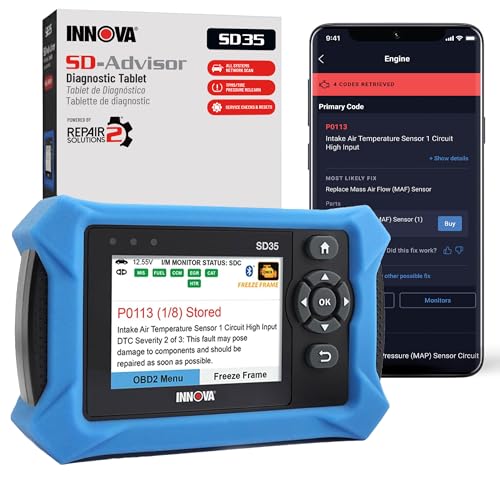
- OBD2 SCANNER FOR ALL SYSTEMS – The INNOVA SD35 is a tablet-based OBD2 scanner designed for advanced diagnostics. Read and clear check engine light, ABS, SRS, and TPMS codes, plus test your car battery and alternator to prevent unexpected failures. Vehicle coverage may vary. Please use Innova’s Coverage Checker to verify compatibility.
- ALL-SYSTEM DIAGNOSTICS & LIVE DATA – Unlike basic code readers, this OBD2 scanner for all vehicles scans engine, transmission, ABS, SRS, and more. Get real-time live data, including RPM, fuel trims, temperature readings, and oxygen sensor performance.
- OBD2 TABLET WITH USER-FRIENDLY INTERFACE – This automotive scan tool features a high-resolution display, making vehicle diagnostics faster and easier.
- ADVANCED TPMS, OIL RESET & SERVICE FUNCTIONS – Perform TPMS sensor checks, oil light reset, and other service resets with ease This professional diagnostic tool provides comprehensive vehicle maintenance capabilities in one device.
- WIDE VEHICLE COVERAGE (1996 & NEWER CARS & TRUCKS) – This OBD2 scanner Bluetooth tablet is compatible with Toyota
 , Ford, Honda, Chevrolet, Nissan, Dodge, and more. However, feature coverage may vary. Please use Innova's Coverage Checker to verify coverage.
 ,
, 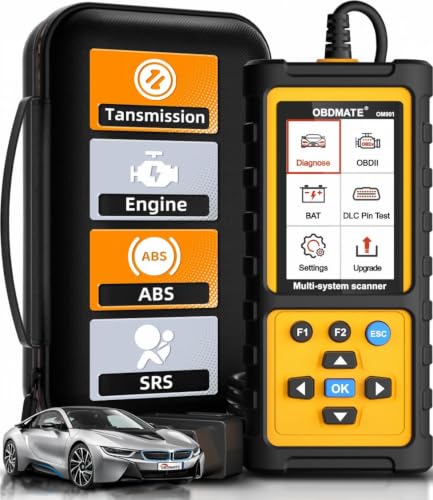
- 【Reset ABS/SRS/Transmission/Engine Lights】 More than an check engine code reader, OBDMATE OM901 obd2 scanner performs comprehensive diagnostics for the 4 most-used systems (ABS/SRS/Engine/Transmission). It quickly clears fault codes, turns off warning lights, read data stream and auto VIN.
- 【3.5" Handheld Scanner with 4 System Diagnose】 3.5" Super large TFT screen equipped displays an intuitive menu and clear readings of various sensors from ABS, SRS, ECM and TCM systems. It arrived with a silicone protective case and hard-shell carrying case, ensuring long-lived durability and drop resistance. The car diagnostic tool is plug-to-play designed, plug it and get diagnosis started without any batteries or updates required.
- 【One-Click I/M Readines&Full OBD2 Functions】 Press F1 to get an intuitive corloured form about whether various emissions-related systems on the vehicle are operating properly. Help you get smog-check ready quickly. OM901 car scanner supports all essential OBD2 functions you need: read & clear codes, view freeze frame, read I/M readiness, retrieve VIN, live data stream (with graphing display), O2 sensor test, onboard monitoring mode, and EVAP leak test.
- 【Battery Voltage Check&DLC Pin Test】 It allows you to monitor battery health by testing current battery voltage. Plus, this obd2 diagnostic tool features DLC 16-PIN test to check current voltage of every pin.
- 【Automotive Scanner Diagnostic Kit】 The package comes with 1 car scanner, 1 USB-type c cable, 1 hard storage bag and 1 user manual(en). Free to update without any hidden fees. 5 languanges available in setting including English, French, Italian, German and Espanish. Valuable and Portable, making it a great tool kit for car owners, DIY enthusiasts, and professional mechanics.
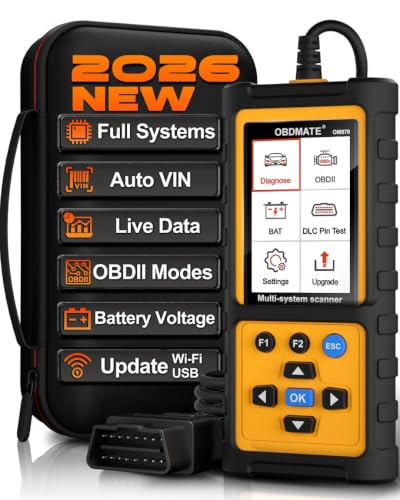
- 【Full Systems Automotive Diagnostic】 More than checking engine, ABS and SRS, OBDMATE OM970 obd2 scanner performs comprehensive diagnostics on all electric modules. It quickly scans and clears fault codes, turns off warning lights, reads live data, and features Auto-VIN technology.
- 【Live Datastream&4-in-1 Graph】 Easily view live sensor data such as RPM, fuel trims, ATF temperature, wheel speed sensor, battery voltage and so on. OM970 scan tool also supports 4-in-1 trend graphing. Spend just 3 minutes to check – and you'll know exactly what's going wrong, helping you avoid hundreds in dealership diagnostic fees.
- 【One-Click I/M Readiness&Full OBD2 Functions】 Press F1 to get an intuitive corloured form about whether your vehicle's emissions-related systems are operating properly. Help you get smog-check ready quickly. OM970 obd2 diagnostic tool supports all essential OBD2 functions you need. Plus, it features battery voltage test and DLC 16-PIN test.
- 【Straightforward Menus with Easy Navigation】 All functions are easy to understand without obscure decriptions. 3.5" Large screen delivers clear readings while keeping one-hand operation. The car diagnostic tool comes with a silicone protective case and a hard-shell carrying case, ensuring long-lived durability and drop resistance.
- 【Budget-Friendly, No Subscriptions, Free Software Updates】 Plug and play: no bluetooth pairing, monthly fees, Wi-Fi connection, or any other troublesome initial settings. OM970 obd2 scanner works out of the box with the latest software. Lifetime free upgrade.
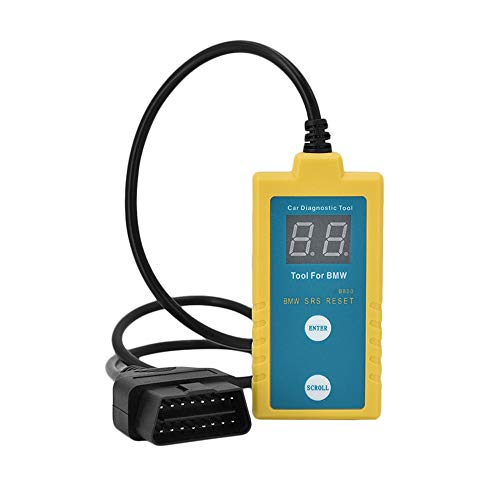
- ✔️【Professional SRS Reset for 1994-2003 BMW】 Designed specifically for classic BMW models (1994-2003). This B800 scanner reads & clears SRS airbag fault codes, turns off the warning light, and saves you a costly dealer visit. Confirmed compatible with: E36, E46 (EXCEPT 2001 330i), E34, E38, E39, Z3, and X5 (E53). NOT compatible with any BMW built before 1994 or after 2003.
- ✔️【Important: Two Different Connection Ports – Read Before Use】 To avoid “not working” issues, please note: For 1994–2000 BMWs (most E36, E34, Z3, early E39), the SRS diagnostic port is a round 20-pin connector under the hood. You MUST use the included 16-pin to 20-pin adapter cable. For 2000–2003 models (late E46, E39, X5), use the standard OBD-II port inside the cabin. Incorrect connection is the #1 reason for “incompatibility” reports.
- ✔️【Read & Clear Fault Codes in Minutes】 Quickly diagnose why your SRS light is on. The scanner accurately reads fault codes from airbag and seatbelt pretensioner systems. With one button press, clear the codes and reset the SRS warning light in seconds. No expensive dealer tools needed.
- ✔️【User-Friendly for DIYers – No Mechanic Required】 Easy operation with an intuitive button layout: ‘Enter’ to confirm, ‘Scroll’ to navigate. The clear LCD screen shows results instantly. Includes a step-by-step manual (revised for clarity) to guide you through the entire reset process.
- ✔️【Reliable Support with 1-Year Warranty】 We stand behind the quality of our B800 scanner. It comes with a 1-Year Hassle-Free Warranty. If you have any questions or need support, please contact us with your Order ID, and our dedicated team will assist you promptly.
This product presentation was made with AAWP plugin.